
Join the Conversation
- Find Answers
- :
- Splunk Administration
- :
- Deployment Architecture
- :
- Forwarder Management not displaying a deployed app
- Subscribe to RSS Feed
- Mark Topic as New
- Mark Topic as Read
- Float this Topic for Current User
- Bookmark Topic
- Subscribe to Topic
- Mute Topic
- Printer Friendly Page
- Mark as New
- Bookmark Message
- Subscribe to Message
- Mute Message
- Subscribe to RSS Feed
- Permalink
- Report Inappropriate Content
Forwarder Management not displaying a deployed app

Hi guys,
I always find some trouble with the deployment server. This time I did a clean install of 4 splunk instances.
- 2 indexers
- 1 search head
- 1 Deployment server
I have only 2 apps in "deployment-apps", one that should go to the search heard and one to both indexers.
deploymentclient.conf in the indexers looks like this:
[deployment-client]
phoneHomeIntervalInSecs=30

[target-broker:deploymentServer]
targetUri= 192.168.137.154:8089
serverclass.conf in the deployment server looks like this:
[global]

### Search Head
[serverClass:splunksh01]
whitelist.0             = 192.168.137.153
stateOnClient           = noop
restartSplunkd          = true
[serverClass:splunksh01:app:bLeaf]

### Indexers
[serverClass:splunkindexers]
filterType      = whitelist
whitelist.0             = 192.168.137.151
whitelist.1             = 192.168.137.152
stateOnClient           = noop
restartSplunkd          = true
continueMatching    = true
[serverClass:splunkindexers:app:CFG-buttercup-idx]
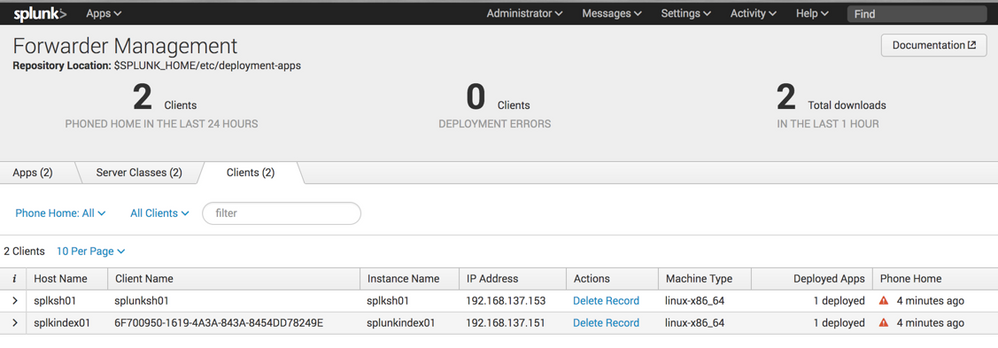
So, 3 main issues here:
- Why is splunkindex02 missing? - it matched, the app is deployed, I've checked by via SSH CLI.
- Why is there a red exclamation mark icon next to "phone home" column?
- I set 30 seconds call home, shouldn't it always be 30 seconds and not 4min or any other number?
I don't understand what I've done wrong here. - Could you give me a hand please?
- Mark as New
- Bookmark Message
- Subscribe to Message
- Mute Message
- Subscribe to RSS Feed
- Permalink
- Report Inappropriate Content

The Deployment Server doesn't lie. At no recent point in time has splunkindex02 contacted the Deployment Server. Perhaps that server somehow lost its deploymentclient.conf file or perhaps another one has been deployed (which, by the way, can be done from your Deployment Server) that has pointed that server to another Deployment Server (we do this all the time to pass servers back and forth between Production Splunk and Lab Splunk).
- Mark as New
- Bookmark Message
- Subscribe to Message
- Mute Message
- Subscribe to RSS Feed
- Permalink
- Report Inappropriate Content
Click on the red triangle and fix what it says. I am skeptical that index02 deployed because it definitely should show up as a client.
- Mark as New
- Bookmark Message
- Subscribe to Message
- Mute Message
- Subscribe to RSS Feed
- Permalink
- Report Inappropriate Content


Hi santiagoaloi,
you should debug if you see both the Indexers with the correct hostname from your Search Head:
first check is index=_internal | stats values(splunk_server) AS splunk_server count by host, verify if there are both Indexers and both splunk_servers.
After you have to verify that your Indexers have different hostnames in $SPLUNK_HOME/etc/system/local/server.conf and $SPLUNK_HOME/etc/system/local/inputs.conf.
Bye.
Giuseppe



Join the Splunk Community Slack to learn, troubleshoot, and make connections with fellow Splunk practitioners in real time!
Join Splunk User Groups to connect and learn in-person by region or remotely by topic or industry.
Event Series: Level up your SOC: Advancing with Splunk Enterprise Security
Announcing Modern Navigation: A New Era of Splunk User Experience
SOC4Kafka - New Kafka Connector Powered by OpenTelemetry
