
Join the Conversation
- Find Answers
- :
- Using Splunk
- :
- Dashboards & Visualizations
- :
- Re: Dashboard converting strings into dates
- Subscribe to RSS Feed
- Mark Topic as New
- Mark Topic as Read
- Float this Topic for Current User
- Bookmark Topic
- Subscribe to Topic
- Mute Topic
- Printer Friendly Page
- Mark as New
- Bookmark Message
- Subscribe to Message
- Mute Message
- Subscribe to RSS Feed
- Permalink
- Report Inappropriate Content
Why is my Dashboard converting strings into dates?

I use some strings in data to represent months. eg "2022-1"
Run this in Search:
| makeresults format=csv data="Month
2022-1
2022-1
2022-7
2022-7
2022-7
2022-8
2022-9
2022-9
2022-9
2022-10
2022-10
2022-10
2022-10
2022-9"
| stats count by Month | sort Month
You get:
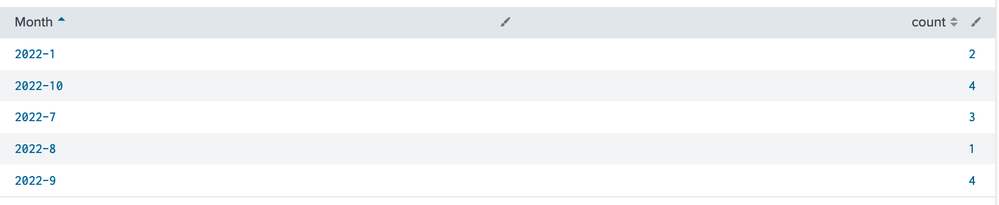
Now use the Splunk query in Dashboard Studio for a Bar Chart:
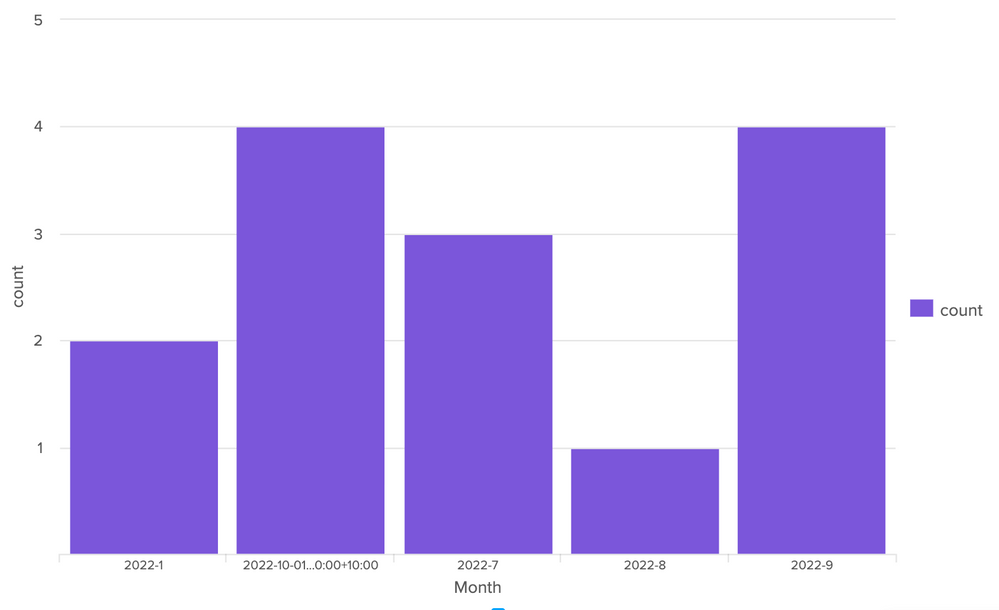
Why is October ("2022-10") being treated as a date suddenly????
Is this Bug or a Feature?
I tried changing the strings to have a leading Zero for the month. eg. "2022-01"
They are ALL then treated as Dates. How do I avoid this?
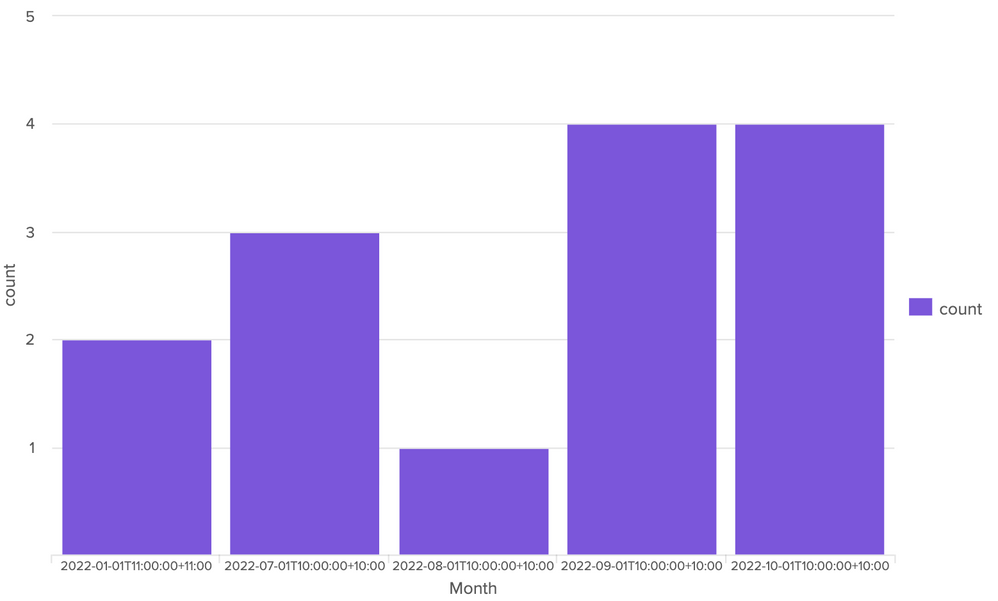
Thanks for your help
- Mark as New
- Bookmark Message
- Subscribe to Message
- Mute Message
- Subscribe to RSS Feed
- Permalink
- Report Inappropriate Content


Hi @bTonyC,
because your dates are converted in strings so 2022-10 is before 2022-2.
to have the correct sort, you have to work in epochtime to sort and then again in human readable for presenting or use two digits for all months (2022-01).
Anyway, please try this:
| makeresults format=csv data="Month
2022-1
2022-1
2022-7
2022-7
2022-7
2022-8
2022-9
2022-9
2022-9
2022-10
2022-10
2022-10
2022-10
2022-9"
| stats count by Month
| eval Month=Month."-01"
| eval Month=strptime(Month, "%Y-%m-%d")
| sort Month
| eval Month=strftime(Month, "%Y-%m
Ciao.
Giuseppe
- Mark as New
- Bookmark Message
- Subscribe to Message
- Mute Message
- Subscribe to RSS Feed
- Permalink
- Report Inappropriate Content
Thanks Giuseppe,
I ended up doing something very similar to get the ordering correct.
(Convert string to a date then back to a string for display)
Any idea why October displays as a full dates when they are all just strings "2022-10"???
Further experimenting shows that the hyphen is the trigger. If I use another character, this problem doesn't happen. eg. "2022>10"
Thanks,
Tony
- Mark as New
- Bookmark Message
- Subscribe to Message
- Mute Message
- Subscribe to RSS Feed
- Permalink
- Report Inappropriate Content
Hi @bTonyC,
In my Splunk I have a correct display:
| makeresults format=csv data="Month
2022-1
2022-1
2022-7
2022-7
2022-7
2022-8
2022-9
2022-9
2022-9
2022-10
2022-10
2022-10
2022-10
2022-9"
| stats count by Month
| eval Month=Month."-01"
| eval Month=strptime(Month, "%Y-%m-%d")
| sort Month
| eval Month=strftime(Month, "%Y-%m")
if one answer solves your need, please accept one answer for the other people of Community or tell me how we can help you.
Ciao and happy splunking
Giuseppe
P.S.: Karma Points are appreciated 😉
- Mark as New
- Bookmark Message
- Subscribe to Message
- Mute Message
- Subscribe to RSS Feed
- Permalink
- Report Inappropriate Content
Thanks again Giuseppe!!
I agree that Month is displayed correctly in Splunk Search.
The issue appears when using a chart visualisation in Splunk Dashboard Studio.
(See my previous screenshots to see what I mean)
Dashboard Studio charts seem to convert "2022-10" into a Date/time and displays that.
This is the core issue.
Regards,
Tony
- Mark as New
- Bookmark Message
- Subscribe to Message
- Mute Message
- Subscribe to RSS Feed
- Permalink
- Report Inappropriate Content
Hi @bTonyC,
sorry, I didn't tried with Dashboard Studio, and this situation is one or the reasons because I never started to use it!
maybe you could try to add also the day in your date (2022-11-01) so Dashboard Studio will not change your output.
ciao.
Giuseppe

Join the Splunk Community Slack to learn, troubleshoot, and make connections with fellow Splunk practitioners in real time!
Join Splunk User Groups to connect and learn in-person by region or remotely by topic or industry.
Index This | What travels the world but is also stuck in place?
Discover New Use Cases: Unlock Greater Value from Your Existing Splunk Data
Continue Your Journey: Join Session 2 of the Data Management and Federation Bootcamp ...
