
Turn on suggestions
Auto-suggest helps you quickly narrow down your search results by suggesting possible matches as you type.
Dashboards & Visualizations
×
Join the Conversation
Without signing in, you're just watching from the sidelines. Sign in or Register to connect, share, and be part of the Splunk Community.
Turn on suggestions
Auto-suggest helps you quickly narrow down your search results by suggesting possible matches as you type.
- Find Answers
- :
- Using Splunk
- :
- Dashboards & Visualizations
- :
- Re: Why am I unable to create a trellis bell curve...
Options
- Subscribe to RSS Feed
- Mark Topic as New
- Mark Topic as Read
- Float this Topic for Current User
- Bookmark Topic
- Subscribe to Topic
- Mute Topic
- Printer Friendly Page
- Mark as New
- Bookmark Message
- Subscribe to Message
- Mute Message
- Subscribe to RSS Feed
- Permalink
- Report Inappropriate Content
Why am I unable to create a trellis bell curve for my search query?

Lynyrd
Explorer
02-06-2018
09:11 AM
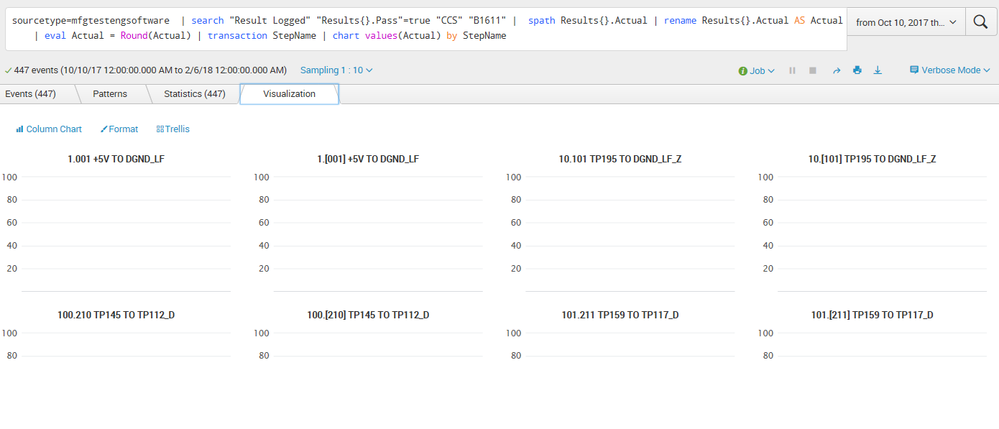
I am not getting any bell curve for each one of my stepnames, why?
sourcetype=mfgtestengsoftware | search "Result Logged" "Results{}.Pass"=true "CCS" "B1611" | spath Results{}.Actual | rename Results{}.Actual AS Actual | eval Actual = Round(Actual) | transaction StepName | bin Actual span=0.5 | chart count by StepName
- Mark as New
- Bookmark Message
- Subscribe to Message
- Mute Message
- Subscribe to RSS Feed
- Permalink
- Report Inappropriate Content
Lynyrd
Explorer
02-13-2018
02:30 PM
- Mark as New
- Bookmark Message
- Subscribe to Message
- Mute Message
- Subscribe to RSS Feed
- Permalink
- Report Inappropriate Content

DalJeanis
Legend
08-10-2018
11:10 PM
@Lynyrd -
Did this ever get resolved?
I'm actually not certain what you mean by "bell curve plot". Data either makes a bell curve or it doesn't. If you mean you want to overlay a bell curve onto a histogram, then that would be something that can be done.
- Mark as New
- Bookmark Message
- Subscribe to Message
- Mute Message
- Subscribe to RSS Feed
- Permalink
- Report Inappropriate Content
Lynyrd
Explorer
02-06-2018
11:11 AM


- Mark as New
- Bookmark Message
- Subscribe to Message
- Mute Message
- Subscribe to RSS Feed
- Permalink
- Report Inappropriate Content
Lynyrd
Explorer
02-06-2018
10:16 AM
tried this too, still no bell curve plots in trellis,
sourcetype=mfgtestengsoftware | search "Result Logged" "Results{}.Pass"=true "CCS" "B1611" | spath Results{}.Actual | rename Results{}.Actual AS Actual | eval Actual = Round(Actual) | transaction StepName | bin Actual span=0.75 | chart values(Actual) by StepName
- Mark as New
- Bookmark Message
- Subscribe to Message
- Mute Message
- Subscribe to RSS Feed
- Permalink
- Report Inappropriate Content

somesoni2
Revered Legend
02-06-2018
10:58 AM
You're using single value visualization?
Give this a try as well.
sourcetype=mfgtestengsoftware | search "Result Logged" "Results{}.Pass"=true "CCS" "B1611" | spath Results{}.Actual | rename Results{}.Actual AS Actual | eval Actual = Round(Actual) | transaction StepName | bin Actual span=0.75 | timechart count(Actual) by StepName
- Mark as New
- Bookmark Message
- Subscribe to Message
- Mute Message
- Subscribe to RSS Feed
- Permalink
- Report Inappropriate Content
Lynyrd
Explorer
02-06-2018
11:16 AM
I tried that and it gave me no bell curves, it gives me names of months of the x axis.
- Mark as New
- Bookmark Message
- Subscribe to Message
- Mute Message
- Subscribe to RSS Feed
- Permalink
- Report Inappropriate Content
Lynyrd
Explorer
02-06-2018
10:08 AM
I tried this and the statisitcs looks better but there is no bell curve plot in trellis.
sourcetype=mfgtestengsoftware | search "Result Logged" "Results{}.Pass"=true "CCS" "B1611" | spath Results{}.Actual | rename Results{}.Actual AS Actual | eval Actual = Round(Actual) | transaction StepName | bin Actual span=0.75 | chart count(Actual) by StepName

Get Updates on the Splunk Community!
Upcoming Webinar: Unmasking Insider Threats with Slunk Enterprise Security’s UEBA
Join us on Wed, Dec 10. at 10AM PST / 1PM EST for a live webinar and demo with Splunk experts! Discover how ...
.conf25 technical session recap of Observability for Gen AI: Monitoring LLM ...
If you’re unfamiliar, .conf is Splunk’s premier event where the Splunk community, customers, partners, and ...
A Season of Skills: New Splunk Courses to Light Up Your Learning Journey
There’s something special about this time of year—maybe it’s the glow of the holidays, maybe it’s the ...
