
Turn on suggestions
Auto-suggest helps you quickly narrow down your search results by suggesting possible matches as you type.
Dashboards & Visualizations
×
Join the Conversation
Without signing in, you're just watching from the sidelines. Sign in or Register to connect, share, and be part of the Splunk Community.
Turn on suggestions
Auto-suggest helps you quickly narrow down your search results by suggesting possible matches as you type.
- Find Answers
- :
- Using Splunk
- :
- Dashboards & Visualizations
- :
- Why am I unable to create a trellis bell curve for...
Options
- Subscribe to RSS Feed
- Mark Topic as New
- Mark Topic as Read
- Float this Topic for Current User
- Bookmark Topic
- Subscribe to Topic
- Mute Topic
- Printer Friendly Page
- Mark as New
- Bookmark Message
- Subscribe to Message
- Mute Message
- Subscribe to RSS Feed
- Permalink
- Report Inappropriate Content
Why am I unable to create a trellis bell curve for my search query?

Lynyrd
Explorer
02-06-2018
09:11 AM
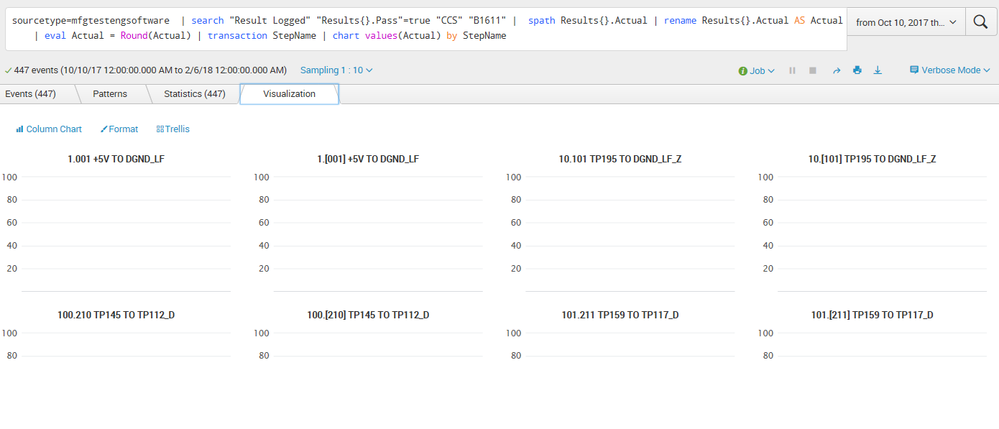
I am not getting any bell curve for each one of my stepnames, why?
sourcetype=mfgtestengsoftware | search "Result Logged" "Results{}.Pass"=true "CCS" "B1611" | spath Results{}.Actual | rename Results{}.Actual AS Actual | eval Actual = Round(Actual) | transaction StepName | bin Actual span=0.5 | chart count by StepName
- Mark as New
- Bookmark Message
- Subscribe to Message
- Mute Message
- Subscribe to RSS Feed
- Permalink
- Report Inappropriate Content
Lynyrd
Explorer
02-13-2018
02:30 PM
- Mark as New
- Bookmark Message
- Subscribe to Message
- Mute Message
- Subscribe to RSS Feed
- Permalink
- Report Inappropriate Content

DalJeanis
Legend
08-10-2018
11:10 PM
@Lynyrd -
Did this ever get resolved?
I'm actually not certain what you mean by "bell curve plot". Data either makes a bell curve or it doesn't. If you mean you want to overlay a bell curve onto a histogram, then that would be something that can be done.
- Mark as New
- Bookmark Message
- Subscribe to Message
- Mute Message
- Subscribe to RSS Feed
- Permalink
- Report Inappropriate Content
Lynyrd
Explorer
02-06-2018
11:11 AM


- Mark as New
- Bookmark Message
- Subscribe to Message
- Mute Message
- Subscribe to RSS Feed
- Permalink
- Report Inappropriate Content
Lynyrd
Explorer
02-06-2018
10:16 AM
tried this too, still no bell curve plots in trellis,
sourcetype=mfgtestengsoftware | search "Result Logged" "Results{}.Pass"=true "CCS" "B1611" | spath Results{}.Actual | rename Results{}.Actual AS Actual | eval Actual = Round(Actual) | transaction StepName | bin Actual span=0.75 | chart values(Actual) by StepName
- Mark as New
- Bookmark Message
- Subscribe to Message
- Mute Message
- Subscribe to RSS Feed
- Permalink
- Report Inappropriate Content

somesoni2
Revered Legend
02-06-2018
10:58 AM
You're using single value visualization?
Give this a try as well.
sourcetype=mfgtestengsoftware | search "Result Logged" "Results{}.Pass"=true "CCS" "B1611" | spath Results{}.Actual | rename Results{}.Actual AS Actual | eval Actual = Round(Actual) | transaction StepName | bin Actual span=0.75 | timechart count(Actual) by StepName
- Mark as New
- Bookmark Message
- Subscribe to Message
- Mute Message
- Subscribe to RSS Feed
- Permalink
- Report Inappropriate Content
Lynyrd
Explorer
02-06-2018
11:16 AM
I tried that and it gave me no bell curves, it gives me names of months of the x axis.
- Mark as New
- Bookmark Message
- Subscribe to Message
- Mute Message
- Subscribe to RSS Feed
- Permalink
- Report Inappropriate Content
Lynyrd
Explorer
02-06-2018
10:08 AM
I tried this and the statisitcs looks better but there is no bell curve plot in trellis.
sourcetype=mfgtestengsoftware | search "Result Logged" "Results{}.Pass"=true "CCS" "B1611" | spath Results{}.Actual | rename Results{}.Actual AS Actual | eval Actual = Round(Actual) | transaction StepName | bin Actual span=0.75 | chart count(Actual) by StepName

Get Updates on the Splunk Community!
New Year, New Changes for Splunk Certifications
As we embrace a new year, we’re making a small but important update to the Splunk Certification ...
Stay Connected: Your Guide to January Tech Talks, Office Hours, and Webinars!
What are Community Office Hours?
Community Office Hours is an interactive 60-minute Zoom series where ...
[Puzzles] Solve, Learn, Repeat: Reprocessing XML into Fixed-Length Events
This challenge was first posted on Slack #puzzles channelFor a previous puzzle, I needed a set of fixed-length ...
