
Join the Conversation
- Find Answers
- :
- Using Splunk
- :
- Dashboards & Visualizations
- :
- Re: Visual Dashboard using 4 fields in Stats count
- Subscribe to RSS Feed
- Mark Topic as New
- Mark Topic as Read
- Float this Topic for Current User
- Bookmark Topic
- Subscribe to Topic
- Mute Topic
- Printer Friendly Page
- Mark as New
- Bookmark Message
- Subscribe to Message
- Mute Message
- Subscribe to RSS Feed
- Permalink
- Report Inappropriate Content

I'm trying to create a visual dashboard (specifically a column graph or bar chart) using
index=guardium ruleDesc="OS Command Injection"
| stats count by dbUser, DBName, serviceName, sql
This is the graph I get:
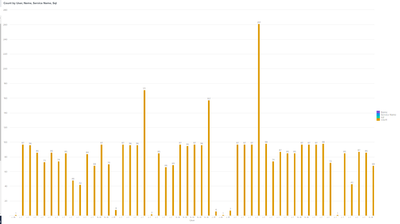
I would like to group these fields into categories on the chart where one part would show count of 1-5 then 6-10...and so on. Then I could drill down a specific bar within the count group to view the fields for that bar in a table format. How would I go about doing this. I am new to splunk and have been stuck finding the best way to represent this data. I was given this search statement and was told to make a visual dashboard of it.
- Mark as New
- Bookmark Message
- Subscribe to Message
- Mute Message
- Subscribe to RSS Feed
- Permalink
- Report Inappropriate Content

You would do a second stats to roll them up like this ...
index=guardium ruleDesc="OS Command Injection"
| stats count by dbUser, DBName, serviceName, sql
| eval category = case(
    count < 6, "1-5",
    count < 11, "6-10",
    count < 16, "11-15",
    1==1, "16+"
)
| stats count by category
Then you would set up a drilldown on the chart to pass a token to another search and limit it based on the token..
- Mark as New
- Bookmark Message
- Subscribe to Message
- Mute Message
- Subscribe to RSS Feed
- Permalink
- Report Inappropriate Content
You would do a second stats to roll them up like this ...
index=guardium ruleDesc="OS Command Injection"
| stats count by dbUser, DBName, serviceName, sql
| eval category = case(
    count < 6, "1-5",
    count < 11, "6-10",
    count < 16, "11-15",
    1==1, "16+"
)
| stats count by category
Then you would set up a drilldown on the chart to pass a token to another search and limit it based on the token..


Join the Splunk Community Slack to learn, troubleshoot, and make connections with fellow Splunk practitioners in real time!
Join Splunk User Groups to connect and learn in-person by region or remotely by topic or industry.
A Four-Part Event Series: Full Stack Observability For the AI Era
SOC4Kafka - New Kafka Connector Powered by OpenTelemetry
Event Series: Level up your SOC: Advancing with Splunk Enterprise Security
