
Join the Conversation
- Find Answers
- :
- Using Splunk
- :
- Dashboards & Visualizations
- :
- Re: Sparkline maximum data points?
- Subscribe to RSS Feed
- Mark Topic as New
- Mark Topic as Read
- Float this Topic for Current User
- Bookmark Topic
- Subscribe to Topic
- Mute Topic
- Printer Friendly Page
- Mark as New
- Bookmark Message
- Subscribe to Message
- Mute Message
- Subscribe to RSS Feed
- Permalink
- Report Inappropriate Content

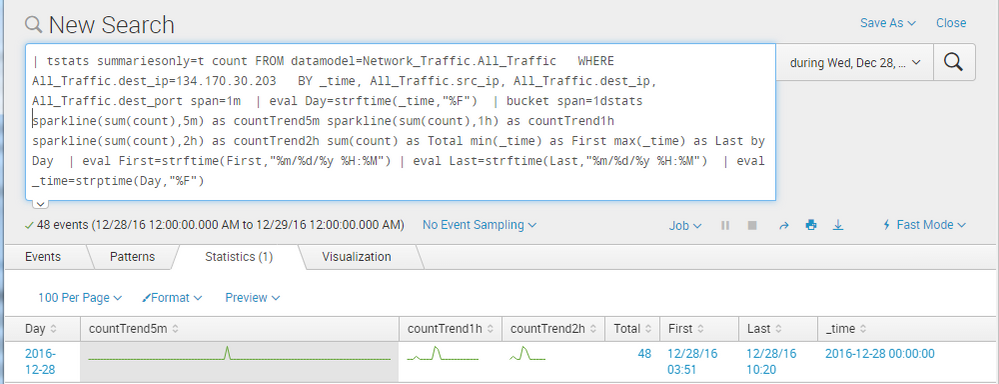
I recently noticed that my sparklines may appear to lose data when I make the resolution too fine. For example over the course of a days data, sparkline(sum(count),1h) as countTrend1h will represent the trend OK, but sparkline(sum(count),5m) as countTrend5m will show only part of the results. I think that this is because at a resolution of 1hour, I have only 24 datapoints, while a resolution of 5m has 288.
What is the maximum number of datapoints that Splunk can reasonable handler in a sparkline? Also, is there a way to deal with it if I inadvertently exceed that number of data points?

- Mark as New
- Bookmark Message
- Subscribe to Message
- Mute Message
- Subscribe to RSS Feed
- Permalink
- Report Inappropriate Content

Sparklines can have 101 data points maximum.
In fact, sparkline generates a multivalue field with a special "header", something like this:
##__SPARKLINE__##,113,322,275,334,314,284,...
So you can use every mv.... command on these fields, e.g. mvcount(countTrend5m)
- Mark as New
- Bookmark Message
- Subscribe to Message
- Mute Message
- Subscribe to RSS Feed
- Permalink
- Report Inappropriate Content

You can generate sparkline charts with the tstats command only if you specify the _time field in the BY clause and use the stats command to generate the actual sparkline.
For example:
| tstats count from datamodel=Authentication.Authentication BY _time, Authentication.src span=1h | stats sparkline(sum(count),1h) AS sparkline, sum(count) as count BY Authentication.src
Also, I don't know if the limit suggested is accurate. When you run the following command, you get many more data points than 101 which are charted:
index=_internal | chart sparkline count by sourcetype
- Mark as New
- Bookmark Message
- Subscribe to Message
- Mute Message
- Subscribe to RSS Feed
- Permalink
- Report Inappropriate Content
Sparklines can have 101 data points maximum.
In fact, sparkline generates a multivalue field with a special "header", something like this:
##__SPARKLINE__##,113,322,275,334,314,284,...
So you can use every mv.... command on these fields, e.g. mvcount(countTrend5m)

Join the Splunk Community Slack to learn, troubleshoot, and make connections with fellow Splunk practitioners in real time!
Join Splunk User Groups to connect and learn in-person by region or remotely by topic or industry.
Index This | What travels the world but is also stuck in place?
Discover New Use Cases: Unlock Greater Value from Your Existing Splunk Data
Continue Your Journey: Join Session 2 of the Data Management and Federation Bootcamp ...
