
Join the Conversation
- Find Answers
- :
- Using Splunk
- :
- Dashboards & Visualizations
- :
- Re: Simple xml : I want to create cool single val...
- Subscribe to RSS Feed
- Mark Topic as New
- Mark Topic as Read
- Float this Topic for Current User
- Bookmark Topic
- Subscribe to Topic
- Mute Topic
- Printer Friendly Page
- Mark as New
- Bookmark Message
- Subscribe to Message
- Mute Message
- Subscribe to RSS Feed
- Permalink
- Report Inappropriate Content

<form>
<fieldset submitButton="true" autoRun="true">
<input type="time" token="field1">
<label></label>
<default>
<earliest>-24h@h</earliest>
<latest>now</latest>
</default>
</input>
</fieldset>
<row>
<panel>
<table>
<search>
<query>| makeresults count=2
| streamstats count
| eval _time = if (count==2,relative_time(_time,"-2h@m"), relative_time(_time,"@m"))
| makecontinuous span=1m _time
| eval count=random() % 200
| timechart span=10m sum(count) as PerfMon
| streamstats list(PerfMon) as PM window=4
| eval PM_30min=if(mvcount(PM)==4,mvindex(PM,0),NULL)
| reverse
| table _time PerfMon PM_30min |head 1|eval range=if(PerfMon / PM_30min > 2 OR PerfMon / PM_30min < 0.5 , "#FF0000" , "#008000")</query>
<earliest>-24h@h</earliest>
<latest>now</latest>
<done>
<condition>
<set token="value">$result.PerfMon$</set>
<set token="color">$result.range$</set>
</condition>
</done>
</search>
<option name="drilldown">none</option>
<option name="refresh.display">progressbar</option>
</table>
</panel>
<panel>
<html id="test">
<head>
<style>
#test {height:200px;}
p {display:block;
color: $color$;
font-size: 12ex;}
</style>
</head>
<body>
<div id="sample">
<p><br/></br>
$value$</p>
</div>
</body>
</html>
</panel>
</row>
</form>
Hi, folks.
I am trying to create a dashboard that displays a single value. (Splunk ver 8.0.1)
I am trying to change the font color when there is more than 50% difference from the previous value.
Since rangemap doesn't work well, I gave up single value dashboard.
I tried to make it but it doesn't look cool.
Please let me know if there is a good way to change the background color, font color, or display method.
- Mark as New
- Bookmark Message
- Subscribe to Message
- Mute Message
- Subscribe to RSS Feed
- Permalink
- Report Inappropriate Content

@to4kawa try the following run anywhere example with the three options to display customized single value in Splunk Dashboard. Please try out and confirm!
- Option 1 uses
<html>panel with CSS override as per your question. - Option 2 uses built in
<single>value visualization. - Option 3 uses Status Indicator Custom visualization by Splunk.
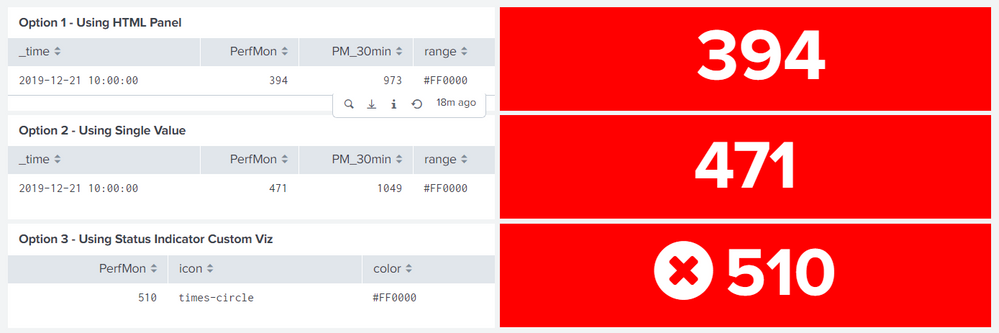
Refer to one of my older answer where I have explained something similar using Single Value ( with icon ) and Status Indicator: https://answers.splunk.com/answers/590581/refresh-data-in-table-by-collecting-token-on-click.html
Also here is an answer for <html> panel with icon and drilldown in case you need it: https://answers.splunk.com/answers/741114/how-to-drill-down-from-custom-result-value-1.html
<form>
  <label>HTML Single Value</label>
  <fieldset submitButton="true" autoRun="true">
    <input type="time" token="field1">
      <label></label>
      <default>
        <earliest>-24h@h</earliest>
        <latest>now</latest>
      </default>
    </input>
  </fieldset>
  <row>
    <panel>
      <table>
        <title>Option 1 - Using HTML Panel</title>
        <search>
          <done>
            <condition>
              <set token="value1">$result.PerfMon$</set>
              <set token="color1">$result.range$</set>
            </condition>
          </done>
          <query>| makeresults count=2
| streamstats count
| eval _time = if (count==2,relative_time(_time,"-2h@m"), relative_time(_time,"@m"))
| makecontinuous span=1m _time
| eval count=random() % 200
| timechart span=10m sum(count) as PerfMon
| streamstats list(PerfMon) as PM window=4
| eval PM_30min=if(mvcount(PM)==4,mvindex(PM,0),NULL)
| reverse
| table _time PerfMon PM_30min
| head 1
| eval range=if(PerfMon / PM_30min > 2 OR PerfMon / PM_30min < 0.5 , "#FF0000" , "#008000")</query>
          <earliest>-24h@h</earliest>
          <latest>now</latest>
        </search>
        <option name="drilldown">none</option>
        <option name="refresh.display">progressbar</option>
      </table>
    </panel>
    <panel id="html_single_1">
      <html id="html1">
            <style>
              #html_single_1 #html1{
                height:115px;
              }
              #html_single_1 .dashboard-panel{
                background: $color1$ !important;
              }
              #sample p{
                display:block;
                color: white;
                font-weight: bold;
                text-align: center;
                font-size: 12ex;
                position: absolute;
                top: 40%;
                left:40%;
              }
            </style>
            <div id="sample">
              <p>$value1$</p>
            </div>
        </html>
    </panel>
  </row>
  <row>
    <panel>
      <table>
        <title>Option 2 - Using Single Value</title>
        <search>
          <done>
            <condition>
              <set token="value2">$result.PerfMon$</set>
              <set token="color2">$result.range$</set>
            </condition>
          </done>
          <query>| makeresults count=2
| streamstats count
| eval _time = if (count==2,relative_time(_time,"-2h@m"), relative_time(_time,"@m"))
| makecontinuous span=1m _time
| eval count=random() % 200
| timechart span=10m sum(count) as PerfMon
| streamstats list(PerfMon) as PM window=4
| eval PM_30min=if(mvcount(PM)==4,mvindex(PM,0),NULL)
| reverse
| table _time PerfMon PM_30min
| head 1
| eval range=if(PerfMon / PM_30min > 2 OR PerfMon / PM_30min < 0.5 , "#FF0000" , "#008000")</query>
          <earliest>-24h@h</earliest>
          <latest>now</latest>
        </search>
        <option name="drilldown">none</option>
        <option name="refresh.display">progressbar</option>
      </table>
    </panel>
    <panel>
      <single>
        <search>
          <query>| makeresults
            | fields - _time
            | eval Value=$value2$
          </query>
        </search>
        <option name="colorMode">block</option>
        <option name="rangeColors">["$color2$","$color2$"]</option>
        <option name="rangeValues">[0]</option>
        <option name="useColors">1</option>
      </single>
    </panel>
  </row>
  <row>
    <panel>
      <table>
        <title>Option 3 - Using Status Indicator Custom Viz</title>
        <search id="bStats">
          <done>
            <condition>
              <set token="value3">$result.PerfMon$</set>
              <set token="color3">$result.range$</set>
            </condition>
          </done>
          <query>| makeresults count=2
| streamstats count
| eval _time = if (count==2,relative_time(_time,"-2h@m"), relative_time(_time,"@m"))
| makecontinuous span=1m _time
| eval count=random() % 200
| timechart span=10m sum(count) as PerfMon
| streamstats list(PerfMon) as PM window=4
| eval PM_30min=if(mvcount(PM)==4,mvindex(PM,0),NULL)
| reverse
| head 1
| eval color=if(PerfMon / PM_30min > 2 OR PerfMon / PM_30min < 0.5 , "#FF0000" , "#008000"),
       icon=if(PerfMon / PM_30min > 2 OR PerfMon / PM_30min < 0.5 , "times-circle" , "check-circle")
| table PerfMon icon color</query>
          <earliest>-24h@h</earliest>
          <latest>now</latest>
        </search>
        <option name="drilldown">none</option>
        <option name="refresh.display">progressbar</option>
      </table>
    </panel>
    <panel>
      <viz type="status_indicator_app.status_indicator">
        <search base="bStats">
          <query/>
        </search>
        <option name="height">115</option>
        <option name="drilldown">none</option>
        <option name="refresh.display">progressbar</option>
        <option name="status_indicator_app.status_indicator.colorBy">field_value</option>
        <option name="status_indicator_app.status_indicator.fillTarget">background</option>
        <option name="status_indicator_app.status_indicator.fixIcon">warning</option>
        <option name="status_indicator_app.status_indicator.icon">field_value</option>
        <option name="status_indicator_app.status_indicator.precision">0</option>
        <option name="status_indicator_app.status_indicator.showOption">1</option>
        <option name="status_indicator_app.status_indicator.staticColor">#555</option>
        <option name="status_indicator_app.status_indicator.useColors">true</option>
        <option name="status_indicator_app.status_indicator.useThousandSeparator">false</option>
      </viz>
    </panel>
  </row>
</form>
| makeresults | eval message= "Happy Splunking!!!"

- Mark as New
- Bookmark Message
- Subscribe to Message
- Mute Message
- Subscribe to RSS Feed
- Permalink
- Report Inappropriate Content
Thank you , @niketnilay @vnravikumar
Both were cool.
I'll do this.
- Mark as New
- Bookmark Message
- Subscribe to Message
- Mute Message
- Subscribe to RSS Feed
- Permalink
- Report Inappropriate Content

Hi
Give a try with following css
    <panel>
      <html id="test">
          <head>
            <style>
              #test{
                   text-align: center;
                   width: 100%;
                   }
             #test p {
                  display: inline-block;
                  margin: 0 auto;
                  padding-top:8%;
                  height: 60px;
                  width: 50%;
                  font-size: 6ex;
                  font-family:Verdana;
                  color : white;
                  background-color: $color$;
                 }
              </style>
            </head>
            <body>
              <div id="sample">
                <p>$value$</p>
              </div>
            </body>
        </html>
- Mark as New
- Bookmark Message
- Subscribe to Message
- Mute Message
- Subscribe to RSS Feed
- Permalink
- Report Inappropriate Content
@to4kawa try the following run anywhere example with the three options to display customized single value in Splunk Dashboard. Please try out and confirm!
- Option 1 uses
<html>panel with CSS override as per your question. - Option 2 uses built in
<single>value visualization. - Option 3 uses Status Indicator Custom visualization by Splunk.
Refer to one of my older answer where I have explained something similar using Single Value ( with icon ) and Status Indicator: https://answers.splunk.com/answers/590581/refresh-data-in-table-by-collecting-token-on-click.html
Also here is an answer for <html> panel with icon and drilldown in case you need it: https://answers.splunk.com/answers/741114/how-to-drill-down-from-custom-result-value-1.html
<form>
  <label>HTML Single Value</label>
  <fieldset submitButton="true" autoRun="true">
    <input type="time" token="field1">
      <label></label>
      <default>
        <earliest>-24h@h</earliest>
        <latest>now</latest>
      </default>
    </input>
  </fieldset>
  <row>
    <panel>
      <table>
        <title>Option 1 - Using HTML Panel</title>
        <search>
          <done>
            <condition>
              <set token="value1">$result.PerfMon$</set>
              <set token="color1">$result.range$</set>
            </condition>
          </done>
          <query>| makeresults count=2
| streamstats count
| eval _time = if (count==2,relative_time(_time,"-2h@m"), relative_time(_time,"@m"))
| makecontinuous span=1m _time
| eval count=random() % 200
| timechart span=10m sum(count) as PerfMon
| streamstats list(PerfMon) as PM window=4
| eval PM_30min=if(mvcount(PM)==4,mvindex(PM,0),NULL)
| reverse
| table _time PerfMon PM_30min
| head 1
| eval range=if(PerfMon / PM_30min > 2 OR PerfMon / PM_30min < 0.5 , "#FF0000" , "#008000")</query>
          <earliest>-24h@h</earliest>
          <latest>now</latest>
        </search>
        <option name="drilldown">none</option>
        <option name="refresh.display">progressbar</option>
      </table>
    </panel>
    <panel id="html_single_1">
      <html id="html1">
            <style>
              #html_single_1 #html1{
                height:115px;
              }
              #html_single_1 .dashboard-panel{
                background: $color1$ !important;
              }
              #sample p{
                display:block;
                color: white;
                font-weight: bold;
                text-align: center;
                font-size: 12ex;
                position: absolute;
                top: 40%;
                left:40%;
              }
            </style>
            <div id="sample">
              <p>$value1$</p>
            </div>
        </html>
    </panel>
  </row>
  <row>
    <panel>
      <table>
        <title>Option 2 - Using Single Value</title>
        <search>
          <done>
            <condition>
              <set token="value2">$result.PerfMon$</set>
              <set token="color2">$result.range$</set>
            </condition>
          </done>
          <query>| makeresults count=2
| streamstats count
| eval _time = if (count==2,relative_time(_time,"-2h@m"), relative_time(_time,"@m"))
| makecontinuous span=1m _time
| eval count=random() % 200
| timechart span=10m sum(count) as PerfMon
| streamstats list(PerfMon) as PM window=4
| eval PM_30min=if(mvcount(PM)==4,mvindex(PM,0),NULL)
| reverse
| table _time PerfMon PM_30min
| head 1
| eval range=if(PerfMon / PM_30min > 2 OR PerfMon / PM_30min < 0.5 , "#FF0000" , "#008000")</query>
          <earliest>-24h@h</earliest>
          <latest>now</latest>
        </search>
        <option name="drilldown">none</option>
        <option name="refresh.display">progressbar</option>
      </table>
    </panel>
    <panel>
      <single>
        <search>
          <query>| makeresults
            | fields - _time
            | eval Value=$value2$
          </query>
        </search>
        <option name="colorMode">block</option>
        <option name="rangeColors">["$color2$","$color2$"]</option>
        <option name="rangeValues">[0]</option>
        <option name="useColors">1</option>
      </single>
    </panel>
  </row>
  <row>
    <panel>
      <table>
        <title>Option 3 - Using Status Indicator Custom Viz</title>
        <search id="bStats">
          <done>
            <condition>
              <set token="value3">$result.PerfMon$</set>
              <set token="color3">$result.range$</set>
            </condition>
          </done>
          <query>| makeresults count=2
| streamstats count
| eval _time = if (count==2,relative_time(_time,"-2h@m"), relative_time(_time,"@m"))
| makecontinuous span=1m _time
| eval count=random() % 200
| timechart span=10m sum(count) as PerfMon
| streamstats list(PerfMon) as PM window=4
| eval PM_30min=if(mvcount(PM)==4,mvindex(PM,0),NULL)
| reverse
| head 1
| eval color=if(PerfMon / PM_30min > 2 OR PerfMon / PM_30min < 0.5 , "#FF0000" , "#008000"),
       icon=if(PerfMon / PM_30min > 2 OR PerfMon / PM_30min < 0.5 , "times-circle" , "check-circle")
| table PerfMon icon color</query>
          <earliest>-24h@h</earliest>
          <latest>now</latest>
        </search>
        <option name="drilldown">none</option>
        <option name="refresh.display">progressbar</option>
      </table>
    </panel>
    <panel>
      <viz type="status_indicator_app.status_indicator">
        <search base="bStats">
          <query/>
        </search>
        <option name="height">115</option>
        <option name="drilldown">none</option>
        <option name="refresh.display">progressbar</option>
        <option name="status_indicator_app.status_indicator.colorBy">field_value</option>
        <option name="status_indicator_app.status_indicator.fillTarget">background</option>
        <option name="status_indicator_app.status_indicator.fixIcon">warning</option>
        <option name="status_indicator_app.status_indicator.icon">field_value</option>
        <option name="status_indicator_app.status_indicator.precision">0</option>
        <option name="status_indicator_app.status_indicator.showOption">1</option>
        <option name="status_indicator_app.status_indicator.staticColor">#555</option>
        <option name="status_indicator_app.status_indicator.useColors">true</option>
        <option name="status_indicator_app.status_indicator.useThousandSeparator">false</option>
      </viz>
    </panel>
  </row>
</form>
| makeresults | eval message= "Happy Splunking!!!"

Join the Splunk Community Slack to learn, troubleshoot, and make connections with fellow Splunk practitioners in real time!
Join Splunk User Groups to connect and learn in-person by region or remotely by topic or industry.
Index This | What travels the world but is also stuck in place?
Discover New Use Cases: Unlock Greater Value from Your Existing Splunk Data
Continue Your Journey: Join Session 2 of the Data Management and Federation Bootcamp ...
