
Join the Conversation
- Find Answers
- :
- Using Splunk
- :
- Dashboards & Visualizations
- :
- REST API for Splunk Dashboard update giving error ...
- Subscribe to RSS Feed
- Mark Topic as New
- Mark Topic as Read
- Float this Topic for Current User
- Bookmark Topic
- Subscribe to Topic
- Mute Topic
- Printer Friendly Page
- Mark as New
- Bookmark Message
- Subscribe to Message
- Mute Message
- Subscribe to RSS Feed
- Permalink
- Report Inappropriate Content

I have a complex Splunk Dashboard that needs to be updated through REST API.
The Dashboard was created manually, so the Dashboard XML is very large with many graphs,charts and complex search queries.
I am able to do a GET of the dashboard contents.
But when I try to update dashboard via POST and pass entire XML as eai:data, I get the error:
Unparsable URI-encoded request data .
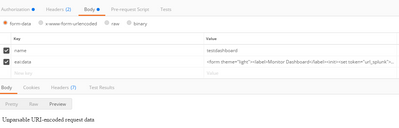
When I try to pass the xml as file (request.xml) for Curl :
curl -ku username:pwd -X POST -H "Content-Type:text/xml" -d 'name=testdashboard' -d 'eai:[email protected]' https://my_splunk_url:8089/servicesNS/username/appspace/data/ui/views
<?xml version="1.0" encoding="UTF-8"?>
<response>
<messages>
<msg type="ERROR">Error parsing XML on line 1: Start tag expected, '<' not found
</msg>
</messages>
</response>
In the request.xml have tried to replace <form> with <form> still no luck.
Can someone please advise how to update large complex XML through REST API?
- Mark as New
- Bookmark Message
- Subscribe to Message
- Mute Message
- Subscribe to RSS Feed
- Permalink
- Report Inappropriate Content


After many experiments in this week I think this shell script will help you.
#!/bin/sh
data=`cat request.xml`
param=`echo "eai:data=$data"`

res=`curl -ku admin:admin123 https://localhost:8089/servicesNS/admin/search/data/ui/views/ -d 'name=testdashboard' --data-urlencode "$param"`
echo $res
Thanks
KV
▄︻̷̿┻̿═━一
If any of my reply helps you to solve the problem Or gain knowledge, an upvote would be appreciated.
- Mark as New
- Bookmark Message
- Subscribe to Message
- Mute Message
- Subscribe to RSS Feed
- Permalink
- Report Inappropriate Content
After many experiments in this week I think this shell script will help you.
#!/bin/sh
data=`cat request.xml`
param=`echo "eai:data=$data"`

res=`curl -ku admin:admin123 https://localhost:8089/servicesNS/admin/search/data/ui/views/ -d 'name=testdashboard' --data-urlencode "$param"`
echo $res
Thanks
KV
▄︻̷̿┻̿═━一
If any of my reply helps you to solve the problem Or gain knowledge, an upvote would be appreciated.
- Mark as New
- Bookmark Message
- Subscribe to Message
- Mute Message
- Subscribe to RSS Feed
- Permalink
- Report Inappropriate Content


Join the Splunk Community Slack to learn, troubleshoot, and make connections with fellow Splunk practitioners in real time!
Join Splunk User Groups to connect and learn in-person by region or remotely by topic or industry.
Supercharging Windows Security Detection Performance: Introducing Hybrid Field ...
Ditch the Manual Grind: Building AI Agents with Splunk
Cisco Data Fabric from Architecture to Investigation, Better SOC Visibility, and More ...
