
Turn on suggestions
Auto-suggest helps you quickly narrow down your search results by suggesting possible matches as you type.
Dashboards & Visualizations
×
Join the Conversation
Without signing in, you're just watching from the sidelines. Sign in or Register to connect, share, and be part of the Splunk Community.
- Find Answers
- :
- Using Splunk
- :
- Dashboards & Visualizations
- :
- Re: How to remove decimal precision in single valu...
Options
- Subscribe to RSS Feed
- Mark Topic as New
- Mark Topic as Read
- Float this Topic for Current User
- Bookmark Topic
- Subscribe to Topic
- Mute Topic
- Printer Friendly Page
- Mark as New
- Bookmark Message
- Subscribe to Message
- Mute Message
- Subscribe to RSS Feed
- Permalink
- Report Inappropriate Content
How to remove decimal precision in single value visualization, but keep it in the trending value?

Dherom
New Member
04-23-2020
08:49 AM
Good afternoon.
In this panel, I want to remove the decimal precision in the single value while keeping it in the trending value.
How can I do this?

- Mark as New
- Bookmark Message
- Subscribe to Message
- Mute Message
- Subscribe to RSS Feed
- Permalink
- Report Inappropriate Content

harishalipaka
Motivator
04-24-2020
12:14 AM
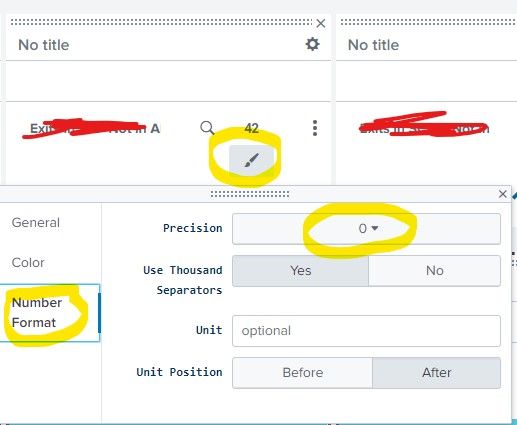
- Mark as New
- Bookmark Message
- Subscribe to Message
- Mute Message
- Subscribe to RSS Feed
- Permalink
- Report Inappropriate Content

richgalloway

SplunkTrust
04-23-2020
10:08 AM
Try adding | fieldformat foo = round(foo, 0) to the end of your query, where 'foo' is the field displayed.
---
If this reply helps you, Karma would be appreciated.
If this reply helps you, Karma would be appreciated.
- Mark as New
- Bookmark Message
- Subscribe to Message
- Mute Message
- Subscribe to RSS Feed
- Permalink
- Report Inappropriate Content
Dherom
New Member
04-28-2020
02:03 AM
fieldformat not modify the number format precision;
integers with 0 are very ugly but its necessary in percentage
😞




Got questions? Get answers!
Join the Splunk Community Slack to learn, troubleshoot, and make connections with fellow Splunk practitioners in real time!
Meet up IRL or virtually!
Join Splunk User Groups to connect and learn in-person by region or remotely by topic or industry.
Get Updates on the Splunk Community!
All Work and No Play? Not at .conf26! Unwind at These Evening Events
Between hands-on technical sessions, keynote reveals, and diving into live architectures, .conf26 is packed ...
Join the Hackathon at .conf26 and build a No-Code AI agent
Join us for the AI Agent Buildathon, an in-person, three-hour hands-on Hackathon where you’ll use Splunk Agent ...
Level Up Your Workflow: Mastering Splunk Cloud Management via Terraform
Tech Talk Recap
From Chaos to Control: Scaling Splunk Cloud with Infrastructure as Code
Managing apps in ...
