
Join the Conversation
- Find Answers
- :
- Using Splunk
- :
- Dashboards & Visualizations
- :
- Re: How to format X axis label in the timechart?
- Subscribe to RSS Feed
- Mark Topic as New
- Mark Topic as Read
- Float this Topic for Current User
- Bookmark Topic
- Subscribe to Topic
- Mute Topic
- Printer Friendly Page
- Mark as New
- Bookmark Message
- Subscribe to Message
- Mute Message
- Subscribe to RSS Feed
- Permalink
- Report Inappropriate Content

Hi All,
I am running a below query:
index=xyz sourcetype=abc | dedup _raw| timechart span=1m count
and what I could see is that the label in the X-axis is always in the below format:

timechart below:
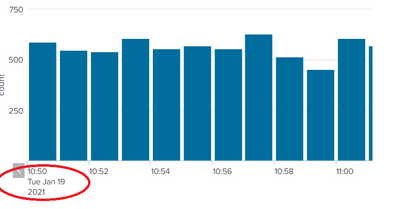
We want date parameter before the month (in AU format) which will be Tue 19 Jan 2021.
Inspite of using Strftime or fieldformat, I am not able to change this label format. Can anybody please help me out on this?
@woodcock : Hi woodcock! I remember you responded to a query in a similiar lines sometime before, but I wasn't able to find that response now.. Need your inputs please !
Please do let me know in case of any queries
Thanks
AG.
- Mark as New
- Bookmark Message
- Subscribe to Message
- Mute Message
- Subscribe to RSS Feed
- Permalink
- Report Inappropriate Content

Try ,
timechart span=1m count |convert timeformat="%a %d %m %Y %H:%M:%S" ctime(_time) AS time | fields - _time | fields time,*
What goes around comes around. If it helps, hit it with Karma 🙂
- Mark as New
- Bookmark Message
- Subscribe to Message
- Mute Message
- Subscribe to RSS Feed
- Permalink
- Report Inappropriate Content
Try ,
timechart span=1m count |convert timeformat="%a %d %m %Y %H:%M:%S" ctime(_time) AS time | fields - _time | fields time,*
What goes around comes around. If it helps, hit it with Karma 🙂
- Mark as New
- Bookmark Message
- Subscribe to Message
- Mute Message
- Subscribe to RSS Feed
- Permalink
- Report Inappropriate Content
- Mark as New
- Bookmark Message
- Subscribe to Message
- Mute Message
- Subscribe to RSS Feed
- Permalink
- Report Inappropriate Content
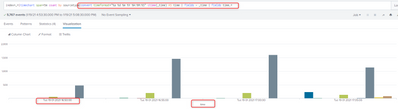
This is my sample search
What goes around comes around. If it helps, hit it with Karma 🙂
- Mark as New
- Bookmark Message
- Subscribe to Message
- Mute Message
- Subscribe to RSS Feed
- Permalink
- Report Inappropriate Content
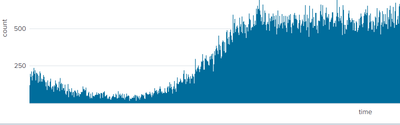
@renjith_nair Thanks Renjith for this. Yeah this is working when the time span chosen is less (say for 30 mins or so).. The problem what I am facing here is that I have to show the timechart for entire day and time span chosen is 5 mins. So what happens is if the X-axis label is long (as in this case for e.g. Tue 19 01 2021 16:50:00), it wont display it in the x - axis. But when we allow the timechart to choose default _time option, it shows the labels properly. So are you aware if there is an option to change the timechart using XML option without changing the search query?

Join the Splunk Community Slack to learn, troubleshoot, and make connections with fellow Splunk practitioners in real time!
Join Splunk User Groups to connect and learn in-person by region or remotely by topic or industry.
[Puzzles] Solve, Learn, Repeat: Character substitutions with Regular Expressions
Splunk Community Badges!
[Puzzles] Solve, Learn, Repeat: Matching cron expressions
