
Join the Conversation
- Find Answers
- :
- Using Splunk
- :
- Dashboards & Visualizations
- :
- How to customize X Axis in time chart?
- Subscribe to RSS Feed
- Mark Topic as New
- Mark Topic as Read
- Float this Topic for Current User
- Bookmark Topic
- Subscribe to Topic
- Mute Topic
- Printer Friendly Page
- Mark as New
- Bookmark Message
- Subscribe to Message
- Mute Message
- Subscribe to RSS Feed
- Permalink
- Report Inappropriate Content

Hi All,
I want chart to be created in the below way. The x-axis needs to have date and time like that.
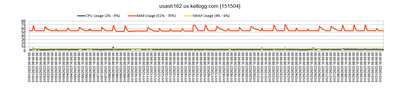
the chart i am able to create is .
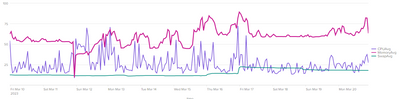
i tried to do eval strftime to _time but not getting the desired result.
The 1st query I tried -
index=unix (source=cpu sourcetype=cpu) OR (sourcetype=vmstat) host IN (usaws135000)
| fields _time cpu_load_percent memUsedPct swapUsedPct host
| timechart span=1h eval(round(avg(cpu_load_percent),2)) as CPUAvg eval(round(avg(memUsedPct),2)) as MemoryAvg eval(round(avg(swapUsedPct),2)) as SwapAvg by host useother=t limit=0
The 2nd query i tried -
index=unix (source=cpu sourcetype=cpu) OR (sourcetype=vmstat) host IN (usaws1350)
| fields _time cpu_load_percent memUsedPct swapUsedPct host
| bin span=1h _time
| eval _time=strftime(_time,"%a %b %d %Y %H:%M:%S")
| stats avg(cpu_load_percent) as CPUAvg avg(memUsedPct) as MemoryAvg avg(swapUsedPct) as SwapAvg by _time
- Mark as New
- Bookmark Message
- Subscribe to Message
- Mute Message
- Subscribe to RSS Feed
- Permalink
- Report Inappropriate Content


Once you've created the chart, click on the Format icon then switch to the X-Axis tab where you specify the label rotation. Or you can do so in Simple XML
<option name="charting.axisLabelsX.majorLabelStyle.rotation">-90</option>You may be able to change the time format using the fieldformat command.
index=unix (source=cpu sourcetype=cpu) OR (sourcetype=vmstat) host IN (usaws135000)
| fields _time cpu_load_percent memUsedPct swapUsedPct host
| timechart span=1h eval(round(avg(cpu_load_percent),2)) as CPUAvg eval(round(avg(memUsedPct),2)) as MemoryAvg eval(round(avg(swapUsedPct),2)) as SwapAvg by host useother=t limit=0
| fieldformat _time=strftime(_time, "%m/%d/%Y %H:%M:%S")
I'm not sure if it's possible to display as many labels as in your example, but this might do it.
<option name="charting.axisLabelsX.majorLabelVisibility">show</option>The default of "auto" selectively hides labels to improve readability.
See https://docs.splunk.com/Documentation/Splunk/9.0.4/Viz/ChartConfigurationReference#Area.2C_Bubble.2C... for more
If this reply helps you, Karma would be appreciated.
- Mark as New
- Bookmark Message
- Subscribe to Message
- Mute Message
- Subscribe to RSS Feed
- Permalink
- Report Inappropriate Content
Once you've created the chart, click on the Format icon then switch to the X-Axis tab where you specify the label rotation. Or you can do so in Simple XML
<option name="charting.axisLabelsX.majorLabelStyle.rotation">-90</option>You may be able to change the time format using the fieldformat command.
index=unix (source=cpu sourcetype=cpu) OR (sourcetype=vmstat) host IN (usaws135000)
| fields _time cpu_load_percent memUsedPct swapUsedPct host
| timechart span=1h eval(round(avg(cpu_load_percent),2)) as CPUAvg eval(round(avg(memUsedPct),2)) as MemoryAvg eval(round(avg(swapUsedPct),2)) as SwapAvg by host useother=t limit=0
| fieldformat _time=strftime(_time, "%m/%d/%Y %H:%M:%S")
I'm not sure if it's possible to display as many labels as in your example, but this might do it.
<option name="charting.axisLabelsX.majorLabelVisibility">show</option>The default of "auto" selectively hides labels to improve readability.
See https://docs.splunk.com/Documentation/Splunk/9.0.4/Viz/ChartConfigurationReference#Area.2C_Bubble.2C... for more
If this reply helps you, Karma would be appreciated.
- Mark as New
- Bookmark Message
- Subscribe to Message
- Mute Message
- Subscribe to RSS Feed
- Permalink
- Report Inappropriate Content
Thank you @richgalloway for your answer and the reference link. Much appreciated .

Join the Splunk Community Slack to learn, troubleshoot, and make connections with fellow Splunk practitioners in real time!
Join Splunk User Groups to connect and learn in-person by region or remotely by topic or industry.
[Puzzles] Solve, Learn, Repeat: Character substitutions with Regular Expressions
Splunk Community Badges!
[Puzzles] Solve, Learn, Repeat: Matching cron expressions
