
Turn on suggestions
Auto-suggest helps you quickly narrow down your search results by suggesting possible matches as you type.
Dashboards & Visualizations
×
Join the Conversation
Without signing in, you're just watching from the sidelines. Sign in or Register to connect, share, and be part of the Splunk Community.
- Find Answers
- :
- Using Splunk
- :
- Dashboards & Visualizations
- :
- How to create dropdown list to remove * option?
Options
- Subscribe to RSS Feed
- Mark Topic as New
- Mark Topic as Read
- Float this Topic for Current User
- Bookmark Topic
- Subscribe to Topic
- Mute Topic
- Printer Friendly Page
- Mark as New
- Bookmark Message
- Subscribe to Message
- Mute Message
- Subscribe to RSS Feed
- Permalink
- Report Inappropriate Content

erica
Explorer
06-05-2022
11:12 PM
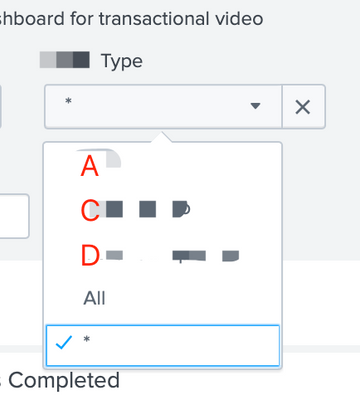
I have a dropdown list with manually specified choices - A, C, D and All, but somehow splunk will auto populate another option * as default in my dropdown list after saving it.
The reason why I do not want * to be representing All in my dashboard is because Type might content B data that I want to exclude from being shown on my dashboard.
Anyone knows how to remove this * option? Thank you
<input type="dropdown" token="contentType">
<label>Type</label>
<choice value="A">A</choice>
<choice value="C">C</choice>
<choice value="D">D</choice>
<choice value="ALL" OR content_type="C" OR content_type="D">All</choice>
<prefix>(</prefix>
<suffix>)</suffix>
<default>"A" OR content_type="C" OR content_type="D"</default>
<initialValue>""A" OR content_type="C" OR content_type="D"</initialValue>
</input>

1 Solution
- Mark as New
- Bookmark Message
- Subscribe to Message
- Mute Message
- Subscribe to RSS Feed
- Permalink
- Report Inappropriate Content

kamlesh_vaghela

SplunkTrust
06-07-2022
05:28 AM
Can you please try this?
<input type="dropdown" token="contentType">
<label>Type</label>
<choice value="A">A</choice>
<choice value="C">C</choice>
<choice value="D">D</choice>
<choice value='"ALL" OR content_type="C" OR content_type="D"'>All</choice>
<prefix>(</prefix>
<suffix>)</suffix>
<default>"A" OR content_type="C" OR content_type="D"</default>
<initialValue>"A" OR content_type="C" OR content_type="D"</initialValue>
</input>
I hope this will help you.
Thanks
KV
▄︻̷̿┻̿═━一 😉
If any of my reply helps you to solve the problem Or gain knowledge, an upvote would be appreciated.
- Mark as New
- Bookmark Message
- Subscribe to Message
- Mute Message
- Subscribe to RSS Feed
- Permalink
- Report Inappropriate Content
kamlesh_vaghela
SplunkTrust
06-07-2022
05:28 AM
Can you please try this?
<input type="dropdown" token="contentType">
<label>Type</label>
<choice value="A">A</choice>
<choice value="C">C</choice>
<choice value="D">D</choice>
<choice value='"ALL" OR content_type="C" OR content_type="D"'>All</choice>
<prefix>(</prefix>
<suffix>)</suffix>
<default>"A" OR content_type="C" OR content_type="D"</default>
<initialValue>"A" OR content_type="C" OR content_type="D"</initialValue>
</input>
I hope this will help you.
Thanks
KV
▄︻̷̿┻̿═━一 😉
If any of my reply helps you to solve the problem Or gain knowledge, an upvote would be appreciated.


Got questions? Get answers!
Join the Splunk Community Slack to learn, troubleshoot, and make connections with fellow Splunk practitioners in real time!
Meet up IRL or virtually!
Join Splunk User Groups to connect and learn in-person by region or remotely by topic or industry.
Get Updates on the Splunk Community!
Splunk App Dev Quarterly Roundup: AI, Agents, and Innovation!
Another quarter, another wave of innovation. From complex integrations to pushing the limits ...
Federated Search for Dynamic Data Self Storage Is Now Generally Available on Splunk ...
Splunk is excited to announce the General Availability of Federated Search for Dynamic Data Self Storage ...
Index This | What has many keys but can’t unlock a door?
July 2026 Edition
Hayyy Splunk Education Enthusiasts and the Eternally Curious!
We’re back with this ...
