
Join the Conversation
- Find Answers
- :
- Using Splunk
- :
- Dashboards & Visualizations
- :
- How to create Javascript for a button on a splunk ...
- Subscribe to RSS Feed
- Mark Topic as New
- Mark Topic as Read
- Float this Topic for Current User
- Bookmark Topic
- Subscribe to Topic
- Mute Topic
- Printer Friendly Page
- Mark as New
- Bookmark Message
- Subscribe to Message
- Mute Message
- Subscribe to RSS Feed
- Permalink
- Report Inappropriate Content

Hello,
Can someone please kindly help me with the Javascript for the below criteria.
create a JavaScript that calls PagerDuty using a button, eventually passing parameters from the dashboard.
Thanks
- Mark as New
- Bookmark Message
- Subscribe to Message
- Mute Message
- Subscribe to RSS Feed
- Permalink
- Report Inappropriate Content


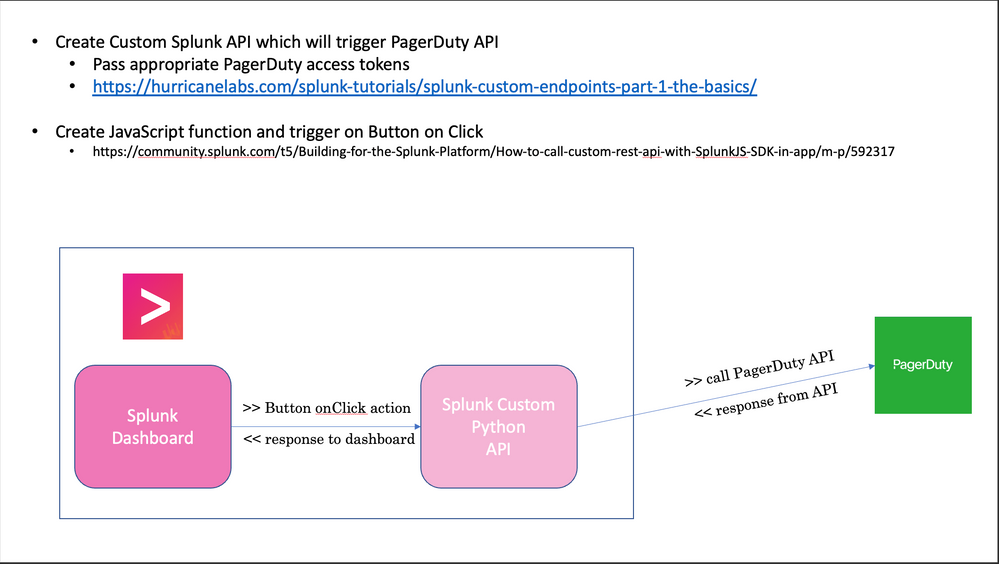
Let's follow the best practice for calling third-party API from Splunk Dashboard.
- Create Custom Splunk API which will trigger PagerDuty API
- Pass appropriate PagerDuty access tokens
- Refer: https://hurricanelabs.com/splunk-tutorials/splunk-custom-endpoints-part-1-the-basics/
- Create JavaScript function and trigger on Button on Click
Please check below pictorial view for Flow understanding.
I hope this will help you.
Thanks
KV
If any of my replies help you to solve the problem Or gain knowledge, an upvote would be appreciated.
- Mark as New
- Bookmark Message
- Subscribe to Message
- Mute Message
- Subscribe to RSS Feed
- Permalink
- Report Inappropriate Content
Let's follow the best practice for calling third-party API from Splunk Dashboard.
- Create Custom Splunk API which will trigger PagerDuty API
- Pass appropriate PagerDuty access tokens
- Refer: https://hurricanelabs.com/splunk-tutorials/splunk-custom-endpoints-part-1-the-basics/
- Create JavaScript function and trigger on Button on Click
Please check below pictorial view for Flow understanding.
I hope this will help you.
Thanks
KV
If any of my replies help you to solve the problem Or gain knowledge, an upvote would be appreciated.
- Mark as New
- Bookmark Message
- Subscribe to Message
- Mute Message
- Subscribe to RSS Feed
- Permalink
- Report Inappropriate Content
Thanks @kamlesh_vaghela , will try to implement the suggested approach.
- Mark as New
- Bookmark Message
- Subscribe to Message
- Mute Message
- Subscribe to RSS Feed
- Permalink
- Report Inappropriate Content
Did anyone has developed a java script for this similar kind of situation? any leads would be highly appreciated
- Mark as New
- Bookmark Message
- Subscribe to Message
- Mute Message
- Subscribe to RSS Feed
- Permalink
- Report Inappropriate Content
May be it's late but answering.
function callCustomAPI() {
        var service = mvc.createService({ owner: "nobody" });
        //send data to server
        console.log(selected_values_array.join());
        var params = selected_values_array.join();
        service.request("/services/my-api-path","POST", {}, {}, JSON.stringify(params), {'Content-Type': 'application/json'}, function(err, resp) {
            // Handle response
            if(resp != null){
              if(resp.status == 200){
                //do something
              } else {
                //do something with status !=200
              }
            }
            // Handle error
            if(err != null){
              //handle error
            }
          });
     }
You can call callCustomAPI from the button click event or any other javascript event.
Thanks
KV
If any of my replies help you to solve the problem Or gain knowledge, an upvote would be appreciated.


Join the Splunk Community Slack to learn, troubleshoot, and make connections with fellow Splunk practitioners in real time!
Join Splunk User Groups to connect and learn in-person by region or remotely by topic or industry.
A Four-Part Event Series: Full Stack Observability For the AI Era
SOC4Kafka - New Kafka Connector Powered by OpenTelemetry
Event Series: Level up your SOC: Advancing with Splunk Enterprise Security
