
Join the Conversation
- Find Answers
- :
- Using Splunk
- :
- Dashboards & Visualizations
- :
- How to convert dashboard to HTML Export using jsPD...
- Subscribe to RSS Feed
- Mark Topic as New
- Mark Topic as Read
- Float this Topic for Current User
- Bookmark Topic
- Subscribe to Topic
- Mute Topic
- Printer Friendly Page
- Mark as New
- Bookmark Message
- Subscribe to Message
- Mute Message
- Subscribe to RSS Feed
- Permalink
- Report Inappropriate Content

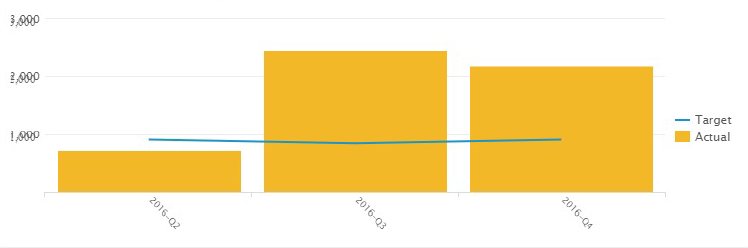
i am trying to have export on HTML dashboard so i am using the jsPDF, am using the below script. also the chart comes out with the x-axis duplicated under each other as attached. any ideas?
 html2canvas(document.getElementById("panel1"), {
            onrendered: function(canvas) {

                var imgData = canvas.toDataURL('image/png');
             //   console.log('Report Image URL: '+imgData);
                var doc = new jsPDF(); //210mm wide and 297mm high

                doc.addImage(imgData, 'PNG', 10, 10);
                doc.save('sample.pdf');
            }
        });

- Mark as New
- Bookmark Message
- Subscribe to Message
- Mute Message
- Subscribe to RSS Feed
- Permalink
- Report Inappropriate Content
i changed the jspdf.js code in the below method and it worked fine
NodeParser.prototype.getChildren = function(parentContainer) {
    return flatten([].filter.call(parentContainer.node.childNodes, renderableNode).map(function(node) {
        var container = [node.nodeType === Node.TEXT_NODE && node.parentElement.tagName !== "text" ? new TextContainer(node, parentContainer) : new NodeContainer(node, parentContainer)].filter(nonIgnoredElement);
        return node.nodeType === Node.ELEMENT_NODE && container.length && node.tagName !== "TEXTAREA" ? (container[0].isElementVisible() ? container.concat(this.getChildren(container[0])) : []) : container;
    }, this));
};
- Mark as New
- Bookmark Message
- Subscribe to Message
- Mute Message
- Subscribe to RSS Feed
- Permalink
- Report Inappropriate Content
i changed the jspdf.js code in the below method and it worked fine
NodeParser.prototype.getChildren = function(parentContainer) {
    return flatten([].filter.call(parentContainer.node.childNodes, renderableNode).map(function(node) {
        var container = [node.nodeType === Node.TEXT_NODE && node.parentElement.tagName !== "text" ? new TextContainer(node, parentContainer) : new NodeContainer(node, parentContainer)].filter(nonIgnoredElement);
        return node.nodeType === Node.ELEMENT_NODE && container.length && node.tagName !== "TEXTAREA" ? (container[0].isElementVisible() ? container.concat(this.getChildren(container[0])) : []) : container;
    }, this));
};
- Mark as New
- Bookmark Message
- Subscribe to Message
- Mute Message
- Subscribe to RSS Feed
- Permalink
- Report Inappropriate Content
Hello @Kimosoft2,
Do you think it's possible to export a full dashboard with this workaround? Can you describe the process, for example how do you call the export in the dashboard ?
If it's possible can you share the full JS script ?
- Mark as New
- Bookmark Message
- Subscribe to Message
- Mute Message
- Subscribe to RSS Feed
- Permalink
- Report Inappropriate Content
Hello @baigura
yes you can do that by adding a div containing all the rows with and id for example all and then call that div for the export , this is what i have done in mine so instead of Panel1 it will be all
- Mark as New
- Bookmark Message
- Subscribe to Message
- Mute Message
- Subscribe to RSS Feed
- Permalink
- Report Inappropriate Content
@Kimosoft2
Thank you for the quick reply. Im a javascript beginner, can you describe in details your work? For example how do you call the export in your dashboard. If possible can you share the JS script? It would be very helpful.
- Mark as New
- Bookmark Message
- Subscribe to Message
- Mute Message
- Subscribe to RSS Feed
- Permalink
- Report Inappropriate Content
ok no worries let me put a sample for you below
HTML :
        <div id="row1" class="dashboard-row dashboard-row1">
            <div id="panel1" class="dashboard-cell" style="width:60%">
                <div class="dashboard-panel clearfix">
                    <h2 class="panel-title"></h2>

                    <div class="panel-element-row">
                        <div id="element1" class="dashboard-element table" style="width: 100%">
                            <div class="panel-body"></div>
                        </div>
                    </div>
                </div>
            </div>
            <div id="panel2" class="dashboard-cell" style="width: 40%">
                <div class="dashboard-panel clearfix">
                    <h2 class="panel-title"></h2>
                    <div class="panel-element-row">
                      <div id="element2" class="dashboard-element table" style="width: 100%">
                            <div class="panel-body"></div>
                        </div>
                    </div>
                </div>
            </div>
        </div>

    </div>


            <div id="panel4" class="dashboard-cell" style="width:60%">
                <div class="dashboard-panel clearfix">
                    <h2 class="panel-title"></h2>

                    <div class="panel-element-row">
                        <div id="element4" class="dashboard-element table" style="width: 100%">
                            <div class="panel-body"></div>
                        </div>
                    </div>
                </div>
            </div>
            <div id="panel5" class="dashboard-cell" style="width: 40%">
                <div class="dashboard-panel clearfix">
                    <h2 class="panel-title"></h2>
                    <div class="panel-element-row">
                         <div id="element5" class="dashboard-element table" style="width: 100%">
                            <div class="panel-body"></div>
                        </div>
                    </div>
                </div>
            </div>
        </div>

    </div>

    </div>
Java script :
html2canvas(document.getElementById("all"), {
onrendered: function(canvas) {
             var imgData = canvas.toDataURL('image/png');
          //   console.log('Report Image URL: '+imgData);
             var doc = new jsPDF(); //210mm wide and 297mm high

             doc.addImage(imgData, 'PNG', 10, 10);
             doc.save('sample.pdf');
         }
     });
- Mark as New
- Bookmark Message
- Subscribe to Message
- Mute Message
- Subscribe to RSS Feed
- Permalink
- Report Inappropriate Content
Cool thank you very much !
- Mark as New
- Bookmark Message
- Subscribe to Message
- Mute Message
- Subscribe to RSS Feed
- Permalink
- Report Inappropriate Content
Hi Baigura/Kimosoft2,
I am new to splunk and sorry for asking my question in this old post. Currently I am working on requirement to add the dashboard content within email body itself as an image instead of pdf attachment. Does the java script & HTML code mentioned here is for the same purpose? If so, how can I implement this in splunk.
- Mark as New
- Bookmark Message
- Subscribe to Message
- Mute Message
- Subscribe to RSS Feed
- Permalink
- Report Inappropriate Content


@Kimosoft2 - If your answer provided a working solution to your question please don't forget to resolve your post by clicking "Accept". That way others can easily find it if they're having the same issue. Thanks.

Join the Splunk Community Slack to learn, troubleshoot, and make connections with fellow Splunk practitioners in real time!
Join Splunk User Groups to connect and learn in-person by region or remotely by topic or industry.
Index This | What travels the world but is also stuck in place?
Discover New Use Cases: Unlock Greater Value from Your Existing Splunk Data
Continue Your Journey: Join Session 2 of the Data Management and Federation Bootcamp ...
