
Join the Conversation
- Find Answers
- :
- Using Splunk
- :
- Dashboards & Visualizations
- :
- Re: How do you make a search that would return ti...
- Subscribe to RSS Feed
- Mark Topic as New
- Mark Topic as Read
- Float this Topic for Current User
- Bookmark Topic
- Subscribe to Topic
- Mute Topic
- Printer Friendly Page
- Mark as New
- Bookmark Message
- Subscribe to Message
- Mute Message
- Subscribe to RSS Feed
- Permalink
- Report Inappropriate Content

Hi Everyone,
I have a dashboard with 2 dropdown filters, From Date and To Date. Below this is a table. It looks something like the image below:
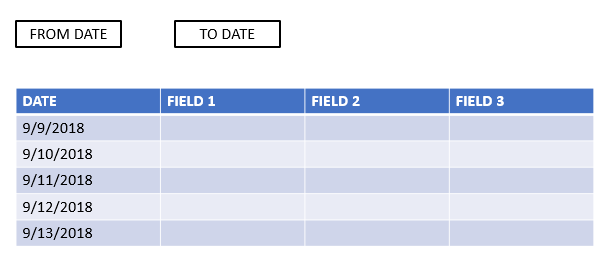
Now, what should happen is that when both of the dropdowns are set to the date today, the search should return results from "date today" and "the last 30 mins". Then, if the dropdown is set to a different date, (for example FROM DATE=9/9/2018, TO DATE=9/11/2018), the search should return results from 9//9/2018 to 9/11/2018.
What could be the possible solution for this? I am trying to use |where and |eval but I still can't figure out how to do this.
I hope anyone can help me solve this.
Thanks in advance!
Have a nice day. 🙂
- Mark as New
- Bookmark Message
- Subscribe to Message
- Mute Message
- Subscribe to RSS Feed
- Permalink
- Report Inappropriate Content

@jvmerilla ,
Try this
<form>
  <label>Time Token</label>
  <search>
    <query>|makeresults|eval earliest=if("$from$"=="$to$","-30m",strptime("$from$","%m/%d/%Y"))|eval latest=if("$from$"=="$to$",now(),strptime("$to$","%m/%d/%Y"))|fields earliest,latest</query>
    <done>
      <set token="earliest_time">$result.earliest$</set>
      <set token="latest_time">$result.latest$</set>
    </done>
  </search>
  <fieldset submitButton="false">
    <input type="dropdown" token="from" searchWhenChanged="true">
      <label>FROM</label>
      <choice value="9/9/2018">9/9/2018</choice>
      <choice value="9/10/2018">9/10/2018</choice>
      <choice value="911/2018">9/11/2018</choice>
      <default>9/9/2018</default>
    </input>
    <input type="dropdown" token="to" searchWhenChanged="true">
      <label>TO</label>
      <choice value="9/9/2018">9/9/2018</choice>
      <choice value="9/10/2018">9/10/2018</choice>
      <choice value="911/2018">9/11/2018</choice>
      <default>9/10/2018</default>
    </input>
  </fieldset>
  <row>
    <panel>
      <chart>
        <search>
          <query>index=_internal|timechart span=10m count by sourcetype</query>
          <earliest>$earliest_time$</earliest>
          <latest>$latest_time$</latest>
        </search>
        <option name="charting.chart">line</option>
        <option name="charting.drilldown">none</option>
      </chart>
    </panel>
  </row>
</form>
What goes around comes around. If it helps, hit it with Karma 🙂
- Mark as New
- Bookmark Message
- Subscribe to Message
- Mute Message
- Subscribe to RSS Feed
- Permalink
- Report Inappropriate Content
@jvmerilla ,
Try this
<form>
  <label>Time Token</label>
  <search>
    <query>|makeresults|eval earliest=if("$from$"=="$to$","-30m",strptime("$from$","%m/%d/%Y"))|eval latest=if("$from$"=="$to$",now(),strptime("$to$","%m/%d/%Y"))|fields earliest,latest</query>
    <done>
      <set token="earliest_time">$result.earliest$</set>
      <set token="latest_time">$result.latest$</set>
    </done>
  </search>
  <fieldset submitButton="false">
    <input type="dropdown" token="from" searchWhenChanged="true">
      <label>FROM</label>
      <choice value="9/9/2018">9/9/2018</choice>
      <choice value="9/10/2018">9/10/2018</choice>
      <choice value="911/2018">9/11/2018</choice>
      <default>9/9/2018</default>
    </input>
    <input type="dropdown" token="to" searchWhenChanged="true">
      <label>TO</label>
      <choice value="9/9/2018">9/9/2018</choice>
      <choice value="9/10/2018">9/10/2018</choice>
      <choice value="911/2018">9/11/2018</choice>
      <default>9/10/2018</default>
    </input>
  </fieldset>
  <row>
    <panel>
      <chart>
        <search>
          <query>index=_internal|timechart span=10m count by sourcetype</query>
          <earliest>$earliest_time$</earliest>
          <latest>$latest_time$</latest>
        </search>
        <option name="charting.chart">line</option>
        <option name="charting.drilldown">none</option>
      </chart>
    </panel>
  </row>
</form>
What goes around comes around. If it helps, hit it with Karma 🙂
- Mark as New
- Bookmark Message
- Subscribe to Message
- Mute Message
- Subscribe to RSS Feed
- Permalink
- Report Inappropriate Content
in the drop down set the token for earliest and latest.
In the search query add the below line
| eval earliest=case(isnum(earliest),earliest,earliest=="-1d","-30m",1=1)



Join the Splunk Community Slack to learn, troubleshoot, and make connections with fellow Splunk practitioners in real time!
Join Splunk User Groups to connect and learn in-person by region or remotely by topic or industry.
How much can you really learn in 3 minutes?
Event Series: The Agentic SOC: Trust Before Autonomy
Free Professional Services for .conf26 Attendees
