
Join the Conversation
- Find Answers
- :
- Using Splunk
- :
- Dashboards & Visualizations
- :
- Re: How can I get the DiskFreeSpace field to be co...
- Subscribe to RSS Feed
- Mark Topic as New
- Mark Topic as Read
- Float this Topic for Current User
- Bookmark Topic
- Subscribe to Topic
- Mute Topic
- Printer Friendly Page
- Mark as New
- Bookmark Message
- Subscribe to Message
- Mute Message
- Subscribe to RSS Feed
- Permalink
- Report Inappropriate Content

Hi there,
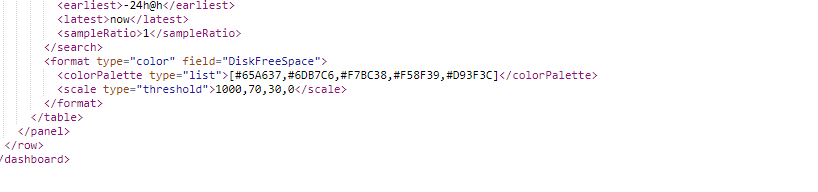
I am pulling physical disk info and just putting it in Dashboard. I want DiskFreeSpace field to be colored automatically depending on the value. Is this possible?
Splunk Version
6.2.3
Splunk Build
264376
Here is what I have setup so far.
|eval DiskFreeSpace=round((FreeSpace/1024/1024/1024),2)|eval DiskSpace=round((Size/1024/1024/1024),2)|rangemap field=DiskFreeSpace blue=10-60 red=0-9 |rename Name AS Disk host AS Host|table Host Disk DiskSpace DiskFreeSpace|dedup Disk

I even added this to my source code
range
Thanks for the help
- Mark as New
- Bookmark Message
- Subscribe to Message
- Mute Message
- Subscribe to RSS Feed
- Permalink
- Report Inappropriate Content

@carlyleadmin since you are on version 6.2.3 and Table Cell formatting option to add colors through UI was introduced only in version 6.5, only option for you to color your Table Cell based on range of value, is to use Simple XML JS and CSS extension. Get the Splunk Dashboard Examples App from Splunkbase and try out the Table Cell Highlighting Example which can be applied to your dashboard.
| makeresults | eval message= "Happy Splunking!!!"
- Mark as New
- Bookmark Message
- Subscribe to Message
- Mute Message
- Subscribe to RSS Feed
- Permalink
- Report Inappropriate Content
@carlyleadmin since you are on version 6.2.3 and Table Cell formatting option to add colors through UI was introduced only in version 6.5, only option for you to color your Table Cell based on range of value, is to use Simple XML JS and CSS extension. Get the Splunk Dashboard Examples App from Splunkbase and try out the Table Cell Highlighting Example which can be applied to your dashboard.
| makeresults | eval message= "Happy Splunking!!!"
- Mark as New
- Bookmark Message
- Subscribe to Message
- Mute Message
- Subscribe to RSS Feed
- Permalink
- Report Inappropriate Content



- Mark as New
- Bookmark Message
- Subscribe to Message
- Mute Message
- Subscribe to RSS Feed
- Permalink
- Report Inappropriate Content
i added
option name=classfield>range to my source

Data Management Digest – December 2025
Index This | What is broken 80% of the time by February?
Unlock Faster Time-to-Value on Edge and Ingest Processor with New SPL2 Pipeline ...
