
Join the Conversation
- Find Answers
- :
- Using Splunk
- :
- Dashboards & Visualizations
- :
- Re: GEOSTATS Rename value in piechart
- Subscribe to RSS Feed
- Mark Topic as New
- Mark Topic as Read
- Float this Topic for Current User
- Bookmark Topic
- Subscribe to Topic
- Mute Topic
- Printer Friendly Page
- Mark as New
- Bookmark Message
- Subscribe to Message
- Mute Message
- Subscribe to RSS Feed
- Permalink
- Report Inappropriate Content

Hi,
Is it possible to change the 'name' of the value in a pie chart displayed on a geostats map? The below example shows the piechart. The blue 1 indicate that there are 4 devices with that status. One device with status 14 and 1 with status 3. I have been trying the change the numbers into a readable status. 1=UP,3=WARNING,14=Critical but for some reason I don't seem to make it possible.
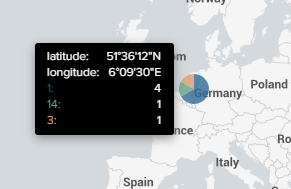
This is the SPL creating the worldmap
index="xxx" Splunk_Node=true
| stats latest(Latitude) as Latitude, latest(Longitude) as Longitude, latest(Node_Status) as Node_Status by NodeID
| geostats count(NodeID) by Node_Status latfield=Latitude longfield=Longitude
Been trying the below. Added this line and change the SPL from Node_Status to NodeStatus but then the map stays empty.
| eval NodeStatus = if(NodeStatus=1,"UP",if(NodeStatus=2,"DOWN",if(NodeStatus=3,"WARNING",if(NodeStatus=14,"CRITICAL",isnull)))) `comment("Change the status number to something readable")`
Someone any thoughts on this?

- Mark as New
- Bookmark Message
- Subscribe to Message
- Mute Message
- Subscribe to RSS Feed
- Permalink
- Report Inappropriate Content


This should do it.
index="xxx" Splunk_Node=true
| eval Node_Status = case (Node_Status=1, "UP", Node_Status=2, "DOWN", Node_Status=3, "WARNING", Node_Status=4, "CRITICAL", 1==1, "OTHER")
| stats latest(Latitude) as Latitude, latest(Longitude) as Longitude, latest(Node_Status) as Node_Status by NodeID
| geostats count(NodeID) by Node_Status latfield=Latitude longfield=Longitude
If this reply helps you, Karma would be appreciated.
- Mark as New
- Bookmark Message
- Subscribe to Message
- Mute Message
- Subscribe to RSS Feed
- Permalink
- Report Inappropriate Content
This should do it.
index="xxx" Splunk_Node=true
| eval Node_Status = case (Node_Status=1, "UP", Node_Status=2, "DOWN", Node_Status=3, "WARNING", Node_Status=4, "CRITICAL", 1==1, "OTHER")
| stats latest(Latitude) as Latitude, latest(Longitude) as Longitude, latest(Node_Status) as Node_Status by NodeID
| geostats count(NodeID) by Node_Status latfield=Latitude longfield=Longitude
If this reply helps you, Karma would be appreciated.
- Mark as New
- Bookmark Message
- Subscribe to Message
- Mute Message
- Subscribe to RSS Feed
- Permalink
- Report Inappropriate Content
Yep, that has done it. Many thanks. Did not occur to me to use case for this.
I corrected a typo in the CRITICAL part. The status number is 14 and not 4 but it works perfectly.

Join the Splunk Community Slack to learn, troubleshoot, and make connections with fellow Splunk practitioners in real time!
Join Splunk User Groups to connect and learn in-person by region or remotely by topic or industry.
New to the Community? Join Us for an Exclusive Post .conf26 Welcome Session (Plus a ...
Accelerate Splunk App Development with AI
Meet the .conf26 AI Agent Buildathon Winners
