
Join the Conversation
- Find Answers
- :
- Using Splunk
- :
- Dashboards & Visualizations
- :
- Re: Editing number precision in the source dashboa...
- Subscribe to RSS Feed
- Mark Topic as New
- Mark Topic as Read
- Float this Topic for Current User
- Bookmark Topic
- Subscribe to Topic
- Mute Topic
- Printer Friendly Page
- Mark as New
- Bookmark Message
- Subscribe to Message
- Mute Message
- Subscribe to RSS Feed
- Permalink
- Report Inappropriate Content

Hello,
I have a dashboard which has one panel displaying a statistics table. The table is very wide (~300 numeric columns) which makes manually editing the number precision for each column prohibitive in the UI. I attempted to do this in the source editor but the number precision I input does not translate to the table in the panel after saving.
Here is a sample block of code I am inserting:
<format type="number" field="xxxxx_percent">
<option name="precision">0.000</option>
<option name="unit">%</option>
<option name="unitPosition">after</option>
</format>
and the result looks like this:
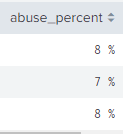
Anyone know why my precision option is not persisting but the other options are?
Thank you in advance!
-MD
- Mark as New
- Bookmark Message
- Subscribe to Message
- Mute Message
- Subscribe to RSS Feed
- Permalink
- Report Inappropriate Content


The precision option expects an integer specifying the number of decimal places to display. Entering "0.000" means show no decimals. Try
<option name="precision">3</option>See https://docs.splunk.com/Documentation/Splunk/9.0.1/Viz/TableFormatsXML#Number_format_rules for more information.
If this reply helps you, Karma would be appreciated.
- Mark as New
- Bookmark Message
- Subscribe to Message
- Mute Message
- Subscribe to RSS Feed
- Permalink
- Report Inappropriate Content
This makes total sense. It is a little misleading however between the UI format option which gives options like 0, 0.0, 0.00, 0.000, 0.0000, and the Source format which requires an integer which when having zero decimal precision is the same setting in both..."0". An enhancement for the UI to align with the Source editing would probably be a good idea.
- Mark as New
- Bookmark Message
- Subscribe to Message
- Mute Message
- Subscribe to RSS Feed
- Permalink
- Report Inappropriate Content
You're not wrong. Go to https://ideas.splunk.com to make your suggestion.
If this reply helps you, Karma would be appreciated.
- Mark as New
- Bookmark Message
- Subscribe to Message
- Mute Message
- Subscribe to RSS Feed
- Permalink
- Report Inappropriate Content
The precision option expects an integer specifying the number of decimal places to display. Entering "0.000" means show no decimals. Try
<option name="precision">3</option>See https://docs.splunk.com/Documentation/Splunk/9.0.1/Viz/TableFormatsXML#Number_format_rules for more information.
If this reply helps you, Karma would be appreciated.

Join the Splunk Community Slack to learn, troubleshoot, and make connections with fellow Splunk practitioners in real time!
Join Splunk User Groups to connect and learn in-person by region or remotely by topic or industry.
Index This | What travels the world but is also stuck in place?
Discover New Use Cases: Unlock Greater Value from Your Existing Splunk Data
Continue Your Journey: Join Session 2 of the Data Management and Federation Bootcamp ...
