
Join the Conversation
- Find Answers
- :
- Using Splunk
- :
- Dashboards & Visualizations
- :
- Re: Dashboard query
- Subscribe to RSS Feed
- Mark Topic as New
- Mark Topic as Read
- Float this Topic for Current User
- Bookmark Topic
- Subscribe to Topic
- Mute Topic
- Printer Friendly Page
- Mark as New
- Bookmark Message
- Subscribe to Message
- Mute Message
- Subscribe to RSS Feed
- Permalink
- Report Inappropriate Content

I am a beginner at Splunk and I am stuck in a case. How can I get the User-agent from the Request Heder field in Splunk? I mean to ask what query should I write for this??
- Mark as New
- Bookmark Message
- Subscribe to Message
- Mute Message
- Subscribe to RSS Feed
- Permalink
- Report Inappropriate Content


Given those examples, the rex command can do the job.
... | rex field=httpMessage.requestHeaders "User-Agent:\s(?<user_agent>\S+)"
...If this reply helps you, Karma would be appreciated.
- Mark as New
- Bookmark Message
- Subscribe to Message
- Mute Message
- Subscribe to RSS Feed
- Permalink
- Report Inappropriate Content
More details, please. What problem are you trying to solve? What queries have you tried so far? Are you looking for the user-agent string from one of your Splunk indexes or from a Splunk user. If the latter, then there is no query for it.
Is your web server sending user-agent strings to Splunk for indexing? If not then no query will find them and you should work on getting that data indexed. If it is indexed then you should be able to search for it, assuming your role has access to the proper index. Again, we'll need more information to be more helpful.
If this reply helps you, Karma would be appreciated.
- Mark as New
- Bookmark Message
- Subscribe to Message
- Mute Message
- Subscribe to RSS Feed
- Permalink
- Report Inappropriate Content
Hi @richgalloway ,
Thanks for the reply, I want to understand what Splunk query should I write to extract UserAgent information from the Request Headers.
I have attached an ss below and want to get the highlighted values.
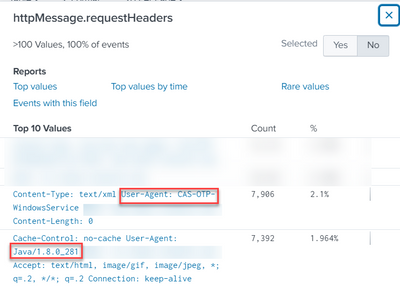
Please let me know if any other way I should ask my question. 🙂
- Mark as New
- Bookmark Message
- Subscribe to Message
- Mute Message
- Subscribe to RSS Feed
- Permalink
- Report Inappropriate Content
Given those examples, the rex command can do the job.
... | rex field=httpMessage.requestHeaders "User-Agent:\s(?<user_agent>\S+)"
...If this reply helps you, Karma would be appreciated.
- Mark as New
- Bookmark Message
- Subscribe to Message
- Mute Message
- Subscribe to RSS Feed
- Permalink
- Report Inappropriate Content
Thanks 😊

Join the Splunk Community Slack to learn, troubleshoot, and make connections with fellow Splunk practitioners in real time!
Join Splunk User Groups to connect and learn in-person by region or remotely by topic or industry.
Persistent Queue at TcpOut — One of Splunk's Most Practical Features
Build resilience for the agentic era: Join us at Splunk Go San Jose
Manage Edge Processor pipelines end to end with APIs
