
Join the Conversation
- Find Answers
- :
- Using Splunk
- :
- Dashboards & Visualizations
- :
- Bar chart visualization
- Subscribe to RSS Feed
- Mark Topic as New
- Mark Topic as Read
- Float this Topic for Current User
- Bookmark Topic
- Subscribe to Topic
- Mute Topic
- Printer Friendly Page
- Mark as New
- Bookmark Message
- Subscribe to Message
- Mute Message
- Subscribe to RSS Feed
- Permalink
- Report Inappropriate Content

Hello,
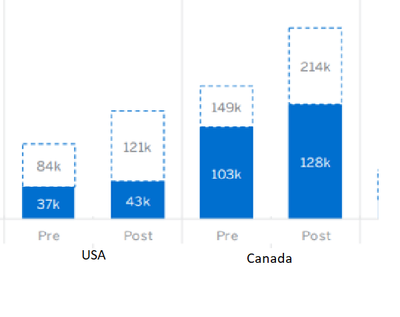
I have a below values in lookup and trying to achieve below bar chart view.
Country old_limit old_spend_limit new_limit new_spend_limit
USA 84000 37000 121000 43000
Canada 149000 103000 214000 128000
old_limit = PRE
new_limit = POST
- Mark as New
- Bookmark Message
- Subscribe to Message
- Mute Message
- Subscribe to RSS Feed
- Permalink
- Report Inappropriate Content


You can do it by creating a stacked bar and setting the limit to be the gap (limit-spend) and creating the rows needed for the 4 groups.
Here's an example, but I suspect there is a better way
| makeresults
| eval _raw="Country,old_limit,old_spend_limit,new_limit,new_spend_limit
USA,84000,37000,121000,43000
Canada,149000,103000,214000,128000"
| multikv forceheader=1
| table Country old_limit old_spend_limit new_limit new_spend_limit
| foreach *_spend_limit [ eval "<<MATCHSEG1>>_gap"='<<MATCHSEG1>>_limit'-<<FIELD>>, type=if("<<MATCHSEG1>>"="old", "Pre", "Post"), MV=mvappend(mvzip(mvzip('<<MATCHSEG1>>_gap', '<<FIELD>>', ";"), type, ";"), MV) ]
| fields Country MV
| mvexpand MV
| rex field=MV "(?<gap>[^\;]*);(?<spend>[^\;]*);(?<type>.*)"
| eval Country=Country." ".type
| fields Country gap spend
This just creates a gap;spend field for each type (pre/post) and then expands the pair for each country.
- Mark as New
- Bookmark Message
- Subscribe to Message
- Mute Message
- Subscribe to RSS Feed
- Permalink
- Report Inappropriate Content
@bowesmana Thank you !!!
I had modified the query and and achieved what I'm looking for.....
| foreach *_spend_limit
[ eval type=if(match("<<MATCHSEG1>>","old"), "Pre", "Post"), MV=mvappend(mvzip(mvzip('<<MATCHSEG1>>_limit', '<<FIELD>>', ";"), type, ";"), MV) ]
| fields market MV
| mvexpand MV
| rex field=MV "(?<limit>[^\;]*);(?<spend>[^\;]*);(?<type>.*)"
| eval market=market." ".type
| fields market limit spend
- Mark as New
- Bookmark Message
- Subscribe to Message
- Mute Message
- Subscribe to RSS Feed
- Permalink
- Report Inappropriate Content
You can do it by creating a stacked bar and setting the limit to be the gap (limit-spend) and creating the rows needed for the 4 groups.
Here's an example, but I suspect there is a better way
| makeresults
| eval _raw="Country,old_limit,old_spend_limit,new_limit,new_spend_limit
USA,84000,37000,121000,43000
Canada,149000,103000,214000,128000"
| multikv forceheader=1
| table Country old_limit old_spend_limit new_limit new_spend_limit
| foreach *_spend_limit [ eval "<<MATCHSEG1>>_gap"='<<MATCHSEG1>>_limit'-<<FIELD>>, type=if("<<MATCHSEG1>>"="old", "Pre", "Post"), MV=mvappend(mvzip(mvzip('<<MATCHSEG1>>_gap', '<<FIELD>>', ";"), type, ";"), MV) ]
| fields Country MV
| mvexpand MV
| rex field=MV "(?<gap>[^\;]*);(?<spend>[^\;]*);(?<type>.*)"
| eval Country=Country." ".type
| fields Country gap spend
This just creates a gap;spend field for each type (pre/post) and then expands the pair for each country.

Join the Splunk Community Slack to learn, troubleshoot, and make connections with fellow Splunk practitioners in real time!
Join Splunk User Groups to connect and learn in-person by region or remotely by topic or industry.
How to Break a Kubernetes Pod on Purpose and Let the AI Troubleshooting Agent Find ...
Splunk Add-on for Microsoft Windows 11.0.3: Parse Once, Search Faster
What's New in Splunk Enterprise Security 8.8 and Beyond
