
Join the Conversation
- Find Answers
- :
- Using Splunk
- :
- Dashboards & Visualizations
- :
- Re: BUG: Single-Value visualization Viz w/ Trellis...
- Subscribe to RSS Feed
- Mark Topic as New
- Mark Topic as Read
- Float this Topic for Current User
- Bookmark Topic
- Subscribe to Topic
- Mute Topic
- Printer Friendly Page
- Mark as New
- Bookmark Message
- Subscribe to Message
- Mute Message
- Subscribe to RSS Feed
- Permalink
- Report Inappropriate Content

Check out this run-anywhere example dashboard XML. You might have to adjust your browser's zoom but on my laptop, on all zooms, it is clipping both the label of the trellis and the value. How can I fix this?
<dashboard>
  <label>Trellis Scaling Example</label>
  <row>
    <panel>
      <single>
        <search>
          <query>| makeresults
| eval _raw="aShortName  bThisIsMediumName  cThis_Name_Is_Somewhat_Long   dThis_Is_An_Absolutely_Absurdly_Long_Stinking_Name
24D 15H 0M  16D 4H 5M          13D 17H 45M                   0D 0H 0M"
| multikv forceheader=1
| fields - _time linecount _raw
| eval foo="bar"
| untable foo asset count
| xyseries foo asset count
| fields - foo</query>
          <earliest>-24h</earliest>
          <latest>now</latest>
        </search>
        <option name="trellis.enabled">1</option>
      </single>
    </panel>
  </row>
</dashboard>
- Mark as New
- Bookmark Message
- Subscribe to Message
- Mute Message
- Subscribe to RSS Feed
- Permalink
- Report Inappropriate Content

@Noah_Woodcock @woodcock , I had answered something similar, obviously the CSS override is based on your requirement so it would have to be adjusted as per actual. https://answers.splunk.com/answers/813362/adjust-trellis-font-size-results.html#answer-812652
I have added Text Box in your code example to play around with the required CSS override for Widget width that you can finally use in your CSS:
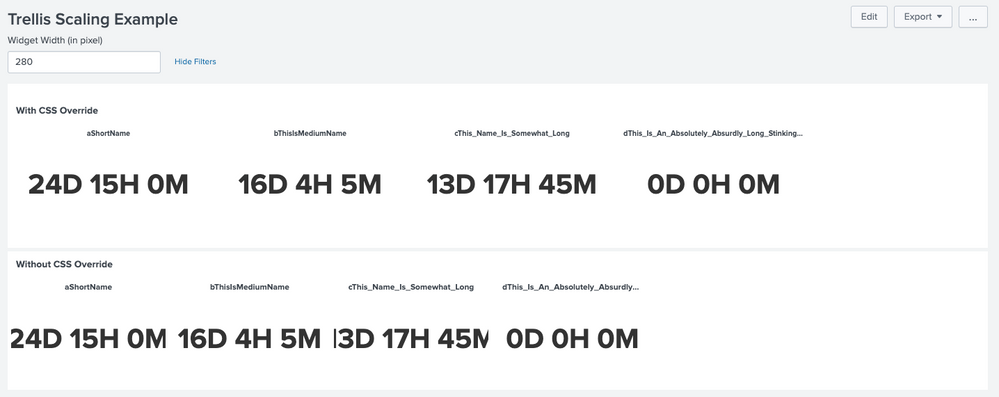
Following is a run anywhere Simple XML example with CSS override:
<form>
  <label>Trellis Scaling Example</label>
  <fieldset submitButton="false">
    <input type="text" token="tokWidth" searchWhenChanged="true">
      <label>Widget Width (in pixel)</label>
      <default>250</default>
    </input>
  </fieldset>
  <row>
    <panel>
      <html>
         <style>
           #trellis_single div.viz-facet{
             width: $tokWidth$px !important;
           }
           #trellis_single .viz-panel.viz-facet-size-medium .facet-label{
             font-size:11px !important;
             font-weight: bold !important;
           }
         </style>
      </html>
      <single id="trellis_single">
        <title>With CSS Override</title>
        <search>
          <query>| makeresults
 | eval _raw="aShortName  bThisIsMediumName  cThis_Name_Is_Somewhat_Long   dThis_Is_An_Absolutely_Absurdly_Long_Stinking_Name
 24D 15H 0M  16D 4H 5M          13D 17H 45M                   0D 0H 0M"
 | multikv forceheader=1
 | fields - _time linecount _raw
 | eval foo="bar"
 | untable foo asset count
 | xyseries foo asset count
 | fields - foo</query>
          <earliest>-24h</earliest>
          <latest>now</latest>
        </search>
        <option name="height">179</option>
        <option name="rangeColors">["0x53a051","0x0877a6","0xf8be34","0xf1813f","0xdc4e41"]</option>
        <option name="trellis.enabled">1</option>
        <option name="trellis.size">medium</option>
      </single>
    </panel>
  </row>
  <row>
    <panel>
      <single>
        <title>Without CSS Override</title>
        <search>
          <query>| makeresults
 | eval _raw="aShortName  bThisIsMediumName  cThis_Name_Is_Somewhat_Long   dThis_Is_An_Absolutely_Absurdly_Long_Stinking_Name
 24D 15H 0M  16D 4H 5M          13D 17H 45M                   0D 0H 0M"
 | multikv forceheader=1
 | fields - _time linecount _raw
 | eval foo="bar"
 | untable foo asset count
 | xyseries foo asset count
 | fields - foo</query>
          <earliest>-24h</earliest>
          <latest>now</latest>
        </search>
        <option name="height">162</option>
        <option name="rangeColors">["0x53a051","0x0877a6","0xf8be34","0xf1813f","0xdc4e41"]</option>
        <option name="trellis.enabled">1</option>
        <option name="trellis.size">medium</option>
      </single>
    </panel>
  </row>
</form>
| makeresults | eval message= "Happy Splunking!!!"
- Mark as New
- Bookmark Message
- Subscribe to Message
- Mute Message
- Subscribe to RSS Feed
- Permalink
- Report Inappropriate Content


@Noah_Woodcock @woodcock just saw this in 8.0.5 Fixed Issues:
| 2020-05-26 | SPL-189778, SPL-186300 | Single-Value visualization Viz w/ Trellis clipping text |
- Mark as New
- Bookmark Message
- Subscribe to Message
- Mute Message
- Subscribe to RSS Feed
- Permalink
- Report Inappropriate Content
@Noah_Woodcock @woodcock , I had answered something similar, obviously the CSS override is based on your requirement so it would have to be adjusted as per actual. https://answers.splunk.com/answers/813362/adjust-trellis-font-size-results.html#answer-812652
I have added Text Box in your code example to play around with the required CSS override for Widget width that you can finally use in your CSS:
Following is a run anywhere Simple XML example with CSS override:
<form>
  <label>Trellis Scaling Example</label>
  <fieldset submitButton="false">
    <input type="text" token="tokWidth" searchWhenChanged="true">
      <label>Widget Width (in pixel)</label>
      <default>250</default>
    </input>
  </fieldset>
  <row>
    <panel>
      <html>
         <style>
           #trellis_single div.viz-facet{
             width: $tokWidth$px !important;
           }
           #trellis_single .viz-panel.viz-facet-size-medium .facet-label{
             font-size:11px !important;
             font-weight: bold !important;
           }
         </style>
      </html>
      <single id="trellis_single">
        <title>With CSS Override</title>
        <search>
          <query>| makeresults
 | eval _raw="aShortName  bThisIsMediumName  cThis_Name_Is_Somewhat_Long   dThis_Is_An_Absolutely_Absurdly_Long_Stinking_Name
 24D 15H 0M  16D 4H 5M          13D 17H 45M                   0D 0H 0M"
 | multikv forceheader=1
 | fields - _time linecount _raw
 | eval foo="bar"
 | untable foo asset count
 | xyseries foo asset count
 | fields - foo</query>
          <earliest>-24h</earliest>
          <latest>now</latest>
        </search>
        <option name="height">179</option>
        <option name="rangeColors">["0x53a051","0x0877a6","0xf8be34","0xf1813f","0xdc4e41"]</option>
        <option name="trellis.enabled">1</option>
        <option name="trellis.size">medium</option>
      </single>
    </panel>
  </row>
  <row>
    <panel>
      <single>
        <title>Without CSS Override</title>
        <search>
          <query>| makeresults
 | eval _raw="aShortName  bThisIsMediumName  cThis_Name_Is_Somewhat_Long   dThis_Is_An_Absolutely_Absurdly_Long_Stinking_Name
 24D 15H 0M  16D 4H 5M          13D 17H 45M                   0D 0H 0M"
 | multikv forceheader=1
 | fields - _time linecount _raw
 | eval foo="bar"
 | untable foo asset count
 | xyseries foo asset count
 | fields - foo</query>
          <earliest>-24h</earliest>
          <latest>now</latest>
        </search>
        <option name="height">162</option>
        <option name="rangeColors">["0x53a051","0x0877a6","0xf8be34","0xf1813f","0xdc4e41"]</option>
        <option name="trellis.enabled">1</option>
        <option name="trellis.size">medium</option>
      </single>
    </panel>
  </row>
</form>
| makeresults | eval message= "Happy Splunking!!!"
- Mark as New
- Bookmark Message
- Subscribe to Message
- Mute Message
- Subscribe to RSS Feed
- Permalink
- Report Inappropriate Content

As usual, you are my hero.
- Mark as New
- Bookmark Message
- Subscribe to Message
- Mute Message
- Subscribe to RSS Feed
- Permalink
- Report Inappropriate Content
Thanks, this really means a lot coming from you.
I am just one of the several Splunk interns from the virtual classroom you have conducted for such a long time with your answers 🙂
| makeresults | eval message= "Happy Splunking!!!"
- Mark as New
- Bookmark Message
- Subscribe to Message
- Mute Message
- Subscribe to RSS Feed
- Permalink
- Report Inappropriate Content
@niketnilay, we could use your expertise here (thank you in advance)!



Join the Splunk Community Slack to learn, troubleshoot, and make connections with fellow Splunk practitioners in real time!
Join Splunk User Groups to connect and learn in-person by region or remotely by topic or industry.
Event Series: Level up your SOC: Advancing with Splunk Enterprise Security
Announcing Modern Navigation: A New Era of Splunk User Experience
SOC4Kafka - New Kafka Connector Powered by OpenTelemetry
