
Join the Conversation
- Find Answers
- :
- Apps & Add-ons
- :
- All Apps and Add-ons
- :
- All Apps and Add-ons
- :
- Re: Why is the Splunk App for Unix and Linux not e...
- Subscribe to RSS Feed
- Mark Topic as New
- Mark Topic as Read
- Float this Topic for Current User
- Bookmark Topic
- Subscribe to Topic
- Mute Topic
- Printer Friendly Page
- Mark as New
- Bookmark Message
- Subscribe to Message
- Mute Message
- Subscribe to RSS Feed
- Permalink
- Report Inappropriate Content
Why is the Splunk App for Unix and Linux not extracting fields?

Hello
am doing POC on host metrics using Splunk App for Unix and Linux
i have installed *Splunk Add-on for Unix and Linux on my 5- forwarders and indexer* and enabled scripted inputs.
i have installed *Splunk App for Unix app on my search head*.
i can see events when i perform search . the problem it is not extracting fields.
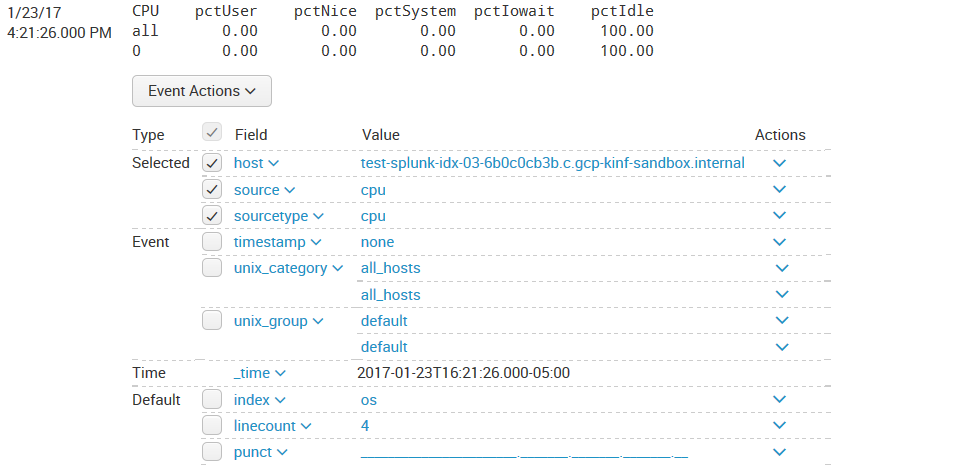
can any one please help me how can i extract the fields??
thanks in advance
- Mark as New
- Bookmark Message
- Subscribe to Message
- Mute Message
- Subscribe to RSS Feed
- Permalink
- Report Inappropriate Content

The main reason for this is that you are using search mode of Fast or Smart instead of Verbose. Look under the timepicker value on the very right and set it to Verbose!
- Mark as New
- Bookmark Message
- Subscribe to Message
- Mute Message
- Subscribe to RSS Feed
- Permalink
- Report Inappropriate Content

You might want to check the btool pulls you get from your various devices. You might have some conflicts with where you have installed the *nix apps.
http://docs.splunk.com/Documentation/Splunk/6.5.1/Admin/Wheretofindtheconfigurationfiles
In the link above you can read where your apps are in precidence order. If you wish, upload a debug btool pull for your inputs and outputs files and post them here for further help.
- Mark as New
- Bookmark Message
- Subscribe to Message
- Mute Message
- Subscribe to RSS Feed
- Permalink
- Report Inappropriate Content
thanks for your response.
you mentioned conflicts, can i know what conflicts i may come across??
btool pull for inputs that i have enabled for app and outputs for??
- Mark as New
- Bookmark Message
- Subscribe to Message
- Mute Message
- Subscribe to RSS Feed
- Permalink
- Report Inappropriate Content
Some of the conflicts you would like to look for is for example, in the inputs .conf btool pull. You may have some files living in the $SPLUNK_PATH/etc/system/local directory, if this is the case the local directory will take precedence over the apps and not allow your apps inputs in this case to take effect because of the configuration file precedence.
To see a detailed breakdown of the btool pulls something similar to below:
$SPLUNK_PATH/etc/bin/splunk btool inputs list --debug
This should show you the list of everywhere the inputs configuration files live that is built into the running Splunk config.



Join the Splunk Community Slack to learn, troubleshoot, and make connections with fellow Splunk practitioners in real time!
Join Splunk User Groups to connect and learn in-person by region or remotely by topic or industry.
SOC4Kafka - New Kafka Connector Powered by OpenTelemetry
Event Series: Level up your SOC: Advancing with Splunk Enterprise Security
Announcing Modern Navigation: A New Era of Splunk User Experience
