
Join the Conversation
- Find Answers
- :
- Apps & Add-ons
- :
- All Apps and Add-ons
- :
- All Apps and Add-ons
- :
- Re: Status Indicator - Custom Visualization: Why i...
- Subscribe to RSS Feed
- Mark Topic as New
- Mark Topic as Read
- Float this Topic for Current User
- Bookmark Topic
- Subscribe to Topic
- Mute Topic
- Printer Friendly Page
- Mark as New
- Bookmark Message
- Subscribe to Message
- Mute Message
- Subscribe to RSS Feed
- Permalink
- Report Inappropriate Content

I have the following search I am using to create some status indicator visualizations:
... | rangemap field=delta #ff0000=-1000-0 #008000=0-10000 default=#ff0000 | rename range as range_color | eval icon="check-circle" | table delta icon range_color
This works as expected if I use "Show Value and Icon":
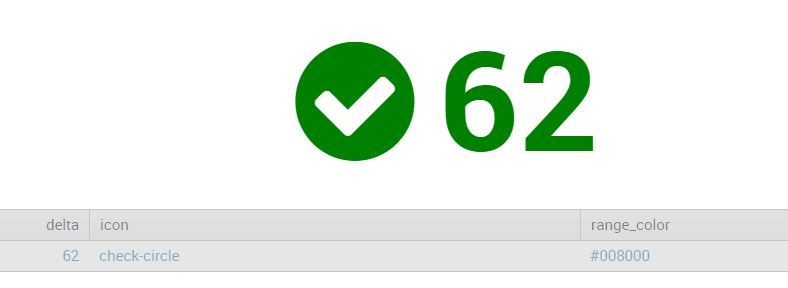
If I use "Show Icon Only", i get the following error:
Error rendering Status Indicator visualization: The specified icon does not exist. Check the font awesome website to find a valid icon. Examples: arrow-circle-left, bullseye, mobile
- Mark as New
- Bookmark Message
- Subscribe to Message
- Mute Message
- Subscribe to RSS Feed
- Permalink
- Report Inappropriate Content

try:
basesearch | table icon range_color delta
I found this too - the order of the fields is relevent when not using both the value and the icon, yet it still insists on providing all 3 fields.
- Mark as New
- Bookmark Message
- Subscribe to Message
- Mute Message
- Subscribe to RSS Feed
- Permalink
- Report Inappropriate Content


@david.rose - Did the answer provided by nickhillscpl help provide a working solution to your question? If yes, please don't forget to resolve this post by clicking "Accept". If no, please leave a comment with more feedback. Thanks!
- Mark as New
- Bookmark Message
- Subscribe to Message
- Mute Message
- Subscribe to RSS Feed
- Permalink
- Report Inappropriate Content
try:
basesearch | table icon range_color delta
I found this too - the order of the fields is relevent when not using both the value and the icon, yet it still insists on providing all 3 fields.
- Mark as New
- Bookmark Message
- Subscribe to Message
- Mute Message
- Subscribe to RSS Feed
- Permalink
- Report Inappropriate Content
Thanks nickhillscpl. "Order" does matter! In my case, I have to put the ragemap field to the middle. Never thought of that!
- Mark as New
- Bookmark Message
- Subscribe to Message
- Mute Message
- Subscribe to RSS Feed
- Permalink
- Report Inappropriate Content

So did this fix it for you? If so, please do click Accept to close the question and help others.
- Mark as New
- Bookmark Message
- Subscribe to Message
- Mute Message
- Subscribe to RSS Feed
- Permalink
- Report Inappropriate Content
I encounter the exact same problem. But if picked icon "Static icon", it worked. Not working when choosing "Field value". Anyone has any thoughts?



Join the Splunk Community Slack to learn, troubleshoot, and make connections with fellow Splunk practitioners in real time!
Join Splunk User Groups to connect and learn in-person by region or remotely by topic or industry.
SOC4Kafka - New Kafka Connector Powered by OpenTelemetry
Event Series: Level up your SOC: Advancing with Splunk Enterprise Security
Announcing Modern Navigation: A New Era of Splunk User Experience
