
Join the Conversation
- Find Answers
- :
- Apps & Add-ons
- :
- All Apps and Add-ons
- :
- All Apps and Add-ons
- :
- Re: Splunk Stream - Failed to detect Splunk_TA_str...
- Subscribe to RSS Feed
- Mark Topic as New
- Mark Topic as Read
- Float this Topic for Current User
- Bookmark Topic
- Subscribe to Topic
- Mute Topic
- Printer Friendly Page
- Mark as New
- Bookmark Message
- Subscribe to Message
- Mute Message
- Subscribe to RSS Feed
- Permalink
- Report Inappropriate Content
Splunk Stream - Failed to detect Splunk_TA_stream status

Hello,
I am attempting to install the Splunk Stream but am running into issues after installing the necessary packages. I am installing the Stream App on a standalone Splunk instance on a VM and have tried on Ubuntu 22.04, Windows 10, Windows 2019 Server both on-premise and in AWS/Azure and am running to the exact same issue.
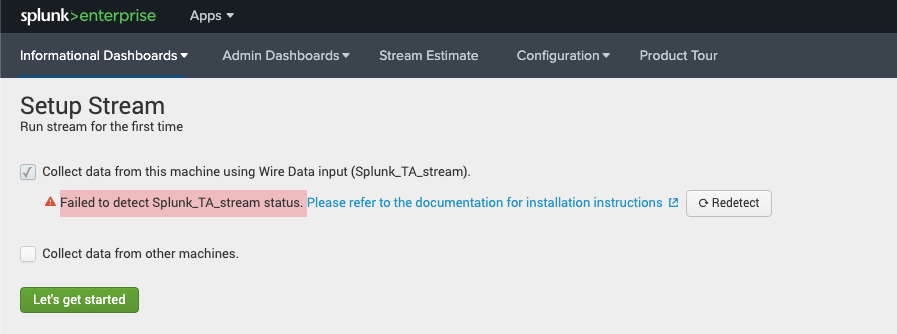
After installing the Splunk App for Stream, Wire Data add-on, and Stream Forwarder add-on as instructed on the link below, when I check the 'Collect data from this machine using Wire Data input (Splunk_TA_stream)', I get the following error: Failed to detect Splunk_TA_stream status.
Pressing 'Redetect' does not help and running the permissions.sh script does not change anything. The Splunk instance itself is a fresh install (no additional configurations) and no other Apps besides Stream and its required add-ons have been installed.
Can someone please hep provide an explanation to this error code I am getting and why it is happened, regardless of which OS I am using? Is there additional steps I must complete? Any guidance is appreciated.
The workflow I have done is as follows:
1. deploy VM (on-prem or cloud, I have used both Ubuntu 22.07 and Windows)
2. install Splunk Enterprise on new VM
3. install Splunk App for Stream, Wire Data add-on, and Stream Forwarder
4. Restart the Splunk instance
- Mark as New
- Bookmark Message
- Subscribe to Message
- Mute Message
- Subscribe to RSS Feed
- Permalink
- Report Inappropriate Content
Was this ever solved? I am currently facing the same issue. I have already spent an afternoon trying to fix the permissions but nothing seems to work.
- Mark as New
- Bookmark Message
- Subscribe to Message
- Mute Message
- Subscribe to RSS Feed
- Permalink
- Report Inappropriate Content
I'll just reply to myself here:
The issue was that the hostname for some reason doesn't resolve properly in the inputs.conf file. It is supposed to automatically insert the actual hostname, but it doesn't.
I created the file "$SPLUNK_HOME/etc/system/default/inputs.conf" (as it didn't exist yet) and entered the following lines (replace [HOSTNAME] with the name of your host system running Splunk):
[default]
host = [HOSTNAME]
This should override the default configuration in "$SPLUNK_HOME/etc/system/local/inputs.conf".
Afterwards, everything worked correctly
- Mark as New
- Bookmark Message
- Subscribe to Message
- Mute Message
- Subscribe to RSS Feed
- Permalink
- Report Inappropriate Content
This one actually fixed the issue been working on this over a day without a solution

Join the Splunk Community Slack to learn, troubleshoot, and make connections with fellow Splunk practitioners in real time!
Join Splunk User Groups to connect and learn in-person by region or remotely by topic or industry.
Why Splunk Customers Should Attend Cisco Live 2026 Las Vegas
What Is the Name of the USB Key Inserted by Bob Smith? (BOTS Hint, Not the Answer)
Automating Threat Operations and Threat Hunting with Recorded Future
