
Join the Conversation
- Find Answers
- :
- Apps & Add-ons
- :
- All Apps and Add-ons
- :
- All Apps and Add-ons
- :
- Re: Splunk Stream - Failed to detect Splunk_TA_str...
- Subscribe to RSS Feed
- Mark Topic as New
- Mark Topic as Read
- Float this Topic for Current User
- Bookmark Topic
- Subscribe to Topic
- Mute Topic
- Printer Friendly Page
- Mark as New
- Bookmark Message
- Subscribe to Message
- Mute Message
- Subscribe to RSS Feed
- Permalink
- Report Inappropriate Content
Splunk Stream - Failed to detect Splunk_TA_stream status

Hello,
I am attempting to install the Splunk Stream but am running into issues after installing the necessary packages. I am installing the Stream App on a standalone Splunk instance on a VM and have tried on Ubuntu 22.04, Windows 10, Windows 2019 Server both on-premise and in AWS/Azure and am running to the exact same issue.
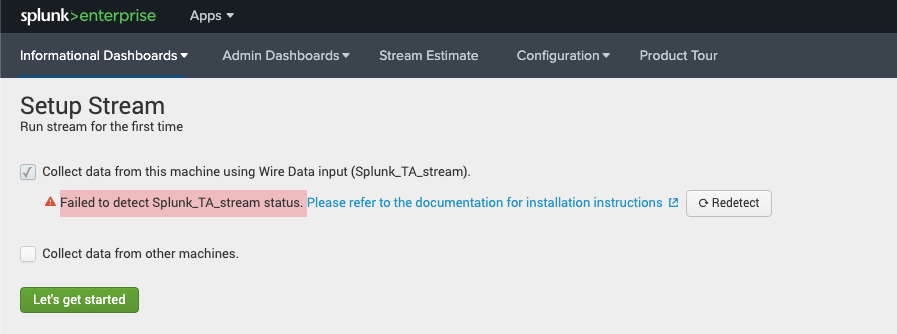
After installing the Splunk App for Stream, Wire Data add-on, and Stream Forwarder add-on as instructed on the link below, when I check the 'Collect data from this machine using Wire Data input (Splunk_TA_stream)', I get the following error: Failed to detect Splunk_TA_stream status.
Pressing 'Redetect' does not help and running the permissions.sh script does not change anything. The Splunk instance itself is a fresh install (no additional configurations) and no other Apps besides Stream and its required add-ons have been installed.
Can someone please hep provide an explanation to this error code I am getting and why it is happened, regardless of which OS I am using? Is there additional steps I must complete? Any guidance is appreciated.
The workflow I have done is as follows:
1. deploy VM (on-prem or cloud, I have used both Ubuntu 22.07 and Windows)
2. install Splunk Enterprise on new VM
3. install Splunk App for Stream, Wire Data add-on, and Stream Forwarder
4. Restart the Splunk instance
- Mark as New
- Bookmark Message
- Subscribe to Message
- Mute Message
- Subscribe to RSS Feed
- Permalink
- Report Inappropriate Content
Was this ever solved? I am currently facing the same issue. I have already spent an afternoon trying to fix the permissions but nothing seems to work.
- Mark as New
- Bookmark Message
- Subscribe to Message
- Mute Message
- Subscribe to RSS Feed
- Permalink
- Report Inappropriate Content
I'll just reply to myself here:
The issue was that the hostname for some reason doesn't resolve properly in the inputs.conf file. It is supposed to automatically insert the actual hostname, but it doesn't.
I created the file "$SPLUNK_HOME/etc/system/default/inputs.conf" (as it didn't exist yet) and entered the following lines (replace [HOSTNAME] with the name of your host system running Splunk):
[default]
host = [HOSTNAME]
This should override the default configuration in "$SPLUNK_HOME/etc/system/local/inputs.conf".
Afterwards, everything worked correctly
- Mark as New
- Bookmark Message
- Subscribe to Message
- Mute Message
- Subscribe to RSS Feed
- Permalink
- Report Inappropriate Content
This one actually fixed the issue been working on this over a day without a solution

Join the Splunk Community Slack to learn, troubleshoot, and make connections with fellow Splunk practitioners in real time!
Join Splunk User Groups to connect and learn in-person by region or remotely by topic or industry.
May 2026 Splunk Expert Sessions: Security & Observability
Network to App: Observability Unlocked [May & June Series]
SPL2 Deep Dives, AppDynamics Integrations, SAML Made Simple and Much More on Splunk ...
