
Join the Conversation
- Find Answers
- :
- Apps & Add-ons
- :
- All Apps and Add-ons
- :
- All Apps and Add-ons
- :
- Splunk App for Windows Infrastructure setup error
- Subscribe to RSS Feed
- Mark Topic as New
- Mark Topic as Read
- Float this Topic for Current User
- Bookmark Topic
- Subscribe to Topic
- Mute Topic
- Printer Friendly Page
- Mark as New
- Bookmark Message
- Subscribe to Message
- Mute Message
- Subscribe to RSS Feed
- Permalink
- Report Inappropriate Content

Hello,
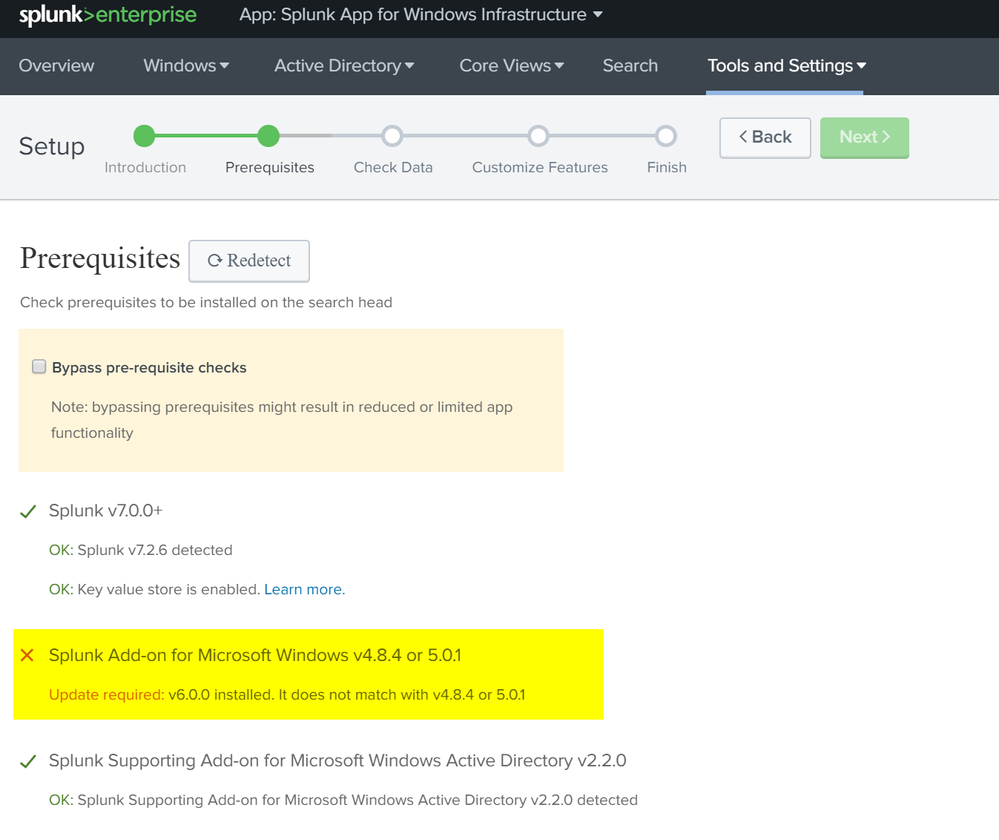
I am in the process of setting up App for Windows Infrastructure and i get the the following error. I am not sure how to downgrade the version.
Thanks,
Derek
- Mark as New
- Bookmark Message
- Subscribe to Message
- Mute Message
- Subscribe to RSS Feed
- Permalink
- Report Inappropriate Content

Do you want to roll the entire Windows Infrastructure App or just fix and move forward?
Assuming you have standalone systems.
1. To fix and move forward, download the 5.0.1 version of Windows TA/addon. Go to https://splunkbase.splunk.com/app/742/ and choose the 5.0.1 version. Download this and unzip and copy/move it to /opt/splunk/etc/apps of your installation (if standalone). Restart and redetect
2. If you want to downgrade or remove the "entire Windows Infrastructure App" , you can delete it/disable via the UI or just delete the app from backend and restart Splunk. Find the compatible apps/addon before you update next time.
- Mark as New
- Bookmark Message
- Subscribe to Message
- Mute Message
- Subscribe to RSS Feed
- Permalink
- Report Inappropriate Content
Do you want to roll the entire Windows Infrastructure App or just fix and move forward?
Assuming you have standalone systems.
1. To fix and move forward, download the 5.0.1 version of Windows TA/addon. Go to https://splunkbase.splunk.com/app/742/ and choose the 5.0.1 version. Download this and unzip and copy/move it to /opt/splunk/etc/apps of your installation (if standalone). Restart and redetect
2. If you want to downgrade or remove the "entire Windows Infrastructure App" , you can delete it/disable via the UI or just delete the app from backend and restart Splunk. Find the compatible apps/addon before you update next time.
- Mark as New
- Bookmark Message
- Subscribe to Message
- Mute Message
- Subscribe to RSS Feed
- Permalink
- Report Inappropriate Content
I want to set the entire thing up. I removed the directory and loaded 5.0.1 and I was able to continue.



Join the Splunk Community Slack to learn, troubleshoot, and make connections with fellow Splunk practitioners in real time!
Join Splunk User Groups to connect and learn in-person by region or remotely by topic or industry.
Think Like an Architect: Introducing the Splunk Certified Cybersecurity Defense ...
Best Practices: Splunk auto adjust pipeline queue
Announcing Modern Navigation: A New Era of Splunk User Experience
