
Join the Conversation
- Find Answers
- :
- Apps & Add-ons
- :
- All Apps and Add-ons
- :
- All Apps and Add-ons
- :
- Pick colours for certain value
- Subscribe to RSS Feed
- Mark Topic as New
- Mark Topic as Read
- Float this Topic for Current User
- Bookmark Topic
- Subscribe to Topic
- Mute Topic
- Printer Friendly Page
- Mark as New
- Bookmark Message
- Subscribe to Message
- Mute Message
- Subscribe to RSS Feed
- Permalink
- Report Inappropriate Content

I use the timeline app to visualize the state of process running over time.
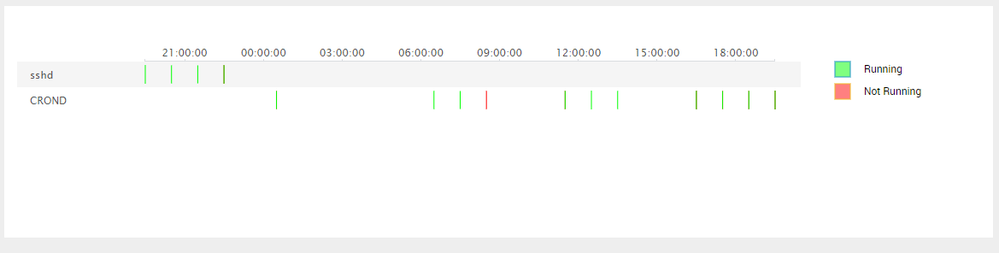
If the process is not running I want to show a red bar and if it is running I want to use a green bar.
The query works fine, look at attched screenshot.
The data is also fine...other screenshot.


How can I make sure that Running is green and Not Running is red?
- Mark as New
- Bookmark Message
- Subscribe to Message
- Mute Message
- Subscribe to RSS Feed
- Permalink
- Report Inappropriate Content

Custom Visualizations do not allow defining sequential category colors through UI or Simple XML. You would need to override the same through colors CSS. .ccat-<fieldName> is the class name created for SVG ( for example ccat-Running). Field Name containing spaces will result in two CSS class names (for example .ccat-Not.running). I have created a simple CSS however, it would be better you customize CSS selector as per your needs and do not override any of other default CSS selector.
  <html>
    <style>
      .ccat-Not.running{
        fill: rgb(255,0,0);
        stroke:  rgb(255,0,0);
      }
      .ccat-Running{
        fill: rgb(0,255,0);
        stroke: rgb(0,255,0);
      }
    </style>
  </html>
| makeresults | eval message= "Happy Splunking!!!"
- Mark as New
- Bookmark Message
- Subscribe to Message
- Mute Message
- Subscribe to RSS Feed
- Permalink
- Report Inappropriate Content
Custom Visualizations do not allow defining sequential category colors through UI or Simple XML. You would need to override the same through colors CSS. .ccat-<fieldName> is the class name created for SVG ( for example ccat-Running). Field Name containing spaces will result in two CSS class names (for example .ccat-Not.running). I have created a simple CSS however, it would be better you customize CSS selector as per your needs and do not override any of other default CSS selector.
  <html>
    <style>
      .ccat-Not.running{
        fill: rgb(255,0,0);
        stroke:  rgb(255,0,0);
      }
      .ccat-Running{
        fill: rgb(0,255,0);
        stroke: rgb(0,255,0);
      }
    </style>
  </html>
| makeresults | eval message= "Happy Splunking!!!"
- Mark as New
- Bookmark Message
- Subscribe to Message
- Mute Message
- Subscribe to RSS Feed
- Permalink
- Report Inappropriate Content

I'am having the same issue. But the fill option is ignored. The stroke color works perfect but not the fill.
It still takes the element.style fill color. Any Idea ?
- Mark as New
- Bookmark Message
- Subscribe to Message
- Mute Message
- Subscribe to RSS Feed
- Permalink
- Report Inappropriate Content
okay I solved the problem by using the following code, unser if this what you should to in css. But it worked for me.
   <html>
     <style>
       .ccat-Not.running{
         fill: rgb(255,0,0) !important;
         stroke:  rgb(255,0,0);
       }
       .ccat-Running{
         fill: rgb(0,255,0) !important;
         stroke: rgb(0,255,0);
       }
     </style>
   </html>
- Mark as New
- Bookmark Message
- Subscribe to Message
- Mute Message
- Subscribe to RSS Feed
- Permalink
- Report Inappropriate Content
Hi Christian. De fill is overwritten by another CSS. Try to use fill: rgb(255,0,0) !important;
Add !important.
- Mark as New
- Bookmark Message
- Subscribe to Message
- Mute Message
- Subscribe to RSS Feed
- Permalink
- Report Inappropriate Content
thank you. my post bellow was submitted at the same time. This worked for me.




Join the Splunk Community Slack to learn, troubleshoot, and make connections with fellow Splunk practitioners in real time!
Join Splunk User Groups to connect and learn in-person by region or remotely by topic or industry.
SOC4Kafka - New Kafka Connector Powered by OpenTelemetry
Event Series: Level up your SOC: Advancing with Splunk Enterprise Security
Announcing Modern Navigation: A New Era of Splunk User Experience
