
Join the Conversation
- Find Answers
- :
- Apps & Add-ons
- :
- All Apps and Add-ons
- :
- All Apps and Add-ons
- :
- Re: [Noob :P] Very basic. How do I install this fi...
- Subscribe to RSS Feed
- Mark Topic as New
- Mark Topic as Read
- Float this Topic for Current User
- Bookmark Topic
- Subscribe to Topic
- Mute Topic
- Printer Friendly Page
- Mark as New
- Bookmark Message
- Subscribe to Message
- Mute Message
- Subscribe to RSS Feed
- Permalink
- Report Inappropriate Content

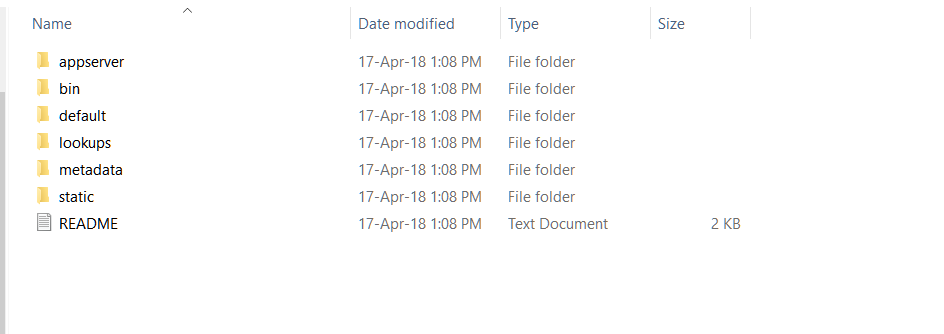
I've downloaded the app, which is .tgz file. How do I run the app on windows? Isn't .tgz a compressed folder format? I tried extracting it but that just gives me the following folders:

- Mark as New
- Bookmark Message
- Subscribe to Message
- Mute Message
- Subscribe to RSS Feed
- Permalink
- Report Inappropriate Content

In Splunk Web, click the "App" drop-down menu at the top left, select Manage Apps, click Install app from file, click Choose file, select the .TGZ file, then click the Upload button.
- Mark as New
- Bookmark Message
- Subscribe to Message
- Mute Message
- Subscribe to RSS Feed
- Permalink
- Report Inappropriate Content
In Splunk Web, click the "App" drop-down menu at the top left, select Manage Apps, click Install app from file, click Choose file, select the .TGZ file, then click the Upload button.
- Mark as New
- Bookmark Message
- Subscribe to Message
- Mute Message
- Subscribe to RSS Feed
- Permalink
- Report Inappropriate Content

There are various ways to install that, also depending on the architecture of your splunk environment (single instance, distributed...).
This part of the documentation may be a good starting point: http://docs.splunk.com/Documentation/Splunk/latest/Admin/Deployappsandadd-ons
If you want to get more concrete input here, it would greatly help if you could provide some info on your splunk architecture. Is this just a simple single instance splunk box, or part of a larger distributed setup?
For a simple single instance environment, you can just drop the extracted .tgz into etc/apps folder in your splunk install. Or install the open the tgz through the "install app from file" option in the "manage apps" page in Splunk Web GUI.

Join the Splunk Community Slack to learn, troubleshoot, and make connections with fellow Splunk practitioners in real time!
Join Splunk User Groups to connect and learn in-person by region or remotely by topic or industry.
May 2026 Splunk Expert Sessions: Security & Observability
Network to App: Observability Unlocked [May & June Series]
SPL2 Deep Dives, AppDynamics Integrations, SAML Made Simple and Much More on Splunk ...
