
Join the Conversation
- Find Answers
- :
- Apps & Add-ons
- :
- All Apps and Add-ons
- :
- All Apps and Add-ons
- :
- Re: No Results Found in Splunk for Unix
- Subscribe to RSS Feed
- Mark Topic as New
- Mark Topic as Read
- Float this Topic for Current User
- Bookmark Topic
- Subscribe to Topic
- Mute Topic
- Printer Friendly Page
- Mark as New
- Bookmark Message
- Subscribe to Message
- Mute Message
- Subscribe to RSS Feed
- Permalink
- Report Inappropriate Content

I've just started messing around with Splunk to see if it would be good to use in our environment. I installed the *Nix App on my test machine, which is running Ubuntu 10.04 LTS. After accessing the app I notice that some of the "fields" aren't populating. For example, the CPU Overview has 4 boxes: consumption by command, consumption by user, cpu load by host, 5 most popular executables. The CPU Load By Host box has a graph, so it's getting data. The other 2 show the message: No results found. Inspect ...". I click the Inspect link but I'm not entirely sure what I'm looking for. Here's what I see
(bolded text is what is highlighted):
search index="os" sourcetype="ps" host="*" | multikv fields pctCPU, COMMAND | stats sum(pctCPU) as pctCPU by _time,COMMAND | timechart avg(pctCPU) by COMMAND
This search is an instance of the saved search: CPU Usage by Command (UNIX - CPU).
The following messages were returned by the search subsystem:
DEBUG: base lispy: [ AND host::* index::os sourcetype::ps ]
DEBUG: search context: user="admin", app="unix", bs-pathname="/home/myusername/splunk/etc"
I read the contents of http://docs.splunk.com/Documentation/Splunk/latest/Admin/Cantfindthedatayourelookingfor and notice it says that the free version doesn't allow you to use "scheduled saved searches or summary indexing". Is that what's happening here?
Edited to add: using Splunk version 4.3 and Splunk for *Nix version 4.5
- Mark as New
- Bookmark Message
- Subscribe to Message
- Mute Message
- Subscribe to RSS Feed
- Permalink
- Report Inappropriate Content

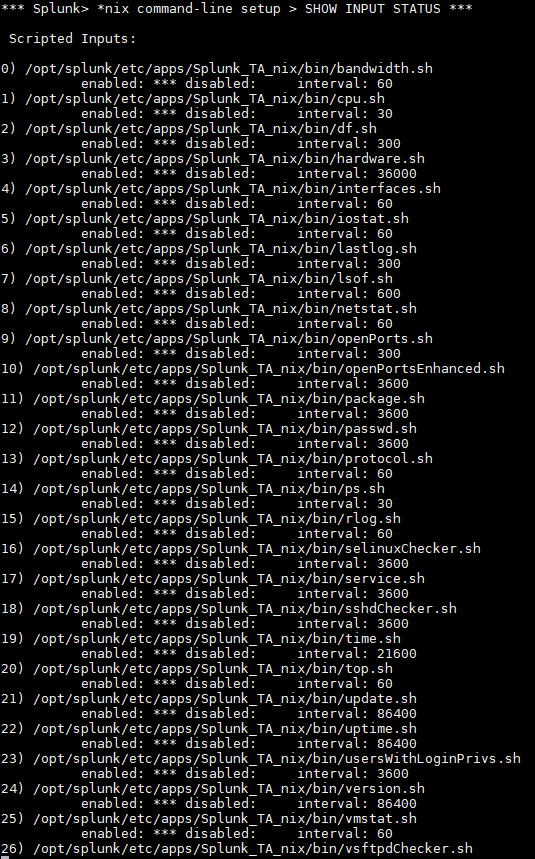
Splunk for Unix and Linux uses scripted inputs to populate its dashboards - in the case above, unix/bin/ps.sh. Thus, if you have not enabled the proper scripted inputs, either in Splunk Mangager of via the app's setup page, the dashboards will not be populated with data.
- Mark as New
- Bookmark Message
- Subscribe to Message
- Mute Message
- Subscribe to RSS Feed
- Permalink
- Report Inappropriate Content

- Mark as New
- Bookmark Message
- Subscribe to Message
- Mute Message
- Subscribe to RSS Feed
- Permalink
- Report Inappropriate Content


@DamienLeveque, you've added on to a thread that is six years old and has an accepted answer. Please post a new question for help with your problem.
If this reply helps you, Karma would be appreciated.
- Mark as New
- Bookmark Message
- Subscribe to Message
- Mute Message
- Subscribe to RSS Feed
- Permalink
- Report Inappropriate Content
Splunk for Unix and Linux uses scripted inputs to populate its dashboards - in the case above, unix/bin/ps.sh. Thus, if you have not enabled the proper scripted inputs, either in Splunk Mangager of via the app's setup page, the dashboards will not be populated with data.
- Mark as New
- Bookmark Message
- Subscribe to Message
- Mute Message
- Subscribe to RSS Feed
- Permalink
- Report Inappropriate Content
no problem, glad to help!
- Mark as New
- Bookmark Message
- Subscribe to Message
- Mute Message
- Subscribe to RSS Feed
- Permalink
- Report Inappropriate Content
Oh, thanks. I didn't get that some of the "scripted Input" options were dependent upon each other. For example, I had enabled cpu.sh but not ps.sh because I didn't think I needed it. I went in and enabled all the scripts to be on the safe side and the various fields/panes are now populated. Thank you for your help.

Join the Splunk Community Slack to learn, troubleshoot, and make connections with fellow Splunk practitioners in real time!
Join Splunk User Groups to connect and learn in-person by region or remotely by topic or industry.
Index This | What travels the world but is also stuck in place?
Discover New Use Cases: Unlock Greater Value from Your Existing Splunk Data
Continue Your Journey: Join Session 2 of the Data Management and Federation Bootcamp ...
