
Join the Conversation
- Find Answers
- :
- Apps & Add-ons
- :
- All Apps and Add-ons
- :
- All Apps and Add-ons
- :
- Re: [Indexer_Name] Streamed search execute failed ...
- Subscribe to RSS Feed
- Mark Topic as New
- Mark Topic as Read
- Float this Topic for Current User
- Bookmark Topic
- Subscribe to Topic
- Mute Topic
- Printer Friendly Page
- Mark as New
- Bookmark Message
- Subscribe to Message
- Mute Message
- Subscribe to RSS Feed
- Permalink
- Report Inappropriate Content

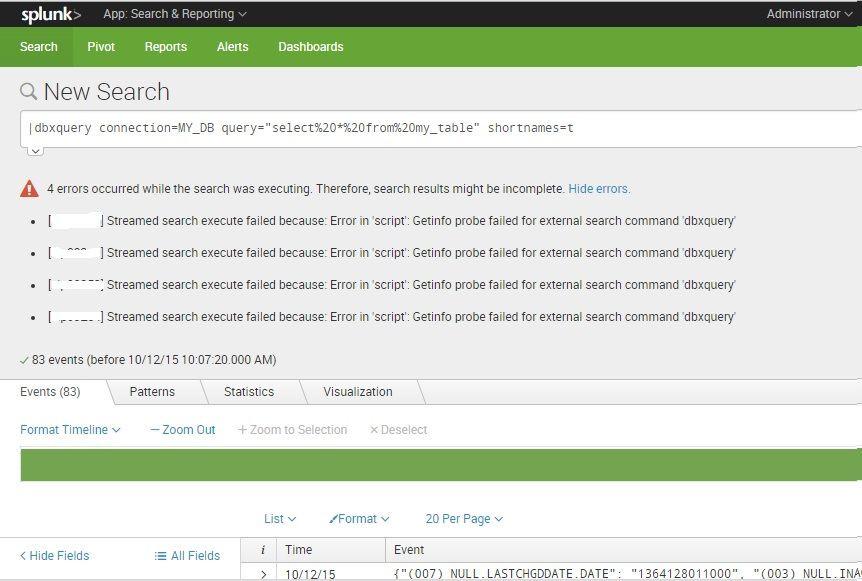
I have SPLUNK 6.3 version and have 4 indexers in the cluster. I installed SPLUNK DB Connect v2 app on the standalone dev SH.
I added a DB connection in the app, which was successfully tested (showed schema names in the preview). Then, I gave read permission to "All Apps" for the SPLUNK DB Connect 2 app (using Manage Apps), the Identity (in DBconnect 2 app), and the DB Connection (in DBconnect 2 app).
However, when I run an adhoc search query in the Search app, I get 4 errors, one for my 4 indexers each indexer.
I am wondering, why the Search app is looking in my indexers? After all, it is an adhoc db query.
P.S. The Splunk DB Connect 2 app is only installed in my standalone dev SH, not on the Indexers.
Please help!
Thanks
Ishaan

- Mark as New
- Bookmark Message
- Subscribe to Message
- Mute Message
- Subscribe to RSS Feed
- Permalink
- Report Inappropriate Content


per todd_miller, this is a newly introduced bug -- please open a support ticket so we can be sure to update you on the fix.
- Mark as New
- Bookmark Message
- Subscribe to Message
- Mute Message
- Subscribe to RSS Feed
- Permalink
- Report Inappropriate Content
per todd_miller, this is a newly introduced bug -- please open a support ticket so we can be sure to update you on the fix.
- Mark as New
- Bookmark Message
- Subscribe to Message
- Mute Message
- Subscribe to RSS Feed
- Permalink
- Report Inappropriate Content
Thanks a lot, @jcoates_splunk !
I updated to 2.0.6 and it is working fine now 🙂
Regards,
Ishaan
- Mark as New
- Bookmark Message
- Subscribe to Message
- Mute Message
- Subscribe to RSS Feed
- Permalink
- Report Inappropriate Content
DB Connect 2.0.6 released. http://docs.splunk.com/Documentation/DBX/latest/ReleaseNotes/Releasenotes
- Mark as New
- Bookmark Message
- Subscribe to Message
- Mute Message
- Subscribe to RSS Feed
- Permalink
- Report Inappropriate Content
I think a few people are getting this error (myself included) but just for due-diligence, please check your 'commands.conf' file in the DBXv2 "default" directory and make sure that local is set to true. I don't think it matters but it's still worth validating.
- Mark as New
- Bookmark Message
- Subscribe to Message
- Mute Message
- Subscribe to RSS Feed
- Permalink
- Report Inappropriate Content
Not working; (It is set to true already).
$ pwd
SPLUNK_HOME/etc/apps/splunk_app_db_connect/default
$ cat commands.conf
[dbxquery]
filename = dbxquery.py
supports_getinfo = true
supports_rawargs = true
passauth = true
run_in_preview = false
local = true
Any other suggestion, please!

Join the Splunk Community Slack to learn, troubleshoot, and make connections with fellow Splunk practitioners in real time!
Join Splunk User Groups to connect and learn in-person by region or remotely by topic or industry.
Index This | What travels the world but is also stuck in place?
Discover New Use Cases: Unlock Greater Value from Your Existing Splunk Data
Continue Your Journey: Join Session 2 of the Data Management and Federation Bootcamp ...
