
Join the Conversation
- Find Answers
- :
- Apps & Add-ons
- :
- All Apps and Add-ons
- :
- All Apps and Add-ons
- :
- Re: How to enable Javascript for Splunk App
- Subscribe to RSS Feed
- Mark Topic as New
- Mark Topic as Read
- Float this Topic for Current User
- Bookmark Topic
- Subscribe to Topic
- Mute Topic
- Printer Friendly Page
- Mark as New
- Bookmark Message
- Subscribe to Message
- Mute Message
- Subscribe to RSS Feed
- Permalink
- Report Inappropriate Content
How to enable Javascript for Splunk App

Hi Splunkers,
I am developing a custom app and I am using React to build an user interface for it. I have tested on my local and it works well. But when I copy all files to /opt/splunk/etc/apps/flowdock/default/data/ui/alerts this directory, I got error like below picture:

How can we solve this issue? Thanks in advance.
- Mark as New
- Bookmark Message
- Subscribe to Message
- Mute Message
- Subscribe to RSS Feed
- Permalink
- Report Inappropriate Content


Hi
There are quite many similar questions already e.g. below
The correct place to JS and CSS is
$SPLUNK_HOME/etc/apps/<appname>/appserver/static/
r. Ismo
- Mark as New
- Bookmark Message
- Subscribe to Message
- Mute Message
- Subscribe to RSS Feed
- Permalink
- Report Inappropriate Content
Hi @isoutamo Thank you for your answer. if inside html file we still have javascript code, do we need to move them as well? Cause I have been moved those files under appserver/static but it is still not working.
- Mark as New
- Bookmark Message
- Subscribe to Message
- Mute Message
- Subscribe to RSS Feed
- Permalink
- Report Inappropriate Content
Hi
are you using simpleXML or pure html files (converted from simpleXML)?
I think that the solution could be more simple if all JS files are in one place and you then include those to the dashboards.
r. Ismo
https://community.splunk.com/t5/Dashboards-Visualizations/How-do-you-add-JS-in-xml/td-p/373307
- Mark as New
- Bookmark Message
- Subscribe to Message
- Mute Message
- Subscribe to RSS Feed
- Permalink
- Report Inappropriate Content
Hi,
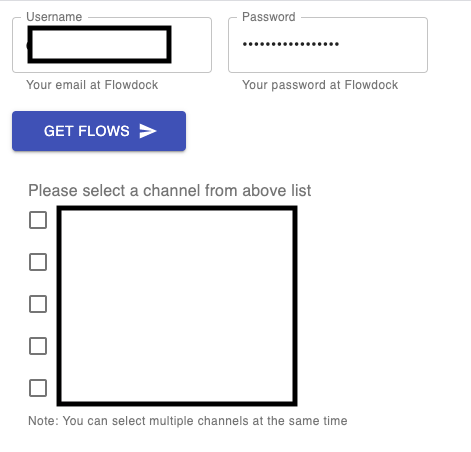
I am not using simpleXML. I just coded the GUI using React and then I build the project to html and js files. If you looked at the warning, it comes from the noscript tag inside my HTML file. It seems we need to enable javascript somewhere under splunk app?! Bytheway I only have a basic form like this:
- Mark as New
- Bookmark Message
- Subscribe to Message
- Mute Message
- Subscribe to RSS Feed
- Permalink
- Report Inappropriate Content
@isoutamo Sorry, I have to disable your question as a solution. Because I just realised we were missing understanding about my issue. Actually I want to run javascript inside the HTML file from this directory:
$SPLUNK_HOME/etc/apps/app_name/default/data/ui/alerts
Basically this file is the form, where we get inputs from users, when they are creating alerts. For the dashboards, sure we are able to run js and I am building a custom dashboard using React and it works.
- Mark as New
- Bookmark Message
- Subscribe to Message
- Mute Message
- Subscribe to RSS Feed
- Permalink
- Report Inappropriate Content
Here's the content of my HTML file:
<!doctype html>
<html lang="en">

<head>
    <meta charset="utf-8" />
    <link rel="icon" href="/favicon.ico" />
    <meta name="viewport" content="width=device-width,initial-scale=1" />
    <meta name="theme-color" content="#000000" />
    <meta name="description" content="Web site created using create-react-app" />
    <link rel="apple-touch-icon" href="/logo192.png" />
    <link rel="manifest" href="/manifest.json" />
    <title>Flowdock App</title>
</head>

<body><noscript>You need to enable JavaScript to run this app.</noscript>
    <div id="root"></div>
    <script src="/static/js/index.js"></script>
    <script src="/static/js/2.a630fc11.chunk.js"></script>
    <script src="/static/js/main.5040630f.chunk.js"></script>
</body>

</html>

Join the Splunk Community Slack to learn, troubleshoot, and make connections with fellow Splunk practitioners in real time!
Join Splunk User Groups to connect and learn in-person by region or remotely by topic or industry.
[Puzzles] Solve, Learn, Repeat: Classic British Rock Bands
New to the Community? Join Us for an Exclusive Post .conf26 Welcome Session (Plus a ...
Accelerate Splunk App Development with AI
