
Join the Conversation
- Find Answers
- :
- Using Splunk
- :
- Other Using Splunk
- :
- Alerting
- :
- Re: field extraction
- Subscribe to RSS Feed
- Mark Topic as New
- Mark Topic as Read
- Float this Topic for Current User
- Bookmark Topic
- Subscribe to Topic
- Mute Topic
- Printer Friendly Page
- Mark as New
- Bookmark Message
- Subscribe to Message
- Mute Message
- Subscribe to RSS Feed
- Permalink
- Report Inappropriate Content

I have the following log
!!! --- HUB ctxsdc1cvdi013.za.sbicdirectory.com:443 is unavailable --- !!! user='molefe_user' password='molefe' quota='user' host='002329bvpc123cw.branches.sbicdirectory.com' port='443' count='1' !!! --- HUB 002329bvpc123cw.branches.sbicdirectory.com:443 is unavailable --- !!! host='005558bvpc5ce4w.za.sbicdirectory.com' port='443' count='1' !!! --- HUB 005558bvpc5ce4w.za.sbicdirectory.com:443 is unavailable --- !!! host='41360jnbpbb758w.za.sbicdirectory.com' port='443' count='1' !!! --- HUB 41360jnbpbb758w.za.sbicdirectory.com:443 is unavailable --- !!! host='48149jnbpbb041w.za.sbicdirectory.com' port='443' count='1' !!! --- HUB 48149jnbpbb041w.za.sbicdirectory.com:443 is unavailable --- !!! user='pips_lvl_one_user' password='pips_lvl_one' quota='user'
I have above log and I'm struggling to extract the colored items
ctxsdc1cvdi013.za.sbicdirectory.com = as workstation ID
is unavailable = as status
molefe = as quota
- Mark as New
- Bookmark Message
- Subscribe to Message
- Mute Message
- Subscribe to RSS Feed
- Permalink
- Report Inappropriate Content


Run this search and check the rex statement
| makeresults
| eval _raw="!!! --- HUB ctxsdc1cvdi013.za.sbicdirectory.com:443 is unavailable --- !!! user='molefe_user' password='molefe' quota='user' host='002329bvpc123cw.branches.sbicdirectory.com' port='443' count='1' !!! --- HUB 002329bvpc123cw.branches.sbicdirectory.com:443 is unavailable --- !!! host='005558bvpc5ce4w.za.sbicdirectory.com' port='443' count='1' !!! --- HUB 005558bvpc5ce4w.za.sbicdirectory.com:443 is unavailable --- !!! host='41360jnbpbb758w.za.sbicdirectory.com' port='443' count='1' !!! --- HUB 41360jnbpbb758w.za.sbicdirectory.com:443 is unavailable --- !!! host='48149jnbpbb041w.za.sbicdirectory.com' port='443' count='1' !!! --- HUB 48149jnbpbb041w.za.sbicdirectory.com:443 is unavailable --- !!! user='pips_lvl_one_user' password='pips_lvl_one' quota='user'"
| rex "!!! --- HUB (?<workstationId>[^:]*):\d+\s(?<status>[^-]*).*?password='(?<quota>[^']*)"
However, did you want the password molefe to be the quota?
Also, this was posted as a single line log message and you only wanted those 3 fields - was that correct - the rex statement will get those.
However, it assumes the :port number will always be present. regex would need to change if that's not the case.
- Mark as New
- Bookmark Message
- Subscribe to Message
- Mute Message
- Subscribe to RSS Feed
- Permalink
- Report Inappropriate Content
Run this search and check the rex statement
| makeresults
| eval _raw="!!! --- HUB ctxsdc1cvdi013.za.sbicdirectory.com:443 is unavailable --- !!! user='molefe_user' password='molefe' quota='user' host='002329bvpc123cw.branches.sbicdirectory.com' port='443' count='1' !!! --- HUB 002329bvpc123cw.branches.sbicdirectory.com:443 is unavailable --- !!! host='005558bvpc5ce4w.za.sbicdirectory.com' port='443' count='1' !!! --- HUB 005558bvpc5ce4w.za.sbicdirectory.com:443 is unavailable --- !!! host='41360jnbpbb758w.za.sbicdirectory.com' port='443' count='1' !!! --- HUB 41360jnbpbb758w.za.sbicdirectory.com:443 is unavailable --- !!! host='48149jnbpbb041w.za.sbicdirectory.com' port='443' count='1' !!! --- HUB 48149jnbpbb041w.za.sbicdirectory.com:443 is unavailable --- !!! user='pips_lvl_one_user' password='pips_lvl_one' quota='user'"
| rex "!!! --- HUB (?<workstationId>[^:]*):\d+\s(?<status>[^-]*).*?password='(?<quota>[^']*)"
However, did you want the password molefe to be the quota?
Also, this was posted as a single line log message and you only wanted those 3 fields - was that correct - the rex statement will get those.
However, it assumes the :port number will always be present. regex would need to change if that's not the case.
- Mark as New
- Bookmark Message
- Subscribe to Message
- Mute Message
- Subscribe to RSS Feed
- Permalink
- Report Inappropriate Content
Can I also get the results of your search
- Mark as New
- Bookmark Message
- Subscribe to Message
- Mute Message
- Subscribe to RSS Feed
- Permalink
- Report Inappropriate Content
Hi the port will always be the same, however when I run this regex command in my search it doesnt extract anything
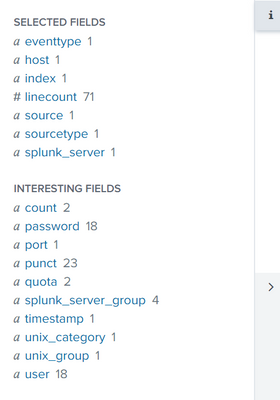
Quota I think it was extracted automatically and its wrong hence I wanted the regex way
- Mark as New
- Bookmark Message
- Subscribe to Message
- Mute Message
- Subscribe to RSS Feed
- Permalink
- Report Inappropriate Content
Can you provide your search and an exact replica of your data. If that rex statement does not work in your environment, then the data you provided in your original post is not the same as the data in your search.


Join the Splunk Community Slack to learn, troubleshoot, and make connections with fellow Splunk practitioners in real time!
Join Splunk User Groups to connect and learn in-person by region or remotely by topic or industry.
SOC4Kafka - New Kafka Connector Powered by OpenTelemetry
Rounding off the Splunk Dashboard Contest
A Four Part Event Series: AI + Observability: AI Agents, LLMs, Apps, & Infrastructure
