
Join the Conversation
- Find Answers
- :
- Using Splunk
- :
- Splunk Search
- :
- Re: using inputlookup command on csv file
- Subscribe to RSS Feed
- Mark Topic as New
- Mark Topic as Read
- Float this Topic for Current User
- Bookmark Topic
- Subscribe to Topic
- Mute Topic
- Printer Friendly Page
- Mark as New
- Bookmark Message
- Subscribe to Message
- Mute Message
- Subscribe to RSS Feed
- Permalink
- Report Inappropriate Content

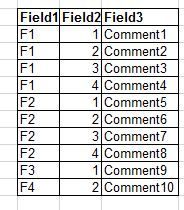
Hi,
I am new to Splunk.
Attached screenshot is the data of my csv file. Please provide me a query to display the value of Field 3 for corresponding Field1 and Field2 values using inputlookup or lookup command.
Regards,
Vandana
- Mark as New
- Bookmark Message
- Subscribe to Message
- Mute Message
- Subscribe to RSS Feed
- Permalink
- Report Inappropriate Content
I found the answer:
|inputlookup file.csv | where Colum1="$Column1$" AND Column2="$Clomun2" | return $Column3
- Mark as New
- Bookmark Message
- Subscribe to Message
- Mute Message
- Subscribe to RSS Feed
- Permalink
- Report Inappropriate Content
I found the answer:
|inputlookup file.csv | where Column1="$Column1$" AND Column2="$Column2$" | return $Column3
- Mark as New
- Bookmark Message
- Subscribe to Message
- Mute Message
- Subscribe to RSS Feed
- Permalink
- Report Inappropriate Content
I found the answer:
|inputlookup file.csv | where Colum1="$Column1$" AND Column2="$Clomun2" | return $Column3
- Mark as New
- Bookmark Message
- Subscribe to Message
- Mute Message
- Subscribe to RSS Feed
- Permalink
- Report Inappropriate Content
| lookup lookup_name field1, field2 OUTPUTNEW field3
- Mark as New
- Bookmark Message
- Subscribe to Message
- Mute Message
- Subscribe to RSS Feed
- Permalink
- Report Inappropriate Content

See this on how to upload your csv file as lookup table file.
https://docs.splunk.com/Documentation/Splunk/7.2.3/Knowledge/Usefieldlookupstoaddinformationtoyourev...
Once you've the lookup table in your Splunk instance, you can use the lookup table as described here:
https://docs.splunk.com/Documentation/Splunk/7.2.3/SearchReference/Lookup
- Mark as New
- Bookmark Message
- Subscribe to Message
- Mute Message
- Subscribe to RSS Feed
- Permalink
- Report Inappropriate Content


What have you tried so far? What results did you get?
If this reply helps you, Karma would be appreciated.



Join the Splunk Community Slack to learn, troubleshoot, and make connections with fellow Splunk practitioners in real time!
Join Splunk User Groups to connect and learn in-person by region or remotely by topic or industry.
Vibe-coding, AI, and Splunkcraft: Highlights from the .conf26 Builder Bar
Thanks for the Memories: .conf26 Took Learning to New Heights
Best Practices: Splunk auto adjust pipeline queue
