
Join the Conversation
- Find Answers
- :
- Using Splunk
- :
- Splunk Search
- :
- Re: transaction/duration?
- Subscribe to RSS Feed
- Mark Topic as New
- Mark Topic as Read
- Float this Topic for Current User
- Bookmark Topic
- Subscribe to Topic
- Mute Topic
- Printer Friendly Page
- Mark as New
- Bookmark Message
- Subscribe to Message
- Mute Message
- Subscribe to RSS Feed
- Permalink
- Report Inappropriate Content

I have events with a kind of chronological flow. The events contain a ID, status, _time and a time inside the event.
For example:
ID status time
1wx 1
1wx 2
1wx 3
I want to group the events on ID, with the different status and time, and the the transaction time between the different statuschanges
I tried to do something with duration but....
- Mark as New
- Bookmark Message
- Subscribe to Message
- Mute Message
- Subscribe to RSS Feed
- Permalink
- Report Inappropriate Content

hello there,
i used basic sample events as shown here: (stage field is the equivalent of "your" status)
30 Dec 2017 23:01:45 stage=processed id=1
30 Dec 2017 23:01:34 stage=queued id=1
30 Dec 2017 23:01:32 stage=recieved id=1
30 Dec 2017 23:01:25 stage=processed id=2
30 Dec 2017 23:01:24 stage=queued id=2
30 Dec 2017 23:01:22 stage=recieved id=2
here is the search i used:
index=<your_index> sourcetype=<your_sourcetype> ...
| eval queued_time = if(stage=="queued",_time,null())
| eval recieved_time = if(stage=="recieved",_time,null())
| eval processed_time = if(stage=="processed",_time,null())
| stats list(*_time) as *_time by id
| eval queue_duration = processed_time-queued_time
| eval transaction_duration = processed_time-recieved_time
replace the field names and values for "stage" with your values
here is a screenshot of the results of different duration you can calculate:
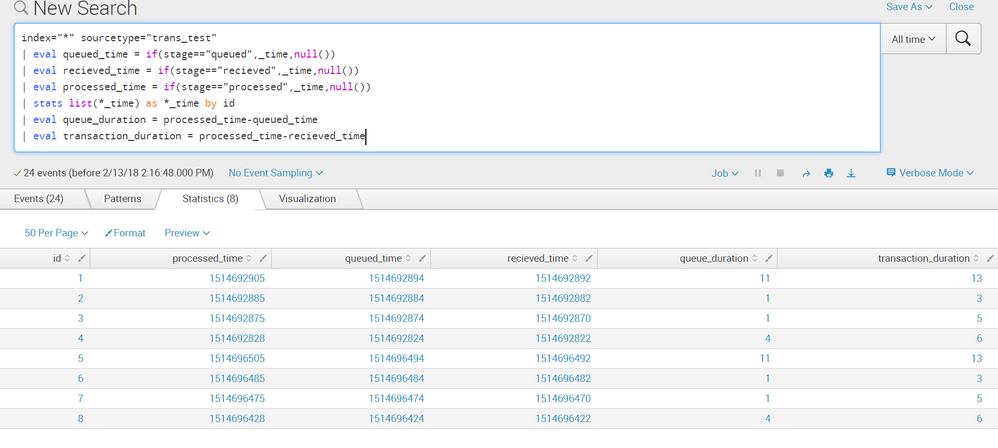
hope it helps

- Mark as New
- Bookmark Message
- Subscribe to Message
- Mute Message
- Subscribe to RSS Feed
- Permalink
- Report Inappropriate Content
hello there,
i used basic sample events as shown here: (stage field is the equivalent of "your" status)
30 Dec 2017 23:01:45 stage=processed id=1
30 Dec 2017 23:01:34 stage=queued id=1
30 Dec 2017 23:01:32 stage=recieved id=1
30 Dec 2017 23:01:25 stage=processed id=2
30 Dec 2017 23:01:24 stage=queued id=2
30 Dec 2017 23:01:22 stage=recieved id=2
here is the search i used:
index=<your_index> sourcetype=<your_sourcetype> ...
| eval queued_time = if(stage=="queued",_time,null())
| eval recieved_time = if(stage=="recieved",_time,null())
| eval processed_time = if(stage=="processed",_time,null())
| stats list(*_time) as *_time by id
| eval queue_duration = processed_time-queued_time
| eval transaction_duration = processed_time-recieved_time
replace the field names and values for "stage" with your values
here is a screenshot of the results of different duration you can calculate:
hope it helps
- Mark as New
- Bookmark Message
- Subscribe to Message
- Mute Message
- Subscribe to RSS Feed
- Permalink
- Report Inappropriate Content
What do i do when events exist more then one time? The events are imported every day and events that dont have a statuschange are imported again. So I have duplicates in my index. I tried Dedup but then I can't do the transaction
- Mark as New
- Bookmark Message
- Subscribe to Message
- Mute Message
- Subscribe to RSS Feed
- Permalink
- Report Inappropriate Content
Great, it works! How can i transform the seconds into minutes e.g. and the epochtime in normal datestamp?
- Mark as New
- Bookmark Message
- Subscribe to Message
- Mute Message
- Subscribe to RSS Feed
- Permalink
- Report Inappropriate Content
im glad you like it.
here is a sample of transforming the result to human readable:
index="*" sourcetype="trans_test"
| eval queued_time = if(stage=="queued",_time,null())
| eval recieved_time = if(stage=="recieved",_time,null())
| eval processed_time = if(stage=="processed",_time,null())
| stats list(*_time) as *_time by id
| eval queue_duration = processed_time-queued_time
| eval transaction_duration = processed_time-recieved_time
| eval queued_time_human = strftime(queued_time, "%c")
| eval recieved_time_human = strftime(recieved_time, "%c")
| eval processed_time_human = strftime(processed_time, "%c")
| eval "queued_duration_Days+HHMMSS" = tostring(queue_duration, "duration")
if that answers your question, kindly mark the question as answered and feel free to upvote any comments you found helpful
- Mark as New
- Bookmark Message
- Subscribe to Message
- Mute Message
- Subscribe to RSS Feed
- Permalink
- Report Inappropriate Content
Thanks, works great. Don't really understand how the last eval works.
- Mark as New
- Bookmark Message
- Subscribe to Message
- Mute Message
- Subscribe to RSS Feed
- Permalink
- Report Inappropriate Content

try this | transaction ID | stats count by duration by ID status time | fields- count
let me know if this helps!
- Mark as New
- Bookmark Message
- Subscribe to Message
- Mute Message
- Subscribe to RSS Feed
- Permalink
- Report Inappropriate Content
Hi, I get 'no results'
In the events-tab i do see events
- Mark as New
- Bookmark Message
- Subscribe to Message
- Mute Message
- Subscribe to RSS Feed
- Permalink
- Report Inappropriate Content
if you have ID,status and time field then only it will work
IF your event contains ID and status field only then try this
| transaction ID | stats count by duration by ID status | fields- count
- Mark as New
- Bookmark Message
- Subscribe to Message
- Mute Message
- Subscribe to RSS Feed
- Permalink
- Report Inappropriate Content
any other ideas?
- Mark as New
- Bookmark Message
- Subscribe to Message
- Mute Message
- Subscribe to RSS Feed
- Permalink
- Report Inappropriate Content
I have the fields i mentioned earlier, so that is not the problem i guess

Join the Splunk Community Slack to learn, troubleshoot, and make connections with fellow Splunk practitioners in real time!
Join Splunk User Groups to connect and learn in-person by region or remotely by topic or industry.
Make Your Machine Data AI-Ready in Splunk
Splunk Asynchronous Forwarding Explained
How to Monitor AI Agents with Splunk Agent Observability
