
Join the Conversation
- Find Answers
- :
- Using Splunk
- :
- Splunk Search
- :
- Re: _time format
- Subscribe to RSS Feed
- Mark Topic as New
- Mark Topic as Read
- Float this Topic for Current User
- Bookmark Topic
- Subscribe to Topic
- Mute Topic
- Printer Friendly Page
- Mark as New
- Bookmark Message
- Subscribe to Message
- Mute Message
- Subscribe to RSS Feed
- Permalink
- Report Inappropriate Content

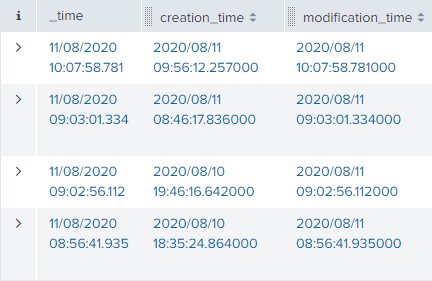
Our data input contains two timestamp fields — creation_time and modification_time — both formatted in line with ISO 8601 (yyyy/mm/dd hh:mm:ss.ms).
Splunk parses modification_time as _time but, in doing so, it applies the system-default timestamp format, in our case the British one (dd/mm/yyyy hh:mm:ss.ms).
Is there any way that we can either:
- Change the timestamp format of _time (not "eval time = _time" etc) so that they match?
or - Hide or replace _time in search results, dashboard table panels, etc so that we can use the original, modification_time field instead?
- Mark as New
- Bookmark Message
- Subscribe to Message
- Mute Message
- Subscribe to RSS Feed
- Permalink
- Report Inappropriate Content
I found that it's only the Events Table that has a permanent _time column so I simply used a Statistics Table instead.
- Mark as New
- Bookmark Message
- Subscribe to Message
- Mute Message
- Subscribe to RSS Feed
- Permalink
- Report Inappropriate Content

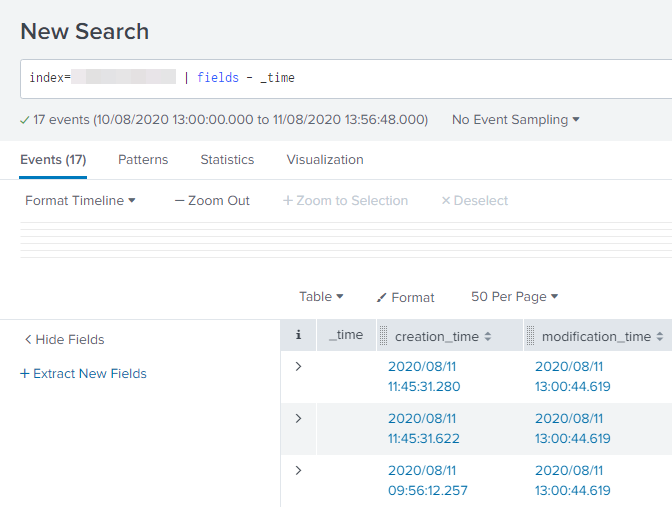
What happens when you just omit the _time from search result/dashboard panel by just adding
|fields - _timeWhat goes around comes around. If it helps, hit it with Karma 🙂
- Mark as New
- Bookmark Message
- Subscribe to Message
- Mute Message
- Subscribe to RSS Feed
- Permalink
- Report Inappropriate Content
The column remains but the fields / cells / values are blank:
- Mark as New
- Bookmark Message
- Subscribe to Message
- Mute Message
- Subscribe to RSS Feed
- Permalink
- Report Inappropriate Content
you can use the table command to choose the fields to display
| table creation_time, modification_time etc.
- Mark as New
- Bookmark Message
- Subscribe to Message
- Mute Message
- Subscribe to RSS Feed
- Permalink
- Report Inappropriate Content
That works for a search but not in the dashboard table panels, even when omitting _time from <fields>.
- Mark as New
- Bookmark Message
- Subscribe to Message
- Mute Message
- Subscribe to RSS Feed
- Permalink
- Report Inappropriate Content
Is your visualisation 'Events' or 'Stats Table'? Should work for Stats table view but if that view doesn't work for you then you could cheat a little.
| eval _time = modification_time
OR
You can play with the time formatting with eval strptime (convert to unixtime) and feed that to strftime (format it the way you want) , but it may be more hassle then its worth.
https://docs.splunk.com/Documentation/Splunk/8.0.5/SearchReference/Commontimeformatvariables
- Mark as New
- Bookmark Message
- Subscribe to Message
- Mute Message
- Subscribe to RSS Feed
- Permalink
- Report Inappropriate Content
Ah, it's an events table. Sorry, I forgot that there was another.
Unfortunately, "eval _time = modification_time " doesn't make a difference - the format stays the same. I supposed that's to be expected, though, as _time is originally derived from modification_time anyway. It's like _time has a hardcoded regional time format or something.
- Mark as New
- Bookmark Message
- Subscribe to Message
- Mute Message
- Subscribe to RSS Feed
- Permalink
- Report Inappropriate Content
Does this work for you?
| eval _time=strftime(_time,"%F %H:%M:%S.%3Q")
- Mark as New
- Bookmark Message
- Subscribe to Message
- Mute Message
- Subscribe to RSS Feed
- Permalink
- Report Inappropriate Content
I'm afraid not. The format stays the same.
- Mark as New
- Bookmark Message
- Subscribe to Message
- Mute Message
- Subscribe to RSS Feed
- Permalink
- Report Inappropriate Content
Sorry but that's all the tricks I know, not sure if there is something on the backend that can override it. Any of these recommendations I have sent have worked in my environment, but I'm not an admin so unsure of the backend wizardry.
Good luck
- Mark as New
- Bookmark Message
- Subscribe to Message
- Mute Message
- Subscribe to RSS Feed
- Permalink
- Report Inappropriate Content
Thanks anyway!
- Mark as New
- Bookmark Message
- Subscribe to Message
- Mute Message
- Subscribe to RSS Feed
- Permalink
- Report Inappropriate Content
I found that it's only the Events Table that has a permanent _time column so I simply used a Statistics Table instead.

Join the Splunk Community Slack to learn, troubleshoot, and make connections with fellow Splunk practitioners in real time!
Join Splunk User Groups to connect and learn in-person by region or remotely by topic or industry.
[Puzzles] Solve, Learn, Repeat: Classic British Rock Bands
New to the Community? Join Us for an Exclusive Post .conf26 Welcome Session (Plus a ...
Accelerate Splunk App Development with AI
