
Turn on suggestions
Auto-suggest helps you quickly narrow down your search results by suggesting possible matches as you type.
Splunk Search
×
Join the Conversation
Without signing in, you're just watching from the sidelines. Sign in or Register to connect, share, and be part of the Splunk Community.
- Find Answers
- :
- Using Splunk
- :
- Splunk Search
- :
- Re: rex command to extract
Options
- Subscribe to RSS Feed
- Mark Topic as New
- Mark Topic as Read
- Float this Topic for Current User
- Bookmark Topic
- Subscribe to Topic
- Mute Topic
- Printer Friendly Page
- Mark as New
- Bookmark Message
- Subscribe to Message
- Mute Message
- Subscribe to RSS Feed
- Permalink
- Report Inappropriate Content

sphiwee
Contributor
07-07-2020
04:36 AM
[2020-07-07 12:40:01+0200] workspace_sandbox RUNNING pid 17159, uptime 21 days, 21:43:58
i have this line of log but i want to extract only workspace_sandbox as a field called Services
im using rex "(^(?<Service>\s\s\w+.\w+))\s\s" but having no luck.
Also want to extract "Running" as status
1 Solution
- Mark as New
- Bookmark Message
- Subscribe to Message
- Mute Message
- Subscribe to RSS Feed
- Permalink
- Report Inappropriate Content

gcusello

SplunkTrust
07-07-2020
05:02 AM
Hi @sphiwee ,
please, try this
| rex "\]\s+(?<service>[^ ]+)\s+(?<status>[^ ]+)"that you can test at https://regex101.com/r/ursNeq/1
Ciao.
Giuseppe
- Mark as New
- Bookmark Message
- Subscribe to Message
- Mute Message
- Subscribe to RSS Feed
- Permalink
- Report Inappropriate Content

to4kawa
Ultra Champion
07-07-2020
04:46 AM
| rex "\]\s(?<Service>\S+) (?<status>\S+)"
- Mark as New
- Bookmark Message
- Subscribe to Message
- Mute Message
- Subscribe to RSS Feed
- Permalink
- Report Inappropriate Content
sphiwee
Contributor
07-07-2020
04:57 AM
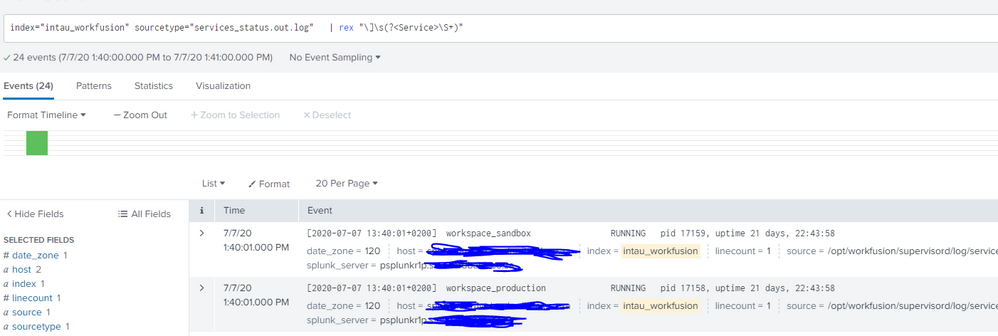
This is what i get, dont think it has to be like this.. any ideas?
- Mark as New
- Bookmark Message
- Subscribe to Message
- Mute Message
- Subscribe to RSS Feed
- Permalink
- Report Inappropriate Content
gcusello
SplunkTrust
07-07-2020
05:02 AM
Hi @sphiwee ,
please, try this
| rex "\]\s+(?<service>[^ ]+)\s+(?<status>[^ ]+)"that you can test at https://regex101.com/r/ursNeq/1
Ciao.
Giuseppe
- Mark as New
- Bookmark Message
- Subscribe to Message
- Mute Message
- Subscribe to RSS Feed
- Permalink
- Report Inappropriate Content
sphiwee
Contributor
07-07-2020
05:40 AM
thanks, you're a legend.
- Mark as New
- Bookmark Message
- Subscribe to Message
- Mute Message
- Subscribe to RSS Feed
- Permalink
- Report Inappropriate Content
gcusello
SplunkTrust
07-07-2020
05:59 AM

Got questions? Get answers!
Join the Splunk Community Slack to learn, troubleshoot, and make connections with fellow Splunk practitioners in real time!
Meet up IRL or virtually!
Join Splunk User Groups to connect and learn in-person by region or remotely by topic or industry.
Get Updates on the Splunk Community!
Persistent Queue at TcpOut — One of Splunk's Most Practical Features
Splunk introduced persistent queueing at the tcpout layer as one of the most practical resilience features in ...
Build resilience for the agentic era: Join us at Splunk Go San Jose
AI is changing how organizations build, operate, and secure digital services. As teams adopt AI agents and ...
Manage Edge Processor pipelines end to end with APIs
This guide uses the Data Management APIs to create an Edge Processor, onboard one instance, deploy a pipeline ...
