
Join the Conversation
- Find Answers
- :
- Using Splunk
- :
- Splunk Search
- :
- Re: query help with chart
- Subscribe to RSS Feed
- Mark Topic as New
- Mark Topic as Read
- Float this Topic for Current User
- Bookmark Topic
- Subscribe to Topic
- Mute Topic
- Printer Friendly Page
- Mark as New
- Bookmark Message
- Subscribe to Message
- Mute Message
- Subscribe to RSS Feed
- Permalink
- Report Inappropriate Content

Hi,
I have a csv file with inputs like this :
Time,Device,Interface,Duration,Bits In/sec,Bits Out/sec,BW
3/22/2019 12:26,A-01,Ethernet1/1,322,0.00000255,0.00000247,10000000000
3/22/2019 12:31,A-01,Ethernet1/1,317,0.00000247,0.00000247,10000000000
3/22/2019 12:37,A-01,Ethernet1/1,319,0.00000242,0.0000025,10000000000
3/22/2019 12:42,A-01,Ethernet1/1,320,0.00000248,0.0000024,10000000000
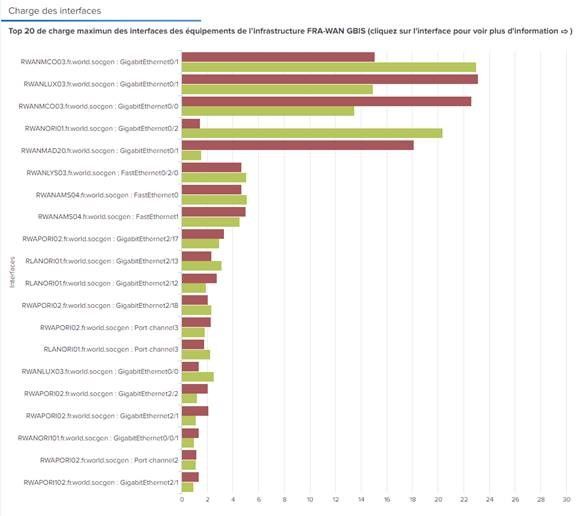
Now i need to show it in a graph like the attached picture where i can show in
x-axis the bandwidth usage and
y-axis i need Device:Interface name
and the usage details should come in the graph as shown in the screenshot. Please help asap.

- Mark as New
- Bookmark Message
- Subscribe to Message
- Mute Message
- Subscribe to RSS Feed
- Permalink
- Report Inappropriate Content
@surekhasplunk,
Try
"your current search"
|eval Interfaces=Device.":".Interface
|stats sum("Bits In/sec") as BitsIn,sum("Bits Out/sec") as BitsOut by Interfaces
What goes around comes around. If it helps, hit it with Karma 🙂
- Mark as New
- Bookmark Message
- Subscribe to Message
- Mute Message
- Subscribe to RSS Feed
- Permalink
- Report Inappropriate Content

Like this:
... | eval bandwidthIn = Duration * 'Bits In/sec'
| eval bandwidthOut = Duration * 'Bits Out/sec'
| eval Device:Interface = Device . ":" . Interface
| stats sum(bandwidthIn) AS bandwidthIn sum(bandwidthOut) AS bandwidthOut BY Device:Interface
- Mark as New
- Bookmark Message
- Subscribe to Message
- Mute Message
- Subscribe to RSS Feed
- Permalink
- Report Inappropriate Content
Hi @woodcock,
Whats the logic behind multiplying Duration with 'Bits In/Sec' and if we are multiplying with duration then should we not divide it by BW value ? Please suggest.
- Mark as New
- Bookmark Message
- Subscribe to Message
- Mute Message
- Subscribe to RSS Feed
- Permalink
- Report Inappropriate Content
You said you desired Bandwidth usage; that is how to calculate usage.
- Mark as New
- Bookmark Message
- Subscribe to Message
- Mute Message
- Subscribe to RSS Feed
- Permalink
- Report Inappropriate Content
Ok.. thanks much @woodcock
- Mark as New
- Bookmark Message
- Subscribe to Message
- Mute Message
- Subscribe to RSS Feed
- Permalink
- Report Inappropriate Content

@surekhasplunk I am confused. You have the data with fields and you have the expected chart in Splunk. Don't you already have the query? Is it assistance required with some assignment? or do you want something on top of the chart that has been attached?
| makeresults | eval message= "Happy Splunking!!!"
- Mark as New
- Bookmark Message
- Subscribe to Message
- Mute Message
- Subscribe to RSS Feed
- Permalink
- Report Inappropriate Content
@surekhasplunk,
Try
"your current search"
|eval Interfaces=Device.":".Interface
|stats sum("Bits In/sec") as BitsIn,sum("Bits Out/sec") as BitsOut by Interfaces
What goes around comes around. If it helps, hit it with Karma 🙂
- Mark as New
- Bookmark Message
- Subscribe to Message
- Mute Message
- Subscribe to RSS Feed
- Permalink
- Report Inappropriate Content
Thank you so much.

Join the Splunk Community Slack to learn, troubleshoot, and make connections with fellow Splunk practitioners in real time!
Join Splunk User Groups to connect and learn in-person by region or remotely by topic or industry.
Accelerate Splunk App Development with AI
Splunk Agent Observability: Measuring AI Value with Splunk Tokenomics on AWS
Enterprise Security Watch Party: What’s New in 8.8 - Recap
