
Join the Conversation
- Find Answers
- :
- Using Splunk
- :
- Splunk Search
- :
- how to loop through json array based on expression...
- Subscribe to RSS Feed
- Mark Topic as New
- Mark Topic as Read
- Float this Topic for Current User
- Bookmark Topic
- Subscribe to Topic
- Mute Topic
- Printer Friendly Page
- Mark as New
- Bookmark Message
- Subscribe to Message
- Mute Message
- Subscribe to RSS Feed
- Permalink
- Report Inappropriate Content
how to loop through json array based on expression and create counter

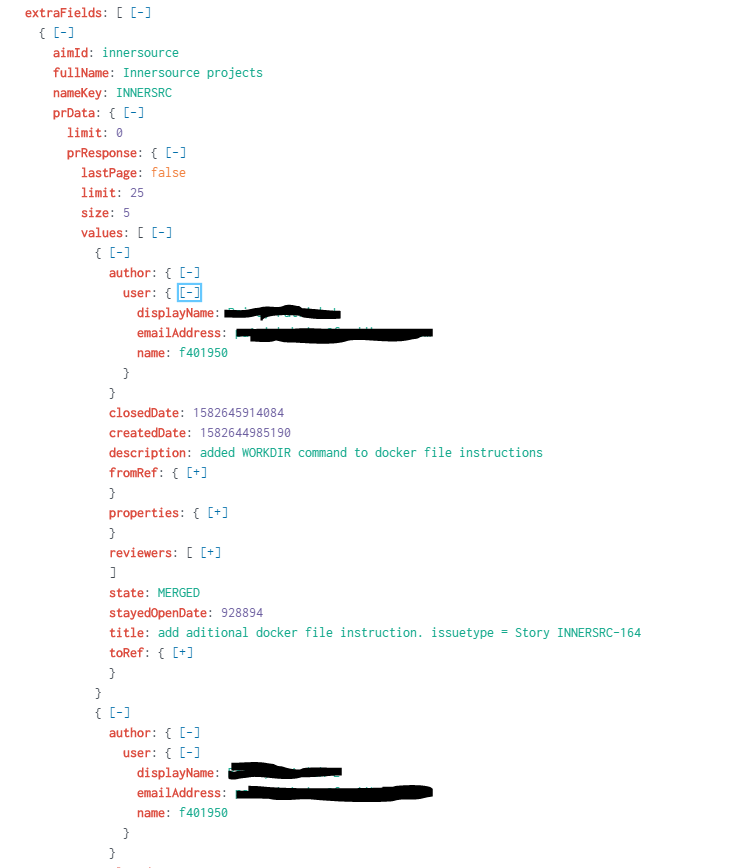
i'm hardcoding some data like names, where i will pass in a token in the future, to create a simple example of what i'm trying to achieve. I want to loop through all values, which has objects containing the data. Each field i loop through, i want to write an if statement to see if it matches what i'm expecting, if so increment the counter, else leave it the same. Here is my data and what i have so far, weird part is the match or even == doesn't work for me here. It should be at least 2 for sum, but nameTotal should have gotten that right at least? If i remove the stats (cause it loses my nameTotal field, nameTotal is always 0 meaning my if statement's never was true which means '<>' isn't right?, not sure what the variable is that i'm looking for from it.
index=myIndex latest=+5h "extraFields{}.aimId"="innersource"  "extraFields{}.prData.prResponse.values{}.author.user.name"="f401950"

| eval nameTotal= 0

| foreach "extraFields{}.prData.prResponse.values{}.author.user.name"

    [eval names=if(match('<<FIELD>>', "f401950"), nameTotal+1, nameTotal)]

| stats sum(names) as totalPrs

| table totalPrs, nameTotal
Results:
totalPrs | nameTotal
1 |
Sample of my data
- Mark as New
- Bookmark Message
- Subscribe to Message
- Mute Message
- Subscribe to RSS Feed
- Permalink
- Report Inappropriate Content

index=myIndex latest=+5h "extraFields{}.aimId"="innersource" "extraFields{}.prData.prResponse.values{}.author.user.name"="f401950"
| spath path=extraFields{}.prData.prResponse.values{}.author.user output=user
| stats count by user
| spath input=user
I see, how about this?
- Mark as New
- Bookmark Message
- Subscribe to Message
- Mute Message
- Subscribe to RSS Feed
- Permalink
- Report Inappropriate Content
thanks! that worked really well!, is there a way i can append more columns based on a subsearch? cause i know stats loses my fields if it's not included in it. I don't want to add it as part of the "by" because it'll throw the data off. I just wanted to give more meta data based on the name, like gender, etc. Here's a snippet of what i was trying to achieve. I want to add name + email as part of the table's results, without modifying the results.
index=myIndex latest=+5h "extraFields{}.aimId"="innersource"  "extraFields{}.prData.prResponse.values{}.author.user.name"="*"
| spath path=extraFields{}.prData.prResponse.values{}.author.user.name output=employeeId
| spath path=extraFields{}.prData.prResponse.values{}.author.user.displayName output=name
| spath path=extraFields{}.prData.prResponse.values{}.author.user.emailAddress output=email
| stats count by employeeId, name, email
| sort -count
- Mark as New
- Bookmark Message
- Subscribe to Message
- Mute Message
- Subscribe to RSS Feed
- Permalink
- Report Inappropriate Content
check my updated answer.
- Mark as New
- Bookmark Message
- Subscribe to Message
- Mute Message
- Subscribe to RSS Feed
- Permalink
- Report Inappropriate Content
that worked, thanks!



Join the Splunk Community Slack to learn, troubleshoot, and make connections with fellow Splunk practitioners in real time!
Join Splunk User Groups to connect and learn in-person by region or remotely by topic or industry.
Thanks for the Memories: .conf26 Took Learning to New Heights
Best Practices: Splunk auto adjust pipeline queue
Splunk Auto Ingestion Parallel Pipeline Scaling
