
Join the Conversation
- Find Answers
- :
- Using Splunk
- :
- Splunk Search
- :
- Re: edit fields
- Subscribe to RSS Feed
- Mark Topic as New
- Mark Topic as Read
- Float this Topic for Current User
- Bookmark Topic
- Subscribe to Topic
- Mute Topic
- Printer Friendly Page
- Mark as New
- Bookmark Message
- Subscribe to Message
- Mute Message
- Subscribe to RSS Feed
- Permalink
- Report Inappropriate Content

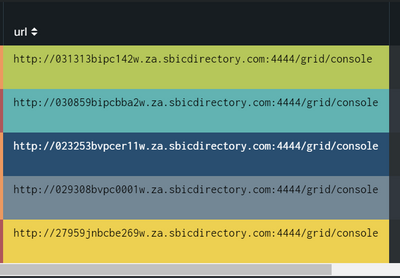
I have the below column whereby im pinging the url in the column, but for a nicer view I only want to display
the pc name eg "03131bipc142w" is this possible?
- Mark as New
- Bookmark Message
- Subscribe to Message
- Mute Message
- Subscribe to RSS Feed
- Permalink
- Report Inappropriate Content


Hi @sphiwee,
if your request is how to modify a log in Splunk, the answer is: not possible on already indexed logs!
if your request is to modify the field uri displayed in the dashboard, you can use a regex to extract only the part of the field that you want, please try something like this:
your_search
| rex field=uri "http:\/\/(?<url>[^\.]+)"
| table url
that you can test at https://regex101.com/r/eekkf4/1
Ciao.
Giuseppe
- Mark as New
- Bookmark Message
- Subscribe to Message
- Mute Message
- Subscribe to RSS Feed
- Permalink
- Report Inappropriate Content

Can you please try this?
YOUR_SEARCH
|rex field=url "(?<pc_name>[a-z0-9|-]+)\.[a-z0-9|-]+\.[a-z0-9|-]+\.[a-z]+"
My Sample Search :
| makeresults | eval url="http://030313bipc142w.za.sbicdirectory.com:4444/grid/console"
|rex field=url "(?<pc_name>[a-z0-9|-]+)\.[a-z0-9|-]+\.[a-z0-9|-]+\.[a-z]+"
Thanks
KV
▄︻̷̿┻̿═━一
If any of my reply helps you to solve the problem Or gain knowledge, an upvote would be appreciated.
- Mark as New
- Bookmark Message
- Subscribe to Message
- Mute Message
- Subscribe to RSS Feed
- Permalink
- Report Inappropriate Content
Hi @sphiwee,
if your request is how to modify a log in Splunk, the answer is: not possible on already indexed logs!
if your request is to modify the field uri displayed in the dashboard, you can use a regex to extract only the part of the field that you want, please try something like this:
your_search
| rex field=uri "http:\/\/(?<url>[^\.]+)"
| table url
that you can test at https://regex101.com/r/eekkf4/1
Ciao.
Giuseppe

Join the Splunk Community Slack to learn, troubleshoot, and make connections with fellow Splunk practitioners in real time!
Join Splunk User Groups to connect and learn in-person by region or remotely by topic or industry.
Meet the .conf26 AI Agent Buildathon Winners
Trusted Autonomy in the SOC: A Maturity Journey
Supercharging Windows Security Detection Performance: Introducing Hybrid Field ...
