
Join the Conversation
- Find Answers
- :
- Using Splunk
- :
- Splunk Search
- :
- Re: duplicate values causing conflict
- Subscribe to RSS Feed
- Mark Topic as New
- Mark Topic as Read
- Float this Topic for Current User
- Bookmark Topic
- Subscribe to Topic
- Mute Topic
- Printer Friendly Page
- Mark as New
- Bookmark Message
- Subscribe to Message
- Mute Message
- Subscribe to RSS Feed
- Permalink
- Report Inappropriate Content

Hi,
Im getting this error although I do not have any duplicate values.
Below is the screenshot and my xml:
<form>
<label>SplunkServers_Analaysis</label>
<fieldset submitButton="true">
</fieldset>
</form>
My search provides the output
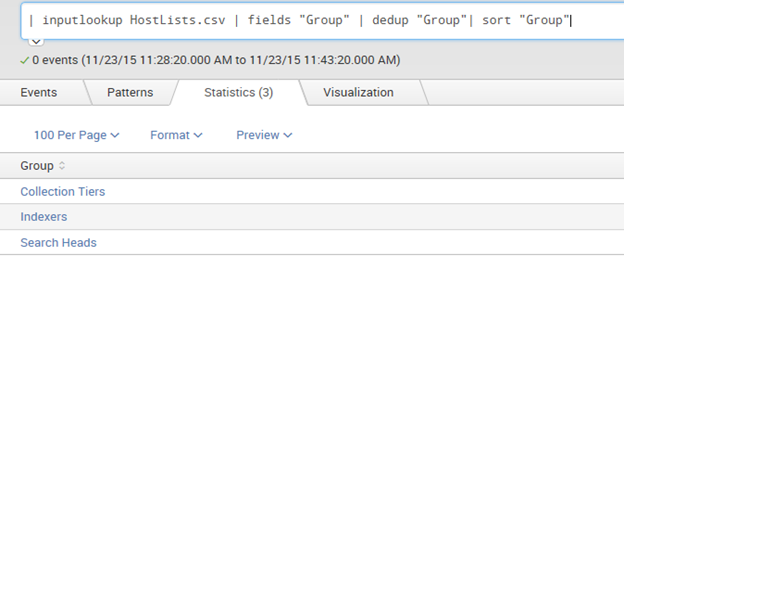
N my lookuptable has unique values:
Group SearchHeadsList IndexersList CollectionTiersList
Search Heads 1 11 22
Indexers 2 12 23
Collection Tiers 3 13 24
What is the reason for this error?

- Mark as New
- Bookmark Message
- Subscribe to Message
- Mute Message
- Subscribe to RSS Feed
- Permalink
- Report Inappropriate Content

Hi,
I think your problem is in your input settings. try to change values of "fields for value" and "field for label". If in you 've rename field in your populating search, make sure that values of "fields for value" and "field for label" have the new name
- Mark as New
- Bookmark Message
- Subscribe to Message
- Mute Message
- Subscribe to RSS Feed
- Permalink
- Report Inappropriate Content

Putting an example to make it simpler
- good practice to put "_tok" in the token name, so it is not confused with field/label names
- also try to query wrapped in CDATA just to ensure double quotes, arrow symbols won't cause problems
- uses "search" rather than the deprecated "populatingSearch" notation
- and is a working dashboard (to try out)
sample code
<form>
  <label>REMOVE THIS DASHBOARD ANYTIME</label>
  <description>Some Description</description>
  <fieldset autoRun="false">
    <input type="dropdown" token="sourcetype_tok" searchWhenChanged="false">
      <label>label_name</label>
      <choice value="*">All</choice>
      <selectFirstChoice>true</selectFirstChoice>
      <search>
      <query>
        <![CDATA[index=_internal | stats count by sourcetype
        ]]>
      </query>
      <earliest>$timeSpan.earliest$</earliest>
      <latest>$timeSpan.latest$</latest>
      </search>
      <fieldForLabel>sourcetype</fieldForLabel>
      <fieldForValue>sourcetype</fieldForValue>
    </input>
    <input type="time" token="timeSpan">
      <label>Time Picker</label>
      <default>
        <earliest>-1h</earliest>
        <latest>now</latest>
      </default>
    </input>
  </fieldset>
  <row>
    <panel>
      <table>
        <title>Event Details</title>
        <search>
          <query>
          <![CDATA[index=_internal sourcetype=$sourcetype_tok$
            | head 1000
            | table _time,index,sourcetype,source,_raw
            ]]>
          </query>
        <earliest>$timeSpan.earliest$</earliest>
        <latest>$timeSpan.latest$</latest>
        </search>
        <option name="count">20</option>
      </table>
    </panel>
  </row>
</form>
- Mark as New
- Bookmark Message
- Subscribe to Message
- Mute Message
- Subscribe to RSS Feed
- Permalink
- Report Inappropriate Content
Hi,
I think your problem is in your input settings. try to change values of "fields for value" and "field for label". If in you 've rename field in your populating search, make sure that values of "fields for value" and "field for label" have the new name
- Mark as New
- Bookmark Message
- Subscribe to Message
- Mute Message
- Subscribe to RSS Feed
- Permalink
- Report Inappropriate Content
Thankyou 🙂
That worked after the necessary changes.
- Mark as New
- Bookmark Message
- Subscribe to Message
- Mute Message
- Subscribe to RSS Feed
- Permalink
- Report Inappropriate Content
Ok, Please don't forget to vote me so that it can be helpfull for others who can have the same problem

Join the Splunk Community Slack to learn, troubleshoot, and make connections with fellow Splunk practitioners in real time!
Join Splunk User Groups to connect and learn in-person by region or remotely by topic or industry.
Persistent Queue at TcpOut — One of Splunk's Most Practical Features
Catalog Is Now Generally Available on Splunk Cloud Platform
Your Path to AgenticOps: AI Experiences for Every Splunk Practitioner
