
Join the Conversation
- Find Answers
- :
- Using Splunk
- :
- Splunk Search
- :
- Re: chart
- Subscribe to RSS Feed
- Mark Topic as New
- Mark Topic as Read
- Float this Topic for Current User
- Bookmark Topic
- Subscribe to Topic
- Mute Topic
- Printer Friendly Page
- Mark as New
- Bookmark Message
- Subscribe to Message
- Mute Message
- Subscribe to RSS Feed
- Permalink
- Report Inappropriate Content

Hi,
I have total four fields lets say a,b,c and d. i want to show 'a' as a separate column and 'b','c' and 'd' as stacked and beside 'a' along with the sum of fields ('b'+'c'+'d') so that the count of these fields would come on the top of their column so that we can easily compare field 'a' with the count of rest.
Note:- I don't want separate column which would give sum of these three field.
Click visualization select column chart
Click format and enable the stack mode.
select show data values as on
Click chart overlay and Click the text box and select Total field.
makeView as Axis as off
Click Apply.
After the above steps that i had mentioned, I can see the total on the top along with the line,
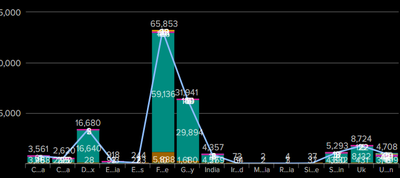
I don't need line, Can you please help me in this.
Thanks in Advance!
Manoj Kumar S
- Mark as New
- Bookmark Message
- Subscribe to Message
- Mute Message
- Subscribe to RSS Feed
- Permalink
- Report Inappropriate Content


It is not possible with standard column charts. You either have stacked column or separate columns, not a mixture.
- Mark as New
- Bookmark Message
- Subscribe to Message
- Mute Message
- Subscribe to RSS Feed
- Permalink
- Report Inappropriate Content
It is not possible with standard column charts. You either have stacked column or separate columns, not a mixture.

Join the Splunk Community Slack to learn, troubleshoot, and make connections with fellow Splunk practitioners in real time!
Join Splunk User Groups to connect and learn in-person by region or remotely by topic or industry.
Make Your Machine Data AI-Ready in Splunk
Splunk Asynchronous Forwarding Explained
How to Monitor AI Agents with Splunk Agent Observability
