
Join the Conversation
- Find Answers
- :
- Using Splunk
- :
- Splunk Search
- :
- Re: array
- Subscribe to RSS Feed
- Mark Topic as New
- Mark Topic as Read
- Float this Topic for Current User
- Bookmark Topic
- Subscribe to Topic
- Mute Topic
- Printer Friendly Page
- Mark as New
- Bookmark Message
- Subscribe to Message
- Mute Message
- Subscribe to RSS Feed
- Permalink
- Report Inappropriate Content
array

Hello
I have log like below
FEATURES_USING=[tokenValidatorInfo=false, requestValidationRequired=false, requestPayloadValidationRequired=false, responsePayloadValidationRequired=false, aopUsed=false, tibcoCommunicatorUsed=false, secretsSecured=false]
I want result should be like below
tokenValidatorInfo=false
equestValidationRequired=false
requestPayloadValidationRequired=false
responsePayloadValidationRequired=false
aopUsed=false
tibcoCommunicatorUsed=false
secretsSecured=false
- Mark as New
- Bookmark Message
- Subscribe to Message
- Mute Message
- Subscribe to RSS Feed
- Permalink
- Report Inappropriate Content

index=_internal | head 1 | fields _raw
| eval _raw="05789549ec5f environment=AWS-DEV 2020-08-25 09:33:52 [scheduling-1] [INFO ] [{spanId=e055c0a22de08485, traceId=e055c0a22de08485}] [com.deltadental.platform.common.config.AppConfig:refreshCommonServicesFeatures:93] - FEATURES_USING=[TOKEN_VALIDATION=false, REQUETS_VALIDATION=false, REQUEST_PAYLOAD_VALIDATION=false, RESPONSE_PAYLOAD_VALIDATION=false, AOP=false, TIBCO_COMMUNICATOR=false, SECRETS_SECURE=false]"

| kv
and search with smart mode
- Mark as New
- Bookmark Message
- Subscribe to Message
- Mute Message
- Subscribe to RSS Feed
- Permalink
- Report Inappropriate Content


Hi @vinod0313
It is not clear if you have already extracted any fields but assuming not:
| makeresults
| eval log="FEATURES_USING=[tokenValidatorInfo=false, requestValidationRequired=false, requestPayloadValidationRequired=false, responsePayloadValidationRequired=false, aopUsed=false, tibcoCommunicatorUsed=false, secretsSecured=false]"
| rex field=log "FEATURES_USING=\[(?<feature>.*)\]"
| makemv delim=", " feature
| mvexpand feature
| fields feature
You could extract the part between the [] into a field, then make it multi-value using ", " as your delimiter, then expand the multi-value field into separate rows.
- Mark as New
- Bookmark Message
- Subscribe to Message
- Mute Message
- Subscribe to RSS Feed
- Permalink
- Report Inappropriate Content
it is not working
my log is shown below
05789549ec5f environment=AWS-DEV 2020-08-25 09:33:52 [scheduling-1] [INFO ] [{spanId=e055c0a22de08485, traceId=e055c0a22de08485}] [com.deltadental.platform.common.config.AppConfig:refreshCommonServicesFeatures:93] - FEATURES_USING=[TOKEN_VALIDATION=false, REQUETS_VALIDATION=false, REQUEST_PAYLOAD_VALIDATION=false, RESPONSE_PAYLOAD_VALIDATION=false, AOP=false, TIBCO_COMMUNICATOR=false, SECRETS_SECURE=false]
I want result should like below
TOKEN_VALIDATION=false
REQUETS_VALIDATION=false
REQUEST_PAYLOAD_VALIDATION=false
-
-
- Mark as New
- Bookmark Message
- Subscribe to Message
- Mute Message
- Subscribe to RSS Feed
- Permalink
- Report Inappropriate Content
Always good to have a real example! However, what is not working?
| makeresults
| eval log="05789549ec5f environment=AWS-DEV 2020-08-25 09:33:52 [scheduling-1] [INFO ] [{spanId=e055c0a22de08485, traceId=e055c0a22de08485}] [com.deltadental.platform.common.config.AppConfig:refreshCommonServicesFeatures:93] - FEATURES_USING=[TOKEN_VALIDATION=false, REQUETS_VALIDATION=false, REQUEST_PAYLOAD_VALIDATION=false, RESPONSE_PAYLOAD_VALIDATION=false, AOP=false, TIBCO_COMMUNICATOR=false, SECRETS_SECURE=false]"
| rex field=log "FEATURES_USING=\[(?<feature>.*)\]"
| makemv delim=", " feature
| mvexpand feature
| fields feature
Gives:
| feature |
| TOKEN_VALIDATION=false |
| REQUETS_VALIDATION=false |
| REQUEST_PAYLOAD_VALIDATION=false |
| RESPONSE_PAYLOAD_VALIDATION=false |
| AOP=false |
| TIBCO_COMMUNICATOR=false |
| SECRETS_SECURE=false |
- Mark as New
- Bookmark Message
- Subscribe to Message
- Mute Message
- Subscribe to RSS Feed
- Permalink
- Report Inappropriate Content
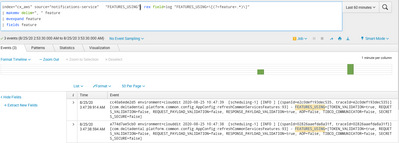
i am getting below events i am not getting actual expected results
- Mark as New
- Bookmark Message
- Subscribe to Message
- Mute Message
- Subscribe to RSS Feed
- Permalink
- Report Inappropriate Content
Yes, the events don't change - you need to look at the results - try adding
| table featureThen look at the statistics tab
- Mark as New
- Bookmark Message
- Subscribe to Message
- Mute Message
- Subscribe to RSS Feed
- Permalink
- Report Inappropriate Content
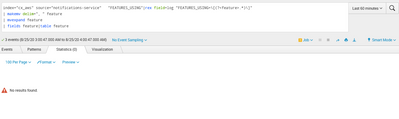
I have added it.
- Mark as New
- Bookmark Message
- Subscribe to Message
- Mute Message
- Subscribe to RSS Feed
- Permalink
- Report Inappropriate Content
OK you took my solution too literally! The rex has to be applied to your _raw not my made up log field:
| rex field=_raw "FEATURES_USING=\[(?<feature>.*)\]"Unless you have already extract FEATURES_USING into its own field

Join the Splunk Community Slack to learn, troubleshoot, and make connections with fellow Splunk practitioners in real time!
Join Splunk User Groups to connect and learn in-person by region or remotely by topic or industry.
[Puzzles] Solve, Learn, Repeat: Classic British Rock Bands
New to the Community? Join Us for an Exclusive Post .conf26 Welcome Session (Plus a ...
Accelerate Splunk App Development with AI
