
Join the Conversation
- Find Answers
- :
- Using Splunk
- :
- Splunk Search
- :
- Re: Zoom and Center Map Visualization
- Subscribe to RSS Feed
- Mark Topic as New
- Mark Topic as Read
- Float this Topic for Current User
- Bookmark Topic
- Subscribe to Topic
- Mute Topic
- Printer Friendly Page
- Mark as New
- Bookmark Message
- Subscribe to Message
- Mute Message
- Subscribe to RSS Feed
- Permalink
- Report Inappropriate Content

Hello,
I have a geostats with iplocation query which specifies specific regions within a country in the search. I'd like to have my map zoomed in on specific country once populated, but I'm honestly not sure how to go about doing that. Please include an example query as the documentation I've found so far hasn't been as helpful as I'd hoped.
Sorry for the undoubtedly noob question.
Thanks!
- Mark as New
- Bookmark Message
- Subscribe to Message
- Mute Message
- Subscribe to RSS Feed
- Permalink
- Report Inappropriate Content


This can be changed in the formatting of the visualization. You can specify location as well as zoom.
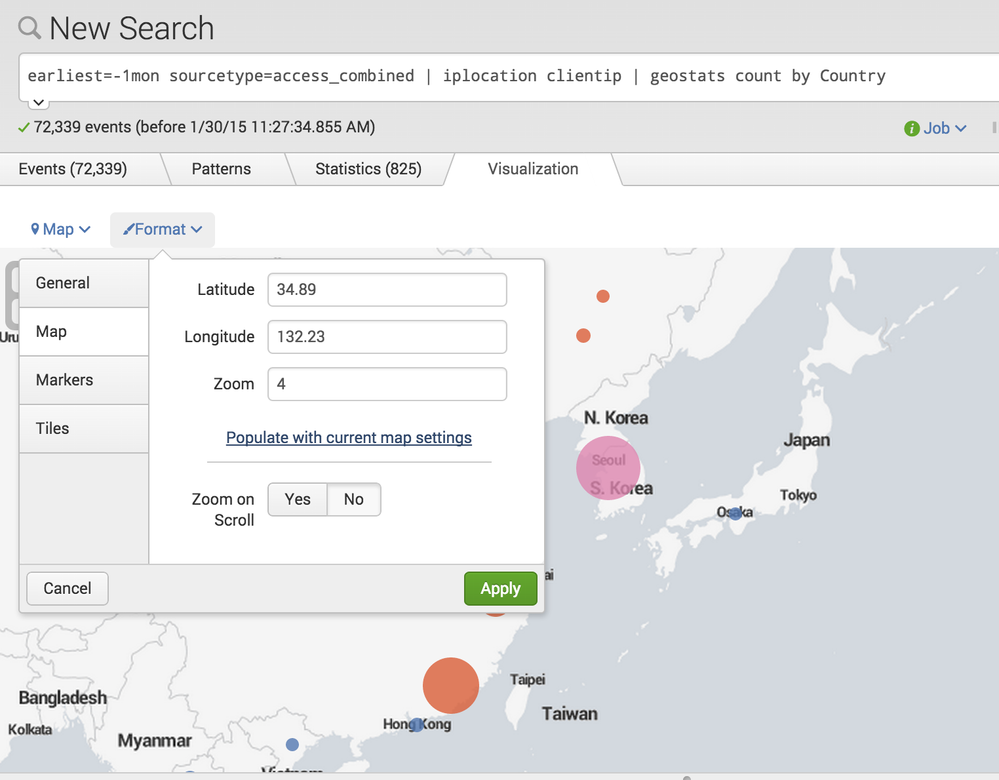
They correspond to these values in the Simple XML
<option name="mapping.map.center">(0,0)</option>
<option name="mapping.map.scrollZoom">0</option>
<option name="mapping.map.zoom">2</option>
The only option in the actual command options themselves that relates to your question is
maxzoomlevel
Syntax: maxzoomlevel=
Description: The maximum level to be created in the quad tree. Defaults to 9, which specifies that 10 zoom levels will be created: 0-9.

- Mark as New
- Bookmark Message
- Subscribe to Message
- Mute Message
- Subscribe to RSS Feed
- Permalink
- Report Inappropriate Content
Thanks to everyone who provided answers. Your help is much appreciated.
- Mark as New
- Bookmark Message
- Subscribe to Message
- Mute Message
- Subscribe to RSS Feed
- Permalink
- Report Inappropriate Content
Does the Zoom on Scroll option (yes/no) only appear in certain versions? I do not have it under any of the format options. I input the line 0 in the source code, but it doesn't take away the ability to zoom while scrolling.
- Mark as New
- Bookmark Message
- Subscribe to Message
- Mute Message
- Subscribe to RSS Feed
- Permalink
- Report Inappropriate Content
well, it at least sounds like it doesn't appear in your version - but to be honest, I'm not sure.
- Mark as New
- Bookmark Message
- Subscribe to Message
- Mute Message
- Subscribe to RSS Feed
- Permalink
- Report Inappropriate Content

I believe what you are looking for is hidden under the Paint Brush Icon when you are in edit panel mode of your dashboard.
- Zoom into the region you want the map to start.
- Edit Panels then select Paint Brush on your Map Panel
- Click Map Section
- Populate with current map settings
- Click Apply
- Mark as New
- Bookmark Message
- Subscribe to Message
- Mute Message
- Subscribe to RSS Feed
- Permalink
- Report Inappropriate Content
This can be changed in the formatting of the visualization. You can specify location as well as zoom.
They correspond to these values in the Simple XML
<option name="mapping.map.center">(0,0)</option>
<option name="mapping.map.scrollZoom">0</option>
<option name="mapping.map.zoom">2</option>
The only option in the actual command options themselves that relates to your question is
maxzoomlevel
Syntax: maxzoomlevel=
Description: The maximum level to be created in the quad tree. Defaults to 9, which specifies that 10 zoom levels will be created: 0-9.

Join the Splunk Community Slack to learn, troubleshoot, and make connections with fellow Splunk practitioners in real time!
Join Splunk User Groups to connect and learn in-person by region or remotely by topic or industry.
Make Your Machine Data AI-Ready in Splunk
Splunk Asynchronous Forwarding Explained
How to Monitor AI Agents with Splunk Agent Observability
