
Join the Conversation
- Find Answers
- :
- Using Splunk
- :
- Splunk Search
- :
- Re: Why does the convert command not work in my se...
- Subscribe to RSS Feed
- Mark Topic as New
- Mark Topic as Read
- Float this Topic for Current User
- Bookmark Topic
- Subscribe to Topic
- Mute Topic
- Printer Friendly Page
- Mark as New
- Bookmark Message
- Subscribe to Message
- Mute Message
- Subscribe to RSS Feed
- Permalink
- Report Inappropriate Content

- Mark as New
- Bookmark Message
- Subscribe to Message
- Mute Message
- Subscribe to RSS Feed
- Permalink
- Report Inappropriate Content

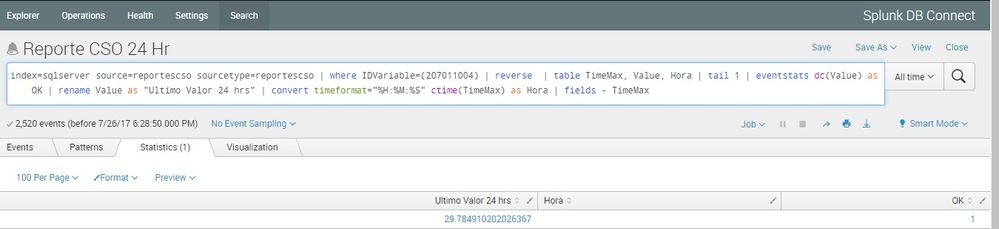
There are several performance issues with your current query, besides the issue you have posted here.
1) Filter results in base query (i.e. before first pipe) :where IDVariable="(207011004)" should be removed and moved as filter to base query.
<YourBaseSearch With Index and Sourcetype> IDVariable="(207011004)" | <your remaining query>
2) You are performing reverse and then tail 1. You can instead perform a single | head 1 command.
3) Create table after head 1 command.
Refer to Splunk Documentation on Query optimization for your referenc: http://docs.splunk.com/Documentation/Splunk/latest/Search/Quicktipsforoptimization
Coming to your issue, you should convert string timestamp to epoch using strptime() function and then use fieldformat command to use the Display format (String Time) as required while retaining the underlying epoch time value. Following is a run anywhere search:
| makeresults
| eval TimeMax=strptime("04/01/2017 05:34:26","%m/%d/%Y %H:%M:%S")
| fieldformat TimeMax=strftime(TimeMax,"%H:%M:%S")
Your query after optimization and fix should look like the following:
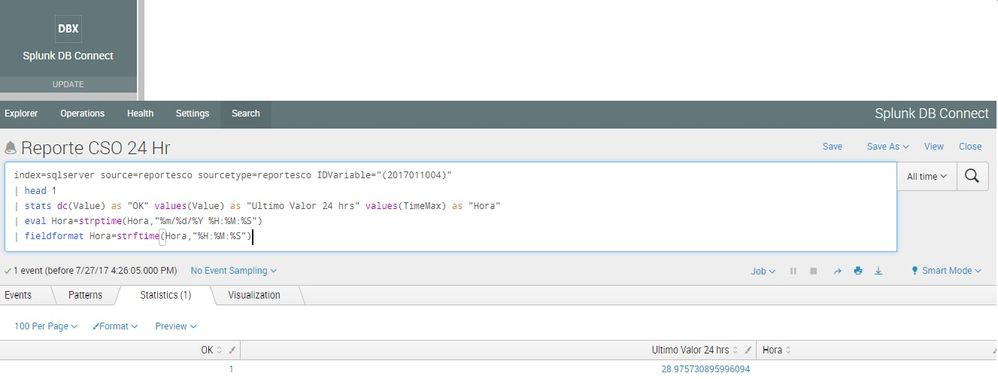
index=sqlserver source=reportesco sourcetype=reportesco IDVariable="(2017011004)"
| head 1
| stats dc(Value) as "OK" values(Value) as "Ultimo Valor 24 hrs" values(TimeMax) as "Hora"
| eval Hora=strptime(Hora,"%m/%d/%Y %H:%M:%S")
| fieldformat Hora=strftime(Hora,"%H:%M:%S")
Please try out an confirm if it is working as expected.
| makeresults | eval message= "Happy Splunking!!!"
- Mark as New
- Bookmark Message
- Subscribe to Message
- Mute Message
- Subscribe to RSS Feed
- Permalink
- Report Inappropriate Content
There are several performance issues with your current query, besides the issue you have posted here.
1) Filter results in base query (i.e. before first pipe) :where IDVariable="(207011004)" should be removed and moved as filter to base query.
<YourBaseSearch With Index and Sourcetype> IDVariable="(207011004)" | <your remaining query>
2) You are performing reverse and then tail 1. You can instead perform a single | head 1 command.
3) Create table after head 1 command.
Refer to Splunk Documentation on Query optimization for your referenc: http://docs.splunk.com/Documentation/Splunk/latest/Search/Quicktipsforoptimization
Coming to your issue, you should convert string timestamp to epoch using strptime() function and then use fieldformat command to use the Display format (String Time) as required while retaining the underlying epoch time value. Following is a run anywhere search:
| makeresults
| eval TimeMax=strptime("04/01/2017 05:34:26","%m/%d/%Y %H:%M:%S")
| fieldformat TimeMax=strftime(TimeMax,"%H:%M:%S")
Your query after optimization and fix should look like the following:
index=sqlserver source=reportesco sourcetype=reportesco IDVariable="(2017011004)"
| head 1
| stats dc(Value) as "OK" values(Value) as "Ultimo Valor 24 hrs" values(TimeMax) as "Hora"
| eval Hora=strptime(Hora,"%m/%d/%Y %H:%M:%S")
| fieldformat Hora=strftime(Hora,"%H:%M:%S")
Please try out an confirm if it is working as expected.
| makeresults | eval message= "Happy Splunking!!!"
- Mark as New
- Bookmark Message
- Subscribe to Message
- Mute Message
- Subscribe to RSS Feed
- Permalink
- Report Inappropriate Content
- Mark as New
- Bookmark Message
- Subscribe to Message
- Mute Message
- Subscribe to RSS Feed
- Permalink
- Report Inappropriate Content
Using:
index=sqlserver source=reportesco sourcetype=reportesco IDVariable="(2017011004)"
| head 1
| stats dc(Value) as "OK" values(Value) as "Ultimo Valor 24 hrs" values(TimeMax) as "Hora"
| eval Hora=strptime(Hora,"%m/%d/%Y %H:%M:%S")
| fieldformat Hora=strftime(Hora,"%H:%M:%S")
Not results, the tables are empty.
And
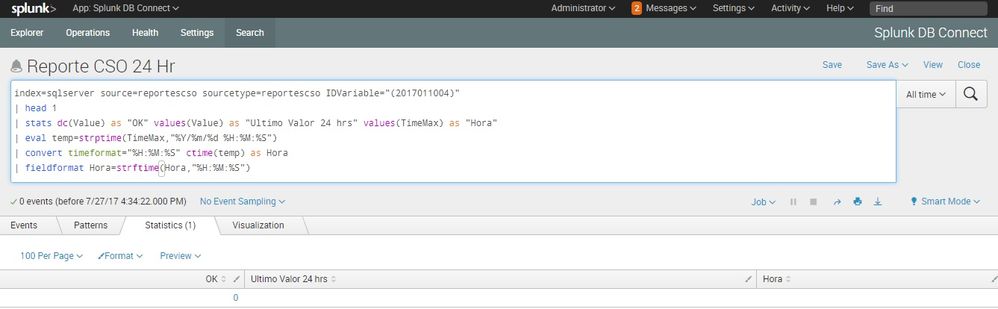
index=sqlserver source=reportescso sourcetype=reportescso
| head 1
| stats dc(Value) as "OK" values(Value) as "Ultimo Valor 24 hrs" values(TimeMax) as "Hora"
| eval temp=strptime(TimeMax,"%Y/%m/%d %H:%M:%S")
| convert timeformat="%H:%M:%S" ctime(temp) as Hora
| fieldformat Hora=strftime(Hora,"%H:%M:%S")
Missing the value "hour"
My Splunk is 6.5.3
- Mark as New
- Bookmark Message
- Subscribe to Message
- Mute Message
- Subscribe to RSS Feed
- Permalink
- Report Inappropriate Content

can you paste value of TimeMax.
- Mark as New
- Bookmark Message
- Subscribe to Message
- Mute Message
- Subscribe to RSS Feed
- Permalink
- Report Inappropriate Content
The format of TimeMax is "%m/%d/%Y %H:%M:%S" and i need this "%H:%M:%S"
- Mark as New
- Bookmark Message
- Subscribe to Message
- Mute Message
- Subscribe to RSS Feed
- Permalink
- Report Inappropriate Content
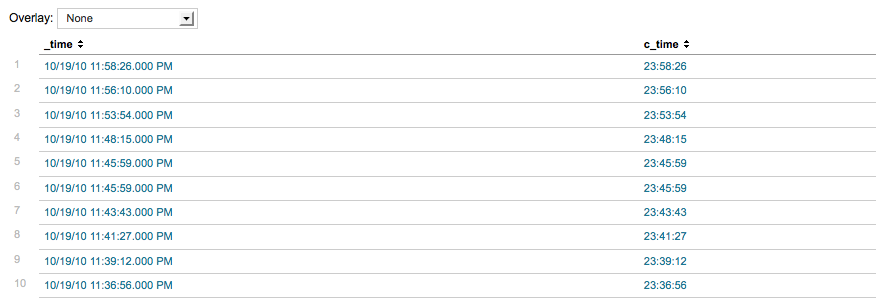
try like below
rest of your search | eval temp=strptime(TimeMax,"%m/%d/%Y %H:%M:%S") | convert timeformat="%H:%M:%S" ctime(temp) AS Hora
- Mark as New
- Bookmark Message
- Subscribe to Message
- Mute Message
- Subscribe to RSS Feed
- Permalink
- Report Inappropriate Content
It does not give me result of the table "hour"
- Mark as New
- Bookmark Message
- Subscribe to Message
- Mute Message
- Subscribe to RSS Feed
- Permalink
- Report Inappropriate Content
| convert timeformat="%H:%M:%S" ctime(temp) AS Hour




Join the Splunk Community Slack to learn, troubleshoot, and make connections with fellow Splunk practitioners in real time!
Join Splunk User Groups to connect and learn in-person by region or remotely by topic or industry.
SOC4Kafka - New Kafka Connector Powered by OpenTelemetry
Event Series: Level up your SOC: Advancing with Splunk Enterprise Security
Announcing Modern Navigation: A New Era of Splunk User Experience
