
Turn on suggestions
Auto-suggest helps you quickly narrow down your search results by suggesting possible matches as you type.
Splunk Search
×
Join the Conversation
Without signing in, you're just watching from the sidelines. Sign in or Register to connect, share, and be part of the Splunk Community.
- Find Answers
- :
- Using Splunk
- :
- Splunk Search
- :
- Why am I losing table formatting when using the re...
Options
- Subscribe to RSS Feed
- Mark Topic as New
- Mark Topic as Read
- Float this Topic for Current User
- Bookmark Topic
- Subscribe to Topic
- Mute Topic
- Printer Friendly Page
- Mark as New
- Bookmark Message
- Subscribe to Message
- Mute Message
- Subscribe to RSS Feed
- Permalink
- Report Inappropriate Content

ppatrikfr
Path Finder
10-23-2018
06:06 AM
Hello,
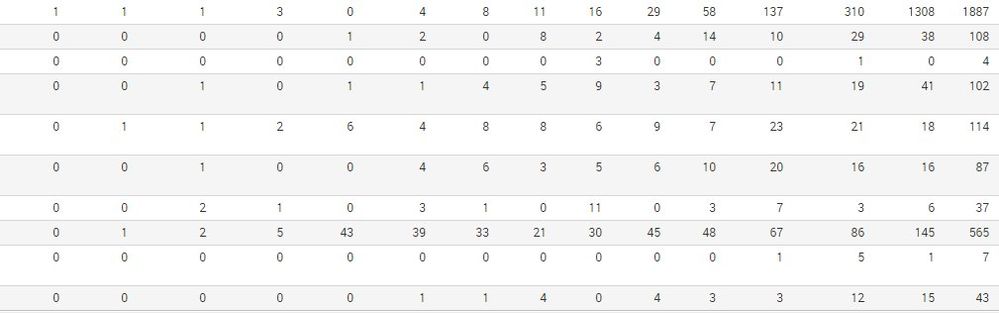
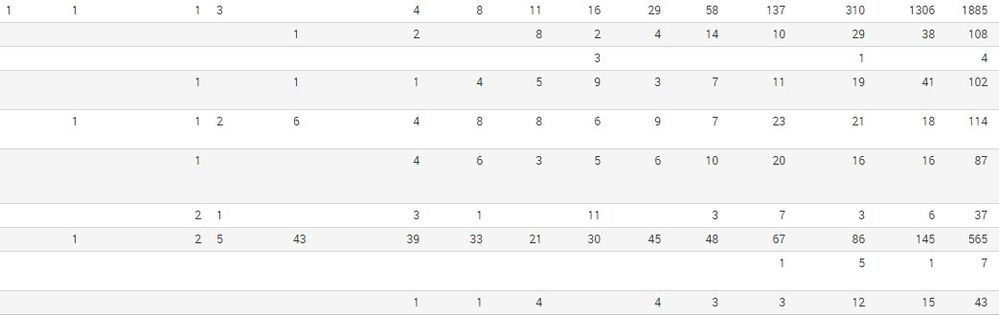
I have a search that i want to take zeros off of. But, when i do it with replace, it loses its table formatting. Can anyone help me?
Obs.: As I'm using the timechart command, I can't use "if statement" in search because column names always change.
Code block i'm allowed to post!
| timechart span=1mon count by "Secao" limit=0 usenull=f useother=f cont=false
| eval mes=strftime(_time,"%B %Y")
| fields - _time span _spandays
| transpose 0 header_field=mes column_name="Secao"
| eval Secao=if(Secao="NULL","Other",Secao)
| eval Departamento=if(Departamento="NULL","Other",Departamento)
| eval Equipe=if(Equipe="NULL","Other",Equipe)
| addtotals
| replace "0" with " "
Before replace:
After replace:
1 Solution
- Mark as New
- Bookmark Message
- Subscribe to Message
- Mute Message
- Subscribe to RSS Feed
- Permalink
- Report Inappropriate Content
ppatrikfr
Path Finder
10-23-2018
06:26 AM
I solved my own problem by using a simple CSS style. I don't know if It's the right way but it works.
If you have any other solution, i'll be glad to hear and discuss about. Tks
  <panel>
          <html depends="$alwaysHideCSS$">
             <style>
                   #table_to_change .table th, .table td {
                        text-align: right!important;
                    }
             </style>
         </html>
          <table>
            <search id="table_to_change" base="base">
              <query> "Your query goes here :)" </query>
            </search>
            <option name="count">50</option>
            <option name="dataOverlayMode">none</option>
            <option name="drilldown">none</option>
            <option name="rowNumbers">false</option>
          </table>
        </panel>
- Mark as New
- Bookmark Message
- Subscribe to Message
- Mute Message
- Subscribe to RSS Feed
- Permalink
- Report Inappropriate Content
ppatrikfr
Path Finder
10-23-2018
06:26 AM
I solved my own problem by using a simple CSS style. I don't know if It's the right way but it works.
If you have any other solution, i'll be glad to hear and discuss about. Tks
  <panel>
          <html depends="$alwaysHideCSS$">
             <style>
                   #table_to_change .table th, .table td {
                        text-align: right!important;
                    }
             </style>
         </html>
          <table>
            <search id="table_to_change" base="base">
              <query> "Your query goes here :)" </query>
            </search>
            <option name="count">50</option>
            <option name="dataOverlayMode">none</option>
            <option name="drilldown">none</option>
            <option name="rowNumbers">false</option>
          </table>
        </panel>




Got questions? Get answers!
Join the Splunk Community Slack to learn, troubleshoot, and make connections with fellow Splunk practitioners in real time!
Meet up IRL or virtually!
Join Splunk User Groups to connect and learn in-person by region or remotely by topic or industry.
Get Updates on the Splunk Community!
Supercharging Windows Security Detection Performance: Introducing Hybrid Field ...
Windows event logs—from Security auditing and Sysmon to PowerShell script blocks—form the operational backbone ...
Ditch the Manual Grind: Building AI Agents with Splunk
Ditch the Manual Grind: Building AI Agents with Splunk
Let’s be real: your team’s time is being eaten alive. ...
Cisco Data Fabric from Architecture to Investigation, Better SOC Visibility, and More ...
Splunk Lantern is Splunk’s customer success center that provides practical guidance from Splunk experts on key ...
