
Join the Conversation
- Find Answers
- :
- Using Splunk
- :
- Splunk Search
- :
- Re: Why am I getting where clause?
- Subscribe to RSS Feed
- Mark Topic as New
- Mark Topic as Read
- Float this Topic for Current User
- Bookmark Topic
- Subscribe to Topic
- Mute Topic
- Printer Friendly Page
- Mark as New
- Bookmark Message
- Subscribe to Message
- Mute Message
- Subscribe to RSS Feed
- Permalink
- Report Inappropriate Content
Why am I getting where clause?

I have a search where I am comparing two indexes for a matching cell and I am trying to filter where Business = 1X... here's the SPL:
index=csmp OR index=aws-business-map
| eval BindleNew = case(sourcetype="sim_csmp", AWSAccountName, sourcetype="csv", BindleName)
| stats values(IssueUrl), values(AWSAccountName) as AWSAccountName, values(BindleName), values(Business) by BindleNew
| search AWSAccountName!=""
I am unsure where to put Business-="1X" clause.
Also, if we have more indexes like csmp that I am trying to compare to aws-business-map, how do we go about matching 4 indexes to aws-business-map?
- Mark as New
- Bookmark Message
- Subscribe to Message
- Mute Message
- Subscribe to RSS Feed
- Permalink
- Report Inappropriate Content
Can we put that into a static function of a dropdown? If so, how should we go about it?
I am building dashboard where we are counting the business
- Mark as New
- Bookmark Message
- Subscribe to Message
- Mute Message
- Subscribe to RSS Feed
- Permalink
- Report Inappropriate Content


Static values are pre-defined and cannot use search results. It's the dynamic dropdowns that use searches.
If this reply helps you, Karma would be appreciated.
- Mark as New
- Bookmark Message
- Subscribe to Message
- Mute Message
- Subscribe to RSS Feed
- Permalink
- Report Inappropriate Content
This should answer the question
index=csmp OR index=aws-business-map
| eval BindleNew = case(sourcetype="sim_csmp", AWSAccountName, sourcetype="csv", BindleName)
| stats values(IssueUrl), values(AWSAccountName) as AWSAccountName, values(BindleName), values(Business) as Business by BindleNew
| search AWSAccountName!="" Business-="1X"
To add more indexes
index=csmp OR index=aws-business-map OR index=index3 OR index=index4
| eval BindleNew = case(sourcetype="sim_csmp", AWSAccountName, sourcetype="csv", BindleName, sourcetype="st3", foo, sourcetype="st4", bar)
| stats values(IssueUrl), values(AWSAccountName) as AWSAccountName, values(BindleName), values(Business) as Business by BindleNew
| search AWSAccountName!="" Business-="1X"
I believe it will not solve the problem, however. That's because the values function returns a multi-value field that doesn't work well with many other commands. Multi-value fields need to be processed with mv* functions (mvindex, mvfind, etc).
If this reply helps you, Karma would be appreciated.
- Mark as New
- Bookmark Message
- Subscribe to Message
- Mute Message
- Subscribe to RSS Feed
- Permalink
- Report Inappropriate Content
index=csmp OR index=aws-business-map OR index=sim OR index=guardduty
| eval BindleNew = case(sourcetype="sim_csmp", AWSAccountName, sourcetype="csv", BindleName, sourcetype="sim_prod", WAWT2-BindleName, sourcetype="sim_prod", CloudTrail-AWSAccountName, sourcetype="sim_gd", AWSAccountId)
| stats values(IssueUrl), values(AWSAccountName) as AWSAccountName, values(BindleName), values(WAWT2-BindleName), values(CloudTrail-AWSAccountName), values(AWSAccountId), values(Business) as Business by BindleNew
| search AWSAccountName!="" Business="XP"
This is what I have for combination so far. Something to note is that CloudTrail-AWSAccountName, WAWT2-BindleName, BindleName, AWSAccountName are all the same data. Can we normalize them using Match?
- Mark as New
- Bookmark Message
- Subscribe to Message
- Mute Message
- Subscribe to RSS Feed
- Permalink
- Report Inappropriate Content
If those fields are all the same then there's no need for a case function. Use the coalesce function to choose the first field that is present in the current event.
index=csmp OR index=aws-business-map OR index=sim OR index=guardduty
| eval BindleNew = lower(coalesce(AWSAccountName, BindleName, WAWT2-BindleName, CloudTrail-AWSAccountName, AWSAccountId))
| stats values(IssueUrl), values(AWSAccountName) as AWSAccountName, values(BindleName), values(WAWT2-BindleName), values(CloudTrail-AWSAccountName), values(AWSAccountId), values(Business) as Business by BindleNew
| search AWSAccountName!="" Business="XP"
If this reply helps you, Karma would be appreciated.
- Mark as New
- Bookmark Message
- Subscribe to Message
- Mute Message
- Subscribe to RSS Feed
- Permalink
- Report Inappropriate Content
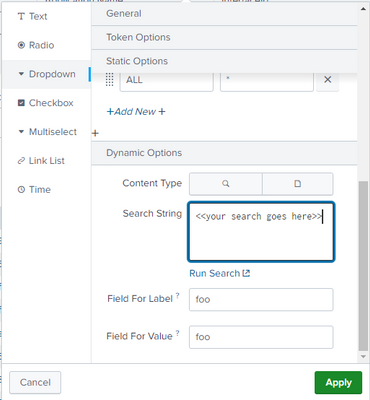
How can we put that SPL query into a dynamic dropdown?
My project is looking for if the query spits out 1X, splunk gets all the events with the Business as 1X. If query is looking for 2X, gets all the events with Business as 2X. Then, I have dashboard panels that are doing counts etc depending on the dropdown.
- Mark as New
- Bookmark Message
- Subscribe to Message
- Mute Message
- Subscribe to RSS Feed
- Permalink
- Report Inappropriate Content
Edit the dashboard and click on the edit icon for the dropdown. Put the query into the search box in the Dynamic Options section.
If this reply helps you, Karma would be appreciated.


Join the Splunk Community Slack to learn, troubleshoot, and make connections with fellow Splunk practitioners in real time!
Join Splunk User Groups to connect and learn in-person by region or remotely by topic or industry.
Event Series: The Agentic SOC: Trust Before Autonomy
Free Professional Services for .conf26 Attendees
Defend at Machine Speed: Your Guide to Security Sessions at .conf26
