
Join the Conversation
- Find Answers
- :
- Using Splunk
- :
- Splunk Search
- :
- Why SPL syntax highlighting not working correctly?
- Subscribe to RSS Feed
- Mark Topic as New
- Mark Topic as Read
- Float this Topic for Current User
- Bookmark Topic
- Subscribe to Topic
- Mute Topic
- Printer Friendly Page
- Mark as New
- Bookmark Message
- Subscribe to Message
- Mute Message
- Subscribe to RSS Feed
- Permalink
- Report Inappropriate Content

Hi,
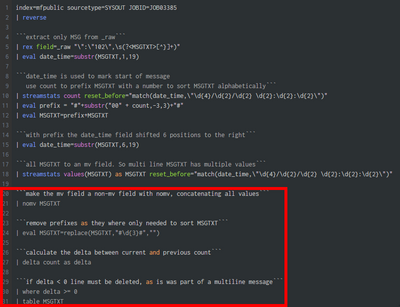
I've created this rather complicated piece of SPL. To make it a bit more understandable I added some comment lines. In the screenshot you can see the SPL syntax highlighting stops working correctly from line #20. The strange thing is that when I remove line 20 all together it works fine, and there are more comment lines further on. Whatever comment I put on that position causes this behaviour.
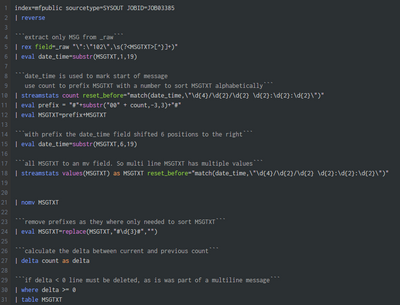
Line removed, it works fine:
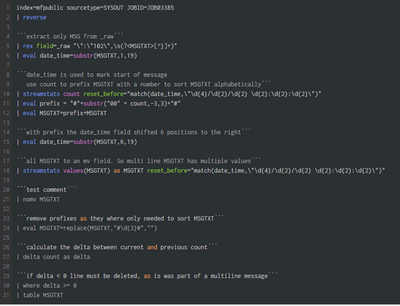
Comment ```test comment``` breaks the thing down again.
It's just a minor cosmetic thing, but I'd like to know what's happening here and why. We're using splunk Enterprise 8.1.10.1 on my site. Any thoughts appreciated!
- Mark as New
- Bookmark Message
- Subscribe to Message
- Mute Message
- Subscribe to RSS Feed
- Permalink
- Report Inappropriate Content


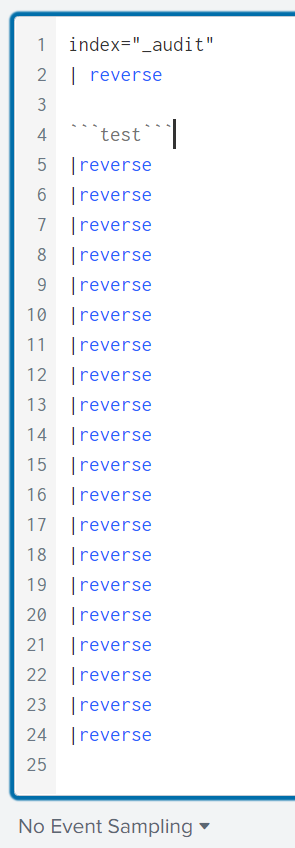
Hi @Hoekb03 ... I am using Splunk 8.2.5 and its SPL highlighting working fine even after 20 lines. Are you using older versions ah?!?!
- Mark as New
- Bookmark Message
- Subscribe to Message
- Mute Message
- Subscribe to RSS Feed
- Permalink
- Report Inappropriate Content
- Mark as New
- Bookmark Message
- Subscribe to Message
- Mute Message
- Subscribe to RSS Feed
- Permalink
- Report Inappropriate Content
It's not that highlighting stops after 20 lines, in my case there are comment lines after line 20, when I remove the line on 20 the rest works fine. Syntax auto fill also stops working in my example I just noted. I tried it at home where I use 9.0 with no problem at all. I'll just wait for a new version @ the office. I'll accept your answer for now.
- Mark as New
- Bookmark Message
- Subscribe to Message
- Mute Message
- Subscribe to RSS Feed
- Permalink
- Report Inappropriate Content
My query doesn't do the trick btw, still curious about the cause of the highlighting not working.

Join the Splunk Community Slack to learn, troubleshoot, and make connections with fellow Splunk practitioners in real time!
Join Splunk User Groups to connect and learn in-person by region or remotely by topic or industry.
Persistent Queue at TcpOut — One of Splunk's Most Practical Features
Catalog Is Now Generally Available on Splunk Cloud Platform
Your Path to AgenticOps: AI Experiences for Every Splunk Practitioner
