
- Find Answers
- :
- Using Splunk
- :
- Splunk Search
- :
- When the value is not showed in the result also i ...
- Subscribe to RSS Feed
- Mark Topic as New
- Mark Topic as Read
- Float this Topic for Current User
- Bookmark Topic
- Subscribe to Topic
- Mute Topic
- Printer Friendly Page
- Mark as New
- Bookmark Message
- Subscribe to Message
- Mute Message
- Subscribe to RSS Feed
- Permalink
- Report Inappropriate Content

In the below query. When i filter the sectodate count greater than 5. I’m missing the count of values “Cool","Super . That’s is really fine as they doesn’t satisfies the where clause condition so data is not displaying in table. But Still I need to display both Cool and Super usage as 0 in the table is it possible.. Please help me on it. Thanks in advance..
indexXXXX ASSIGNED IN ("Cool","Super","Thunder","Lightray","Bluesky")
| eval newfield=now()
|eval Openeddates=strptime(Openeddate, "%Y-%m-%d %H:%M:%S")
| eval todate= strftime(strptime(Openeddate,"%Y-%m-%d %H:%M:%S"),"%Y-%m-%d %H:%M:%S")
| eval todate1= strftime(newfield,"%Y-%m-%d %H:%M:%S")
| eval TimeDiff1=strptime(todate1,"%Y-%m-%d %H:%M:%S")-strptime(todate,"%Y-%m-%d %H:%M:%S")
| eval sectodate=round(TimeDiff1/60/60/24,0)
| where sectodate>5
| stats count as Usage by ASSIGNED
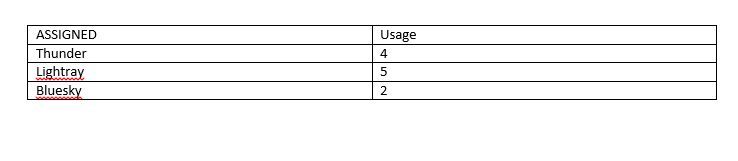
Thanks in Advance ..

- Mark as New
- Bookmark Message
- Subscribe to Message
- Mute Message
- Subscribe to RSS Feed
- Permalink
- Report Inappropriate Content

Add something like this after your existing code...
| rename COMMENT as "Add a zero record for each desired person ASSIGNED, and then stats them together "
| append [| makeresults
    | eval ASSIGNED=mvappend("Cool","Super","Thunder","Lightray","Bluesky")
    | mvexpand ASSIGNED
    | eval Usage=0
    | table ASSIGNED Usage
    ]
| stats sum(Usage) as Usage by ASSIGNED
- Mark as New
- Bookmark Message
- Subscribe to Message
- Mute Message
- Subscribe to RSS Feed
- Permalink
- Report Inappropriate Content
Add something like this after your existing code...
| rename COMMENT as "Add a zero record for each desired person ASSIGNED, and then stats them together "
| append [| makeresults
    | eval ASSIGNED=mvappend("Cool","Super","Thunder","Lightray","Bluesky")
    | mvexpand ASSIGNED
    | eval Usage=0
    | table ASSIGNED Usage
    ]
| stats sum(Usage) as Usage by ASSIGNED
- Mark as New
- Bookmark Message
- Subscribe to Message
- Mute Message
- Subscribe to RSS Feed
- Permalink
- Report Inappropriate Content


@shankarananth
Is ASSIGNED values is fixed? ( ASSIGNED IN ("Cool","Super","Thunder","Lightray","Bluesky") ).
Can you please try following search?
indexXXXX ASSIGNED IN ("Cool","Super","Thunder","Lightray","Bluesky")
| eval newfield=now()
| eval Openeddates=strptime(Openeddate, "%Y-%m-%d %H:%M:%S")
| eval todate= strftime(strptime(Openeddate,"%Y-%m-%d %H:%M:%S"),"%Y-%m-%d %H:%M:%S")
| eval todate1= strftime(newfield,"%Y-%m-%d %H:%M:%S")
| eval TimeDiff1=strptime(todate1,"%Y-%m-%d %H:%M:%S")-strptime(todate,"%Y-%m-%d %H:%M:%S")
| eval sectodate=round(TimeDiff1/60/60/24,0)
| where sectodate>5
| stats count as Usage by ASSIGNED
| append
    [| makeresults
    | eval mySelectedValue="Cool,Super,Thunder,Lightray,Bluesky", ASSIGNED =split(mySelectedValue,",")
    | mvexpand ASSIGNED
    | eval count=0
    | table ASSIGNED count] | stats sum(count) as Count by ASSIGNED
- Mark as New
- Bookmark Message
- Subscribe to Message
- Mute Message
- Subscribe to RSS Feed
- Permalink
- Report Inappropriate Content
@kamlesh_vaghela
convert your comment as answer. So i can vote it ..
🙂
- Mark as New
- Bookmark Message
- Subscribe to Message
- Mute Message
- Subscribe to RSS Feed
- Permalink
- Report Inappropriate Content

Try this!
(your search)
| eval sectodate=round(TimeDiff1/60/60/24,0)
| where sectodate>5
| stats count as Usage by ASSIGNED
↓
(your search)
| eval sectodate=round(TimeDiff1/60/60/24,0)
| stats count(eval(if(sectodate>5,1,0))) as Usage by ASSIGNED

Enterprise Security Content Update (ESCU) | New Releases
Why am I not seeing the finding in Splunk Enterprise Security Analyst Queue?
Index This | What are the 12 Days of Splunk-mas?
