
Join the Conversation
- Find Answers
- :
- Using Splunk
- :
- Splunk Search
- :
- Re: Using span option with timechart causes incorr...
- Subscribe to RSS Feed
- Mark Topic as New
- Mark Topic as Read
- Float this Topic for Current User
- Bookmark Topic
- Subscribe to Topic
- Mute Topic
- Printer Friendly Page
- Mark as New
- Bookmark Message
- Subscribe to Message
- Mute Message
- Subscribe to RSS Feed
- Permalink
- Report Inappropriate Content

Splunk Ver : I tested in 7.3.0 and 6.6.12.
Timezone : I don't know if it’s relevant to this problem, but it is JST
If I run following search, column name will be "99".
| makeresults count=10
| eval field=99
| timechart count by field
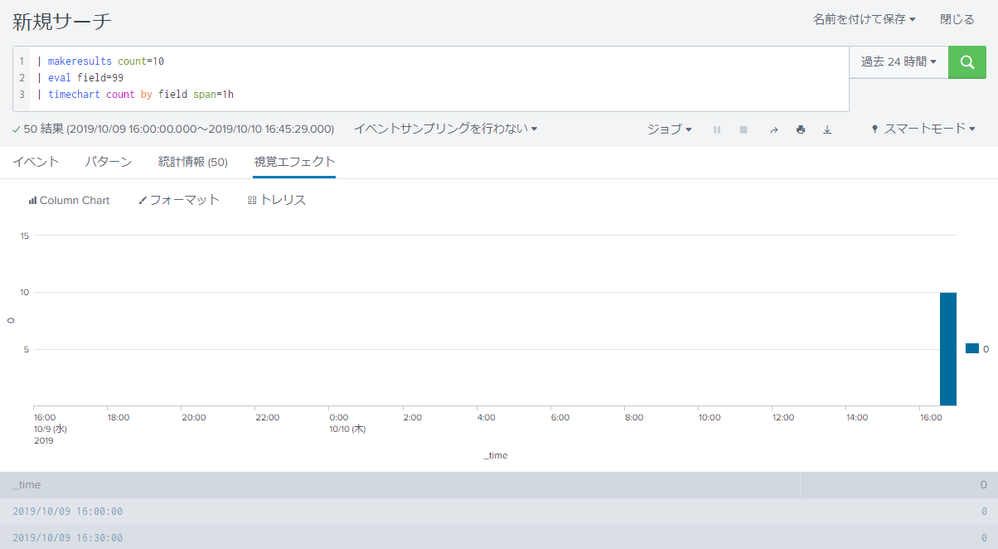
But If I using span option like below, column name changes.
Pattern 1)
    | makeresults count=10
    | eval field=99
    | timechart count by field span=1h
Result 1)
    column name changes to "0".

Pattern 2)
    | makeresults count=10
    | eval field=99
    | timechart count by field span=1m
Result 2)
    column name changes to "60".

Pattern 3)
    | makeresults count=10
    | eval field=99
    | timechart count by field span=1d
Result 3)
    column name changes to "-32400"!
This time, I used makeresults as a sample.
But, if I want to use timechart by some number field like destination port or ID_number in actual operation, it would be a problem if the displayed column names are different.
Is this issue?
Or specification? If so, is there a way to avoid?
- Mark as New
- Bookmark Message
- Subscribe to Message
- Mute Message
- Subscribe to RSS Feed
- Permalink
- Report Inappropriate Content
Sorry... moving span option to after timechart command like below, it worked correctly...
Before)
timechart count by field span=1h
After)
timechart span=1h count by field
I was thinking that I can put span option anywhere.
- Mark as New
- Bookmark Message
- Subscribe to Message
- Mute Message
- Subscribe to RSS Feed
- Permalink
- Report Inappropriate Content
Sorry... moving span option to after timechart command like below, it worked correctly...
Before)
timechart count by field span=1h
After)
timechart span=1h count by field
I was thinking that I can put span option anywhere.
- Mark as New
- Bookmark Message
- Subscribe to Message
- Mute Message
- Subscribe to RSS Feed
- Permalink
- Report Inappropriate Content


Hi yutaka1005,
span hasn't any impact on column names, can you share your search, probably the cause of this behaviour is in the search.
Bye.
Giuseppe
- Mark as New
- Bookmark Message
- Subscribe to Message
- Mute Message
- Subscribe to RSS Feed
- Permalink
- Report Inappropriate Content
Sorry, it was solved by myself.
Thank you for comment!



Join the Splunk Community Slack to learn, troubleshoot, and make connections with fellow Splunk practitioners in real time!
Join Splunk User Groups to connect and learn in-person by region or remotely by topic or industry.
Cisco Data Fabric from Architecture to Investigation, Better SOC Visibility, and More ...
The Trust Gap: Why a Data Foundation is Fundamental to an Agentic Enterprise
Data Management Digest – September 2026
