
Join the Conversation
- Find Answers
- :
- Using Splunk
- :
- Splunk Search
- :
- Token reference for TimeChart panel
- Subscribe to RSS Feed
- Mark Topic as New
- Mark Topic as Read
- Float this Topic for Current User
- Bookmark Topic
- Subscribe to Topic
- Mute Topic
- Printer Friendly Page
- Mark as New
- Bookmark Message
- Subscribe to Message
- Mute Message
- Subscribe to RSS Feed
- Permalink
- Report Inappropriate Content

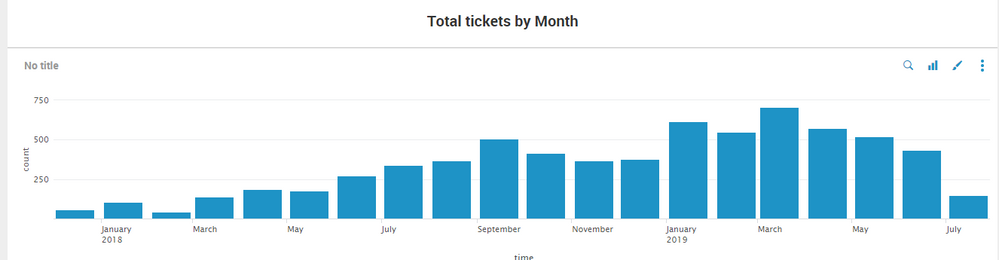
Hi,
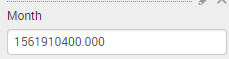
I am currently trying to do a drill down for my panel when i click on each month. However when I click on the month , the month retrieve was in epoch time format. How do i work around this so I can do drilldown for my timechart? Thanks
Best Regards,
Aloysius


- Mark as New
- Bookmark Message
- Subscribe to Message
- Mute Message
- Subscribe to RSS Feed
- Permalink
- Report Inappropriate Content

You can use an eval token instead of the native "set" that Splunk UI uses.
    <drilldown>
      <set token="t">$click.value$</set>
      <eval token="t">strftime($click.value$,"%m")</eval>
    </drilldown>
This will set your token to the month number. For more info on date and times formats:
https://docs.splunk.com/Documentation/Splunk/7.1.1/SearchReference/Commontimeformatvariables
- Mark as New
- Bookmark Message
- Subscribe to Message
- Mute Message
- Subscribe to RSS Feed
- Permalink
- Report Inappropriate Content
You can use an eval token instead of the native "set" that Splunk UI uses.
    <drilldown>
      <set token="t">$click.value$</set>
      <eval token="t">strftime($click.value$,"%m")</eval>
    </drilldown>
This will set your token to the month number. For more info on date and times formats:
https://docs.splunk.com/Documentation/Splunk/7.1.1/SearchReference/Commontimeformatvariables
- Mark as New
- Bookmark Message
- Subscribe to Message
- Mute Message
- Subscribe to RSS Feed
- Permalink
- Report Inappropriate Content
Thanks tiagofbmm,
this solved my question.

Upcoming Webinar: Unmasking Insider Threats with Slunk Enterprise Security’s UEBA
.conf25 technical session recap of Observability for Gen AI: Monitoring LLM ...
A Season of Skills: New Splunk Courses to Light Up Your Learning Journey
